EMA Trend Alignment (10/20/50) with MTF & SignalsBullish Crossovers 10>20>50 and Bearish Crossover 10<20<50Pine Script® göstergesisaldivarm227 tarafından6
🔰BGL Algo Trendline filterfor all with trendline filter identifies the trendPine Script® göstergesiTrendScalperwithAI tarafından71
Mag 8 ± VWAP AlertI have been following Mag 7 plus Avgo for directional indicators for overall market. This is a chart that displays those over or under vwap and alerts can be added, ie 4 of 8 are under vwap, etc. Pine Script® göstergesiJones516 tarafından5
Combined JADEVO-ATR VIX AdaptiveCombined JADEVO-ATR VIX Adaptive is a next-generation volatility-aware trading engine that merges the precision of the JADEVO framework with the adaptive power of ATR and VIX-based volatility modeling. Built for scalpers, intraday traders, and advanced algorithmic systems, this tool dynamically adjusts its sensitivity, key levels, and trade signals based on real-time market expansion and contraction. By combining ATR-driven structure mapping, VIX-influenced volatility filters, and the JADEVO decision core, this indicator identifies high-probability zones, adaptive entry signals, and intelligent profit-taking levels—while filtering out low-quality chop that destroys most scalping systems.Pine Script® göstergesiJust_Trades_13 tarafından21
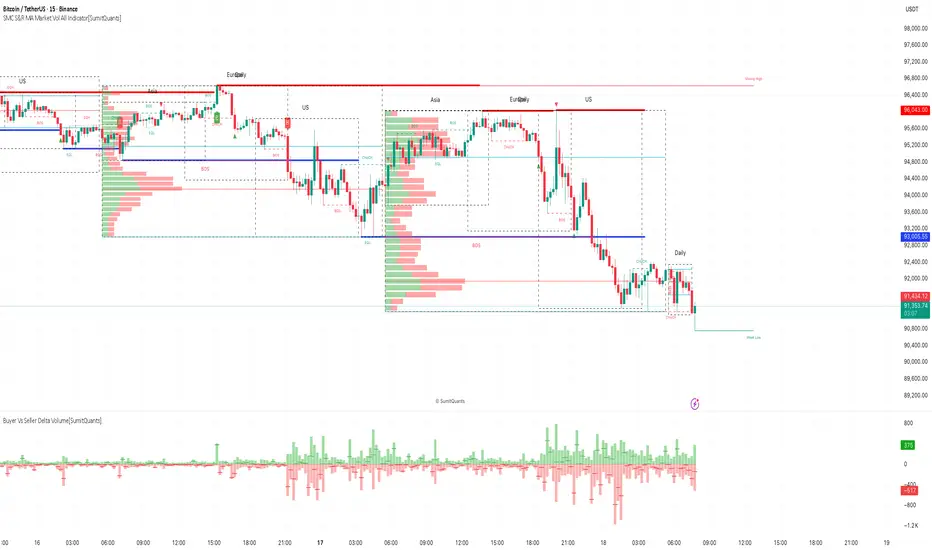
SMC S&R MA Market Vol All Indicator[SumitQuants]🚀 SMC S&R + Market Sessions + Volume Profile + Order Flow Suite The Only All-In-One Institutional Trading System You’ll Ever Need. Looking for an indicator that actually brings clarity to chaotic markets? Meet the SMC S&R MA Market Volume & Sessions Order Flow System — a powerhouse that fuses Smart Money Concepts, Session Profiles, and Dynamic Volume Flow into one ultra-optimized institutional toolkit. This is not “just another SMC indicator.” This is your complete trading ecosystem. 💠 What This Indicator Does (In Simple Terms) It automatically reads the market the way institutions do — and displays it cleanly on your chart with zero clutter. Below is everything packed inside 👇 🔥 1. Market Sessions + Volume Profile (Real Institutional Map) ✔ Tokyo- Asia | London- Europe | New York- US sessions auto-detected ⏱️ ✔ Each session gets its own Volume Profile 📊 ✔ See POC, VAH, VAL, Value Area Box for each session ✔ Live Developing Profile in real-time ✔ Wick-based and body-volume distribution for ultra-accurate auctions ✔ Session Boxes that highlight imbalance zones ✔ Perfect for: High-volume Asia breaks London volatility expansion NY reversal traps 👉 Think of it as having pro-level TPO/Volume Profile inside TradingView. 🎯 2. Advanced S&R Strength Engine (Buyer vs Seller Power Meter) ✔ Detects strongest Support & Resistance zones ✔ Measures Buyer Strength & Seller Strength (% based) ✔ Auto-plots S/R Lines + S/R Zones ✔ Detects Bounce signals, Rejection points, Pressure shifts ✔ Zero repaint logic You get institutional footprints directly on your chart. 📈 3. Smart Money Concepts (Full Automation) ✔ BOS / CHoCH detection ✔ Internal + Swing Structure ✔ Order Blocks (Internal + Swing) ✔ Equal Highs & Equal Lows ✔ Fair Value Gaps (FVG) ✔ Strong/Weak Highs + Lows labeling ✔ Trend coloring (optional) ✔ Premium / Discount Zones All plotted with precision. All customizable. All built to remove guesswork. 💹 4. Multi-MA Engine (5 Fully Configurable MAs) ✔ EMA, SMA, WMA, VWMA, SMMA ✔ Choose length, color, and source ✔ Ideal for trend confirmation + dynamic S/R Smooth. Clean. Non-laggy. 📊 5. Enhanced Supertrend (Toggles + Filters) ✔ Switch between Line / Histogram / Hidden ✔ Optional background trend coloring ✔ Buy/Sell signals with trend-change alerts ✔ No repaint Perfect for directional bias. ⚡ 6. Breakout Detection + Volume Confirmation ✔ Auto-detects Support/Resistance Breaks ✔ Confirms breaks through Volume Surge % Oscillator ✔ Detects: Bullish Breaks Bearish Breaks Bullish Rejections Bearish Rejections You instantly know when a breakout is real or fake. 📍 7. VWAP System with Multi-Band Zones ✔ Session-based VWAP ✔ Bands via Std Deviation or % ✔ Clean pullback zones ✔ Perfect for intraday institutions-style precision 🧠 8. Fully Integrated Alerts Alerts for: ✔ BOS / CHoCH (Internal + Swing) ✔ Order Block Breakouts ✔ Equal Highs / Equal Lows ✔ Fair Value Gaps ✔ S/R Zone Interactions ✔ Trend Shifts ✔ Breakouts with Volume Confirmation ✔ Supertrend Reversals And more. Never miss major price shifts again. 🎨 9. Clean UI + Auto-Adaptive Watermark ✔ Auto-contrast watermark ✔ Minimalistic but premium ✔ Chart-friendly colors ✔ Built to match dark or light themes 🌍 Who This Indicator Is For? ✔ Intraday traders ✔ Swing traders ✔ SMC traders ✔ Volume/Order Flow traders ✔ Forex, Crypto, Index & Stocks ✔ Anyone wanting a single all-in-one trading system 🔥 Why 90% Traders Love This System Because it gives you: 🔥 Session Bias 🔥 Volume-backed Zones 🔥 Clean Market Structure 🔥 Trend Bias + Liquidity Areas 🔥 Institutional S/R with Strength Meter 🔥 Accurate Order Flow Reactions Everything you need to trade like top-tier professionals — without needing 10 indicators. 🛒 Get Full Access This premium institutional system is available as part of the Courses Section on the official website. 👉 Purchase the indicator as a Course at: www.ironmindtrader.com Inside the course, you'll get: ✔ Access instructions ✔ Setup guide ✔ Trading rules ✔ Updates includedPine Script® göstergesiSumitQuants tarafından4
Intellect TBTS V02 [Strategy]📌 Intellect V01 TBO – Trend Breakout Options Strategy Intellect V01 TBO is an intraday trend-breakout strategy designed for index traders who follow Nifty, BankNifty, and FinNifty. It identifies trend shifts using structural pivots, adaptive trendlines, and volatility-adjusted breakout zones. The strategy provides automatic Long/Short signals, optional stop-loss and target projections, and allows users to generate alert messages that include index-option strike information. 🔍 How the Strategy Works 1. Pivot-Based Structure The script identifies short-term high and low pivots using a user-defined period. These pivots become anchor points for constructing directional trendlines. 2. Dynamic Trendline Projection For each pivot, the script builds: A projected trendline Two offset lines above/below A volatility band based on ATR These help detect potential breakout zones. 3. Breakout Signal Logic A trade signal is generated when price crosses the projected trendline: Long Signal – detected when price breaks above a pivot-derived trendline. Short Signal – detected when price breaks below a pivot-derived trendline. Users may optionally restrict entries to a specific time window. 🎯 Stop-Loss & Target Zones When a trade is active: SL and TP levels are set using ATR-based volatility distance Levels appear visually on the chart if enabled Exits occur automatically when TP/SL is hit The strategy also closes open trades near the end of the session (default 3:10 PM) These levels are for visual and backtesting support only. 📝 Index Option Strike Calculation (For Alert Text Only) The strategy can dynamically compute: ATM strike (with optional bias) Correct expiry day for Nifty (weekly) and BankNifty/FinNifty (monthly Tuesday) CE strike for Long signals PE strike for Short signals This strike information is only included in alert text for users who configure external automation. It does not affect backtesting results inside TradingView. ⏱️ Time Window Filter (Optional) Users may define: Start time End time Outside this window, no new trades are generated. 🎛️ User Adjustable Inputs Pivot lookback period Trendline style and extension Display of target/stop-loss Expiry selection mode Strike-bias Lot size (for alert formatting only) Time filter settings 🔔 Alert Messages Alerts include: Direction (Long/Short) Strike details Option type (CE/PE) Quantity A formatted JSON message TradingView does not execute these orders. Users are responsible for managing external automation independently. ⚠️ Important Notes This script does not integrate with any broker by default. It does not place trades automatically; alerts only send text. Backtests simulate index movement, not live option pricing. We recommend using realistic slippage and commission settings. ✔️ This strategy is intended for educational and analytical use. Adjust settings as needed. ✅ 2. CLEAN CHART BEFORE PUBLISHING To avoid moderator flags: Do This Before Publishing: ✔ Remove all manual drawings ✔ Hide any other indicators on the chart ✔ Use light or clean background ✔ Keep only signals/SL/TP from your script If you leave extra drawings, moderators may hide the script again. ✅ 3. FINAL PUBLISHING CHECKLIST Before you click Publish, verify: ✔ Description matches the one above ✔ No broker names anywhere ✔ No "algo trading" or "automation" advertising ✔ Backtest settings are realistic Commission enabled Slippage > 1 Reasonable lot assumption ✔ Chart is clean ✔ Script is set to “Strategy” and compiles without warningsPine Script® stratejisikarthikbabur tarafındanGüncellendi 7
Institutional Sessions Volume Order Flow [SumitQuants]Institutional Sessions Volume Order Flow 🔥 Institutional Sessions Volume Order Flow — The all-in-one Pine v6 toolkit that reveals institutional volume order blocks, session structure, VWAP bands and trend ribbon so you can trade with professional conviction. 🎯 See where smart money is active. Institutional Sessions Volume Order Flow surfaces high-volume order blocks, session boxes, VWAP bands, MA ribbon and Supertrend alerts — a single overlay that turns market noise into tradable structure. ⚡📈 ✨ Key Features 📦 Institutional Volume Order Blocks: Detects bullish & bearish order blocks by aggregating volume around local highs/lows and plots filled zones with volume-percent labels. 🕒 Session Boxes & Timeline: Auto session boxes for Asia/ Europe / NewYork / Sydney with merge options, open/close lines, pip/% labels and optional candle coloring. 📉 VWAP with Bands: Multi-anchor VWAP (Session/Week/Month/Quarter/Year/Earnings/Dividends/Splits) plus up to 3 configurable bands (SD or % mode) and fills. 🧭 Moving Average Ribbon: 4-MA ribbon (SMA/EMA/SMMA/WMA/VWMA) for trend structure and dynamic S/R. ⚡ Supertrend Overlay: Optional Supertrend with conditional background fill and built-in trend-change alert hooks. 🔔 Prebuilt Alerts: Supertrend flips, session opens, session new highs/lows — ready for automation or notifications. ⚙️ Deep Customization: Colors, styles, lookback, merge behaviors, band multipliers, anchor periods, session times, label sizes, and more. 🛠 Pine v6 Optimized: Modern, overlay-ready Pine Script v6 implementation suitable for intraday and multi-timeframe use. 🧠 Why Traders Buy It 🔍 Institutional context: Volume-weighted order blocks reveal where large participants acted — crucial for high-probability trade planning. ✅ Stacked confirmation: Ribbon → VWAP → order block filters noise and aligns entries with institutional flow. 🌐 Session clarity: Quickly identify which market session is driving price and volatility. 📣 Actionable alerts: Be notified exactly when setups trigger so you don’t miss transitions. 🧩 Versatile: Great for scalpers, intraday momentum traders, swing traders, prop desks and system developers. 🚀 Quick Start (3 steps) Add Institutional Sessions Volume Order Flow to your chart (Pine v6). Enable Order Blocks + VWAP + Supertrend to begin. Tune session times and band/MA settings for your instrument and timeframe. Use Supertrend + ribbon alignment + zone retest for higher-probability entries. 🎛️ 🧾 Technical Notes & Compatibility 📜 Pine Script v6 — compatible with TradingView’s current scripting environment. 📌 Overlay indicator — draws directly on price chart. 🔔 Alerts use alertcondition hooks for TradingView notifications. 👤 Author: Created and maintained by SumitQuants. ⚠️ Risk Disclaimer This tool provides context and signals — not guarantees. Backtest, paper trade, and use responsible risk management. Past performance is not indicative of future results. 📉 🛒 Call to Action (CTA) Ready to trade with institutional clarity? 👉 Buy Institutional Sessions Volume Order Flow now — or message for a demo, custom tweaks, or a bundle including backtest/strategy code. Quick support and configuration help included. 💬 Reach out to the website and Buy This Indicator in the Courses Section www.ironmindtrader.comPine Script® göstergesiSumitQuants tarafından14
Dsmart - Song I ver 8.8Chiến thần lướt sóng I .Áp dụng chung cho tất cả các mã. #From #Dsmart#Pine Script® stratejisigiaodichdsmart tarafından9
Session High/Low by BKMarks all session highs and lows Asia High/Low London High/Low New York High/LowPine Script® göstergesik6thi03 tarafındanGüncellendi 5
Quantum Market Analyzer X7Quantum Market Analyzer X7 - Complete Study Guide Table of Contents 1. Overview 2. Indicator Components 3. Signal Interpretation 4. Live Market Analysis Guide 5. Best Practices 6. Limitations and Considerations 7. Risk Disclaimer ________________________________________ Overview The Quantum Market Analyzer X7 is a comprehensive multi-timeframe technical analysis indicator that combines traditional and modern analytical methods. It aggregates signals from multiple technical indicators across seven key analysis categories to provide traders with a consolidated view of market sentiment and potential trading opportunities. Key Features: • Multi-Indicator Analysis: Combines 20+ technical indicators • Real-Time Dashboard: Professional interface with customizable display • Signal Aggregation: Weighted scoring system for overall market sentiment • Advanced Analytics: Includes Order Block detection, Supertrend, and Volume analysis • Visual Progress Indicators: Easy-to-read progress bars for signal strength ________________________________________ Indicator Components 1. Oscillators Section Purpose: Identifies overbought/oversold conditions and momentum changes Included Indicators: • RSI (14): Relative Strength Index - momentum oscillator • Stochastic (14): Compares closing price to price range • CCI (20): Commodity Channel Index - cycle identification • Williams %R (14): Momentum indicator similar to Stochastic • MACD (12,26,9): Moving Average Convergence Divergence • Momentum (10): Rate of price change • ROC (9): Rate of Change • Bollinger Bands (20,2): Volatility-based indicator Signal Interpretation: • Strong Buy (6+ points): Multiple oscillators indicate oversold conditions • Buy (2-5 points): Moderate bullish momentum • Neutral (-1 to 1 points): Balanced conditions • Sell (-2 to -5 points): Moderate bearish momentum • Strong Sell (-6+ points): Multiple oscillators indicate overbought conditions 2. Moving Averages Section Purpose: Determines trend direction and strength Included Indicators: • SMA: 10, 20, 50, 100, 200 periods • EMA: 10, 20, 50 periods Signal Logic: • Price >2% above MA = Strong Buy (+2) • Price above MA = Buy (+1) • Price below MA = Sell (-1) • Price >2% below MA = Strong Sell (-2) Signal Interpretation: • Strong Buy (6+ points): Price well above multiple MAs, strong uptrend • Buy (2-5 points): Price above most MAs, bullish trend • Neutral (-1 to 1 points): Mixed MA signals, consolidation • Sell (-2 to -5 points): Price below most MAs, bearish trend • Strong Sell (-6+ points): Price well below multiple MAs, strong downtrend 3. Order Block Analysis Purpose: Identifies institutional support/resistance levels and breakouts How It Works: • Detects historical levels where large orders were placed • Monitors price behavior around these levels • Identifies breakouts from established order blocks Signal Types: • BULLISH BRK (+2): Breakout above resistance order block • BEARISH BRK (-2): Breakdown below support order block • ABOVE SUP (+1): Price holding above support • BELOW RES (-1): Price rejected at resistance • NEUTRAL (0): No significant order block interaction 4. Supertrend Analysis Purpose: Trend following indicator based on Average True Range Parameters: • ATR Period: 10 (default) • ATR Multiplier: 6.0 (default) Signal Types: • BULLISH (+2): Price above Supertrend line • BEARISH (-2): Price below Supertrend line • NEUTRAL (0): Transition period 5. Trendline/Channel Analysis Purpose: Identifies trend channels and breakout patterns Components: • Dynamic trendline calculation using pivot points • Channel width based on historical volatility • Breakout detection algorithm Signal Types: • UPPER BRK (+2): Breakout above upper channel • LOWER BRK (-2): Breakdown below lower channel • ABOVE MID (+1): Price above channel midline • BELOW MID (-1): Price below channel midline 6. Volume Analysis Purpose: Confirms price movements with volume data Components: • Volume spikes detection • On Balance Volume (OBV) • Volume Price Trend (VPT) • Money Flow Index (MFI) • Accumulation/Distribution Line Signal Calculation: Multiple volume indicators are combined to determine institutional activity and confirm price movements. ________________________________________ Signal Interpretation Overall Summary Signals The indicator aggregates all component signals into an overall market sentiment: Signal Score Range Interpretation Action STRONG BUY 10+ Overwhelming bullish consensus Consider long positions BUY 4-9 Moderate to strong bullish bias Look for long opportunities NEUTRAL -3 to 3 Mixed signals, consolidation Wait for clearer direction SELL -4 to -9 Moderate to strong bearish bias Look for short opportunities STRONG SELL -10+ Overwhelming bearish consensus Consider short positions Progress Bar Interpretation • Filled bars indicate signal strength • Green bars: Bullish signals • Red bars: Bearish signals • More filled bars = stronger conviction ________________________________________ Live Market Analysis Guide Step 1: Initial Assessment 1. Check Overall Summary: Start with the main signal 2. Verify with Component Analysis: Ensure signals align 3. Look for Divergences: Identify conflicting signals Step 2: Timeframe Analysis 1. Set Appropriate Timeframe: Use 1H for intraday, 4H/1D for swing trading 2. Multi-Timeframe Confirmation: Check higher timeframes for trend context 3. Entry Timing: Use lower timeframes for precise entry points Step 3: Signal Confirmation Process. For Buy Signals: 1. Oscillators: Look for oversold conditions (RSI <30, Stoch <20) 2. Moving Averages: Price should be above key MAs 3. Order Blocks: Confirm bounce from support levels 4. Volume: Check for accumulation patterns 5. Supertrend: Ensure bullish trend alignment. For Sell Signals: 1. Oscillators: Look for overbought conditions (RSI >70, Stoch >80) 2. Moving Averages: Price should be below key MAs 3. Order Blocks: Confirm rejection at resistance levels 4. Volume: Check for distribution patterns 5. Supertrend: Ensure bearish trend alignment. Step 4: Risk Management Integration 1. Signal Strength Assessment: Stronger signals = larger position size 2. Stop Loss Placement: Use Order Block levels for stops 3. Take Profit Targets: Based on channel analysis and resistance levels 4. Position Sizing: Adjust based on signal confidence ________________________________________ Best Practices Entry Strategies 1. High Conviction Entries: Wait for STRONG BUY/SELL signals 2. Confluence Trading: Look for multiple components aligning 3. Breakout Trading: Use Order Block and Trendline breakouts 4. Trend Following: Align with Supertrend direction. Risk Management 1. Never Risk More Than 2% Per Trade: Regardless of signal strength 2. Use Stop Losses: Place at invalidation levels 3. Scale Positions: Stronger signals warrant larger (but still controlled) positions 4. Diversification: Don't rely solely on one indicator. Market Conditions 1. Trending Markets: Focus on Supertrend and MA signals 2. Range-Bound Markets: Emphasize Oscillator and Order Block signals 3. High Volatility: Reduce position sizes, widen stops 4. Low Volume: Be cautious of breakout signals. Common Mistakes to Avoid 1. Signal Chasing: Don't enter after signals have already moved significantly 2. Ignoring Context: Consider overall market conditions 3. Overtrading: Wait for high-quality setups 4. Poor Risk Management: Always use appropriate position sizing ________________________________________ Limitations and Considerations Technical Limitations 1. Lagging Nature: All technical indicators are based on historical data 2. False Signals: No indicator is 100% accurate 3. Market Regime Changes: Indicators may perform differently in various market conditions 4. Whipsaws: Possible in choppy, sideways markets. Optimal Use Cases 1. Trending Markets: Performs best in clear trending environments 2. Medium to High Volatility: Requires sufficient price movement for signals 3. Liquid Markets: Works best with adequate volume and tight spreads 4. Multiple Timeframe Analysis: Most effective when used across different timeframes. When to Use Caution 1. Major News Events: Fundamental analysis may override technical signals 2. Market Opens/Closes: Higher volatility can create false signals 3. Low Volume Periods: Signals may be less reliable 4. Holiday Trading: Reduced participation affects signal quality ________________________________________ Risk Disclaimer IMPORTANT LEGAL DISCLAIMER FROM aiTrendview WARNING: TRADING INVOLVES SUBSTANTIAL RISK OF LOSS This Quantum Market Analyzer X7 indicator ("the Indicator") is provided for educational and informational purposes only. By using this indicator, you acknowledge and agree to the following terms: No Investment Advice • The Indicator does NOT constitute investment advice, financial advice, or trading recommendations • All signals generated are based on historical price data and mathematical calculations • Past performance does not guarantee future results • No representation is made that any account will achieve profits or losses similar to those shown. Risk Acknowledgment • TRADING CARRIES SUBSTANTIAL RISK: You may lose some or all of your invested capital • LEVERAGE AMPLIFIES RISK: Margin trading can result in losses exceeding your initial investment • MARKET VOLATILITY: Financial markets are inherently unpredictable and volatile • TECHNICAL ANALYSIS LIMITATIONS: No technical indicator is infallible or guarantees profitable trades. User Responsibility • YOU ARE SOLELY RESPONSIBLE for all trading decisions and their consequences • CONDUCT YOUR OWN RESEARCH: Always perform independent analysis before making trading decisions • CONSULT PROFESSIONALS: Seek advice from qualified financial advisors • RISK MANAGEMENT: Implement appropriate risk management strategies No Warranties • The Indicator is provided "AS IS" without warranties of any kind • aiTrendview makes no representations about the accuracy, reliability, or suitability of the Indicator • Technical glitches, data feed issues, or calculation errors may occur • The Indicator may not work as expected in all market conditions. Limitation of Liability • aiTrendview SHALL NOT BE LIABLE for any direct, indirect, incidental, or consequential damages • This includes but is not limited to: trading losses, missed opportunities, data inaccuracies, or system failures • MAXIMUM LIABILITY is limited to the amount paid for the indicator (if any) Code Usage and Distribution • This indicator is published on TradingView in accordance with TradingView's house rules • UNAUTHORIZED MODIFICATION or redistribution of this code is prohibited • Users may not claim ownership of this intellectual property • Commercial use requires explicit written permission from aiTrendview. Compliance and Regulations • VERIFY LOCAL REGULATIONS: Ensure compliance with your jurisdiction's trading laws • Some trading strategies may not be suitable for all investors • Tax implications of trading are your responsibility • Report trading activities as required by law Specific Risk Factors 1. False Signals: The Indicator may generate incorrect buy/sell signals 2. Market Gaps: Overnight gaps can invalidate technical analysis 3. Fundamental Events: News and economic data can override technical signals 4. Liquidity Risk: Some markets may have insufficient liquidity 5. Technology Risk: Platform failures or connectivity issues may prevent order execution. Professional Trading Warning • THIS IS NOT PROFESSIONAL TRADING SOFTWARE: Not intended for institutional or professional trading • NO REGULATORY APPROVAL: This indicator has not been approved by any financial regulatory authority • EDUCATIONAL PURPOSE: Designed primarily for learning technical analysis concepts FINAL WARNING NEVER INVEST MONEY YOU CANNOT AFFORD TO LOSE Trading financial instruments involves significant risk. The majority of retail traders lose money. Before using this indicator in live trading: 1. Practice on paper/demo accounts extensively 2. Start with small position sizes 3. Develop a comprehensive trading plan 4. Implement strict risk management rules 5. Continuously educate yourself about market dynamics By using the Quantum Market Analyzer X7, you acknowledge that you have read, understood, and agree to this disclaimer. You assume full responsibility for all trading decisions and their outcomes. Contact: For questions about this disclaimer or the indicator, contact aiTrendview through official TradingView channels only. ________________________________________ This study guide and indicator are published on TradingView in compliance with TradingView's community guidelines and house rules. All users must adhere to TradingView's terms of service when using this indicator. Document Version: 1.0 Publisher: aiTrendview ________________________________________ Disclaimer The content provided in this blog post is for educational and training purposes only. It is not intended to be, and should not be construed as, financial, investment, or trading advice. All charting and technical analysis examples are for illustrative purposes. Trading and investing in financial markets involve substantial risk of loss and are not suitable for every individual. Before making any financial decisions, you should consult with a qualified financial professional to assess your personal financial situation.Pine Script® göstergesiaiTrendview-Charting-System tarafından140
Fibonacci Cluster Zones + OB + FVG (AR34)Detailed Description – Fibonacci Cluster Zones + OB + FVG (AR34) This script is an advanced multi-layer confluence system developed under the AR34 Trading Framework, designed to identify high-accuracy reversal zones, liquidity imbalances, institutional footprints, and trend direction using a unified analytic engine. It combines Fibonacci mathematics, Smart Money Concepts, market structure, and smart trend signals to produce precise, reliable trading zones. ⸻ 🔶 1 — Fibonacci Retracement Zones + Custom Smart Levels The script calculates the highest and lowest prices over a selected lookback period to generate key Fibonacci retracement levels: • 0.236 • 0.382 • 0.500 • 0.618 • 0.786 • 1.000 You can also add up to three custom Fibonacci levels (0.66, 0.707, 0.88 or any value you want). ✔ Each level is drawn as a horizontal line ✔ Optional label display for every level ✔ Color and activation fully customizable These levels help identify pullback zones and potential turning points. ⸻ 🔶 2 — True Fibonacci Cluster Detection The script automatically identifies Cluster Zones, which occur when: 1. A Fibonacci level 2. An Order Block 3. A Fair Value Gap all overlap in the same price range. When all three conditions align, the script prints a CLUSTER marker in yellow. These zones represent: • High-probability reversal areas • Strong institutional footprints • Highly reactive price levels ⸻ 🔶 3 — Automatic Order Block (OB) Detection The indicator detects Order Blocks based on structural candle behavior: • Bearish candle → followed by bullish • Price interacts with a Fibonacci level • Area aligns with institutional order flow When detected, the OB is marked for easy visualization. ⸻ 🔶 4 — Fair Value Gap (FVG) Mapping The script scans for liquidity imbalances using the classic FVG logic: • low > high When an FVG exists, it draws a green liquidity box. This highlights: • Gaps left by institutional moves • High-value return zones • Efficient price retracement levels ⸻ 🔶 5 — Fibonacci Extension Projections The script calculates extension targets using: • 1.272 • 1.618 • 2.000 These are drawn as dashed teal lines and help forecast: • Breakout continuation targets • Wave extension objectives • Take-profit areas ⸻ 🔶 6 — Smart Trend Signal (EMA-200 Engine) Trend direction is determined using the EMA 200: • Price above EMA → uptrend • Price below EMA → downtrend A green or red signal icon appears only when the trend flips, reducing noise and improving clarity. This helps detect: • Trend shifts early • Cleaner entries and exits • Trend-based filtering ⸻ 🔶 7 — Four-EMA Multi-Trend System The indicator includes optional visualization of four moving averages: • EMA 20 → Short-term • EMA 50 → Medium-term • EMA 100 → Long-term • EMA 200 → Major trend All are fully customizable (length + color + visibility). ⸻ 🔶 8 — Dynamic Negative Fibonacci Levels (Green Only) When enabled, the script calculates deep retracement zones using: • –0.23 • –0.75 • –1.20 These negative Fibonacci levels are drawn in green and help identify: • Deep liquidity capture points • Hidden structural supports • Potential reversal bottoms ⸻ 🔶 9 — Complete User Control Users maintain full control over: ✔ Enabling/disabling OB detection ✔ Enabling/disabling FVG detection ✔ Activating custom Fibonacci levels ✔ Showing or hiding labels ✔ Selecting timeframe for Fib calculations ✔ Adjusting moving average parameters ✔ Activating dynamic Fibonacci The script is designed to be flexible, scalable, and suitable for any trading style. ⸻ 🎯 Summary This indicator is a powerful all-in-one analytical system that merges: ✔ Fibonacci Mathematics ✔ Smart Money Concepts (OB + FVG) ✔ Trend-based filtering ✔ Institutional cluster detection ✔ Dynamic extensions + retracements ✔ Multi-EMA trend mapping It is ideal for: • Professional traders • SMC / ICT analysts • Day traders and swing traders • Anyone using confluence-based strategies The script provides high-precision reversal zones, trend confirmation, and institutional liquidity mapping — all within a clean and smart visual layout.Pine Script® göstergesiBuaouf1 tarafından58
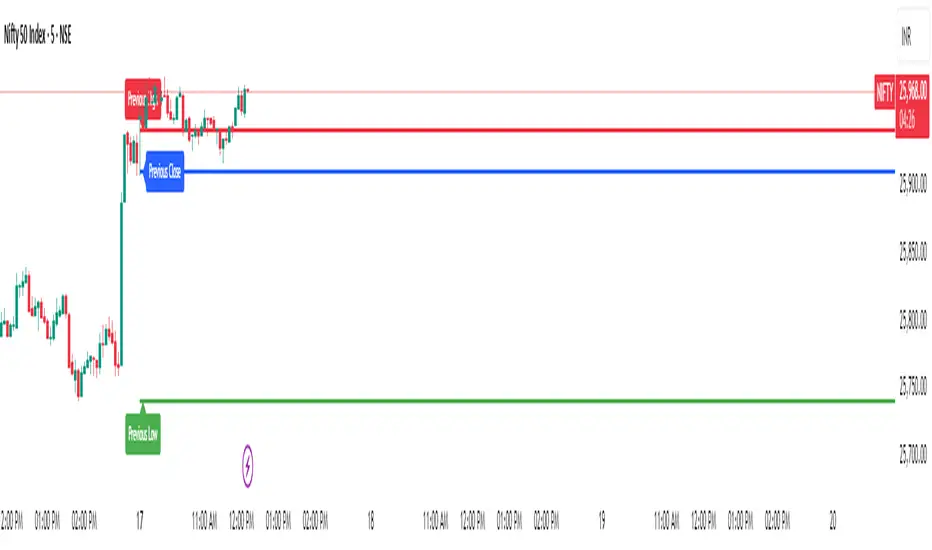
Previous Day Levels @darshaksscThis indicator provides intraday traders and analysts with immediate visual reference to the previous day's high, low, and close. These historical price levels are frequently watched by market participants for potential reaction, context, and session structure. How to Add the Indicator: Open any chart on TradingView. Click the Indicators button at the top. Search for “Previous Day Levels @darshakssc” in the Public Library. Click the ★ Favorite icon if you wish to save it for quick access in the future. Click the indicator’s name to add it to your chart. The lines and labels will appear automatically on any intraday timeframe. What You Will See: Previous day’s High (red line and label: “Previous High”). Previous day’s Low (green line and label: “Previous Low”). Previous day’s Close (blue line and label: “Previous Close”). These are drawn automatically at each new session and remain visible throughout today’s trading. Usage: Use these levels as reference points for context, risk placement, or understanding shifts in session structure. Watch for price interactions, rejections, or consolidations around these lines—they often act as support/resistance for many trading strategies. No signals or trade advice are provided by this tool. All decisions are made manually by the trader. Features: Persistent, color-coded horizontal lines and clear, small labels. No alerts, buy/sell arrows, or any indication of trading performance. Fully automated for each new session—no action required from the user after adding. Disclaimer: This indicator is intended for informational and charting purposes only. It is not financial advice or a buy/sell recommendation. Always perform your own due diligence before making trading decisions.Pine Script® göstergesidarshakssc tarafından28
Weekly Zones +RSI ColorWeekly analysis of stocks, cryptos etc. chart, you will see: The Weekly levels (PWH, PWL, 4 quadrants). The Weekly control zones (the red, green, or grey boxes). The Weekly analysis in the table. Your 1-Hour candles will be colored green (strong), red (weak), or grey (neutral) based on the 1-hour RSI. This should give you a very effective trading system.Pine Script® göstergesiTradeSurfer_369 tarafından119
KP's all in one updatedall in one for intraday overall study, emas,earnings,circuits and morePine Script® göstergesiKrishnpriya tarafından18
RSI BREAKOUT SIGNALSThis BB + RSI Breakout indicator is designed to help traders identify potential buy and sell opportunities based on price movements relative to the Donchian channel (or Bollinger-type channel) and momentum conditions. It calculates the highest high and lowest low over a user-defined length to form a dynamic channel, and then it checks whether the current price breaks above the upper band (for a buy signal) or below the lower band (for a sell signal). To avoid repeated signals in a row, the indicator uses a state system: after a buy signal occurs, it will not generate another buy until a sell occurs, and vice versa. When a buy signal is triggered, it automatically calculates a take-profit price a certain percentage above the buy candle and displays this price below the candle as a “TP” label. Sell signals are displayed above the candle, and any previous TP label is cleared. The indicator updates in real time, so the signals move with the chart, giving a clear and lag-free visualization of entry points and potential profit targets.Pine Script® stratejisigabrielcoracinidesouza07 tarafından22433
Daily Vertical Lines 6PM (Arctic Blue – No Sundays)Daily vertical lines to show each day's beginning at 6 pm, very simple, just bars to represent the days of each week in arctic blue, no sundays, so that it goes in tandem with my weekly indicator. Pine Script® göstergesigabejonah18 tarafından5
CM_MACD_Ult_MTF + Entry SignalsThis script is an enhanced and updated version of the classic CM_Ult_MacD_MTF originally created by ChrisMoody. It preserves the full functionality, look, and behavior of the original multi-timeframe MACD, including: Multi-timeframe MACD calculation 4-color histogram based on momentum direction Optional MACD and Signal line display Optional crossover dots Color-changing MACD line on signal cross Zero-line reference This upgraded version adds entry signals based on MACD/Signal crossovers: New Features Added LONG @ price label when MACD crosses above Signal SHORT @ price label when MACD crosses below Signal Labels appear directly at the crossover point Full support for Pine Script® v6, making it compatible with TradingView’s latest publishing requirements Why this version? The original script was written in an older Pine version and was no longer publishable. This version keeps the full visual identity and logic of the classic MACD while adding modern compatibility and helpful trading signals. Credits Original concept and visual framework: ChrisMoody Added features, Pine v6 migration, and enhancements: tgambinoxPine Script® göstergesitgambinox tarafından53
CJ - ADX Trend Power v5This indicator highlights when the market enters a strong trend phase using ADX together with +DI and –DI. Green background: ADX above the threshold and +DI dominates → strong bullish trend. Red background: ADX above the threshold and –DI dominates → strong bearish trend. It also tags the exact moment when ADX breaks above the strength level, helping traders avoid choppy markets and focus only on high-momentum conditions.Pine Script® göstergesiCriptoJald tarafından8
Order Block Detector by Madtrad✅ Detects bullish and bearish order blocks ✅ Displays green/red rectangles for zones ✅ Displays triangles as signals ✅ 3 types of configurable alerts: Bullish Order Block only Bearish Order Block only All Order Blocks ✅ Information table at top right ✅ Adjustable parameters (sensitivity, display, transparency)Pine Script® göstergesimanolodes tarafından96
BB + RSI Breakout Strategy RSI PLUS BB Really good strategy with a tp of 3% win rate is 95 Pine Script® stratejisigabrielcoracinidesouza07 tarafından33254
6-Signal Trading SystemAlle Indikatoren aus der PJM Vorlage (alt) zusammengefasstPine Script® göstergesidarkblue2404 tarafından24
GTI - Overbought and Oversold indicatorFor this indicator I've merged 6 indicators (RSI, Stochastic, CCI, MFI, UO and William %R) that are decent to spot overbought and oversold conditions into one indicator. The idea is the more indicators that agree on overbought and oversold conditions, the better chance that the condition is correct. Possible input settings Set your own values for the overbought and oversold bands. Noise suppression (On/Off) Length for noise suppression calculations Overbought noise suppression Oversold noise suppression Plot divergences (On/Off) Left/Right lookback settings for finding pivot highs/lows Min/Max lookback range to compare pivots for divergences Style settings Enabled/Disable the line for reversal value Set the color for the line (default is 100% transparent value) Enable/Disable fill color between reversal value and the 0 line Set the fill color Precision for reversal value, default is 2 Explanations The scale goes from 100 to -100, where outliners above 85 or below -85 is expected to be extremely rare. The overbought and oversold bands are calculated from the typical values from each indicator used in the calculation. The noise suppression is a percentile calculation from the last X bars back, where X is the length you set in the settings. 100 is the default value. This is very good to use in strong trends as an asset in a strong bullish trend tend to not touch/breach the oversold band and vise versa. The percentile calculation might still be able to catch the overbought/oversold condition in a strong opposite trending asset. 85 is a default value, but keep in mind that every asset moves differently due to their liquidity pool. The default is only a guide line. The divergence settings only plots normal divergences. Hidden divergences are not calculated. If you want the possibility to plot/see hidden divergences too, let me know in the comments. If enough people wants it I'll consider adding them. when it comes to the style, you might be a bit confused at first. The reversal value is enabled, but not showing. That's because it's enabled with 100% transparency as I like using the fill more than just a line. If you want to use a line instead of the fill, Disable the fill -> edit reversal value color -> set your chosen color and make sure to remove the transparency to make it visible. Exmaple, ticker NOVO_B In the example ticker I've enabled "Noise suppression", using the default 100 length and set noise suppression for both OB and OS to 90. The green and red circles are plotted when the "reversal value" falls below the percentile set, indicating that a possible top was just formed. Keep in mind that strong bullish or bearish trends tend to stay overbought/oversold for a longer time and are likely to print several false signals before the eventual reversal. If a divergences is printed, normally that is either the bottom or close to the bottom before a stronger reversal. Suggestion As all other indicators, don't use this indicator alone to spot reversals. Use it together with 1-3 other indicators like MACD, ADX and OBV. I like to use MACD as a confirmation tool after this tool starts indicating overbought/oversold conditions. For an overbought condition, wait for MACD to cross below the signal line. For an oversold condition, wait for the MACD to cross above the signal line. This way you don't act on false signal. Another way would be to use a DCA strategy, where you buy on each signal. In such a situation I suggest starting small enough to be able to double the total for each time, example below. First signal: $100, then another $100 on second signal, $200 on third signal, $400 on fourth signal and so on. The amounts are an example, find what works for you.Pine Script® göstergesiGizmoTheInvestor tarafındanGüncellendi 2237
Absorption — Bullish or BearishAbsorption — Bullish or Bearish Only is a lightweight and minimalistic tool designed to identify pure absorption events in the market. It highlights only two conditions: Bullish Absorption • Volume spike • Small candle body • Positive delta behavior (close > open) → Indicates potential buy-side absorption at lows Bearish Absorption • Volume spike • Small candle body • Negative delta behavior (close < open) → Indicates potential sell-side absorption at highs This script intentionally keeps the chart clean by marking only “Bullish” or “Bearish” labels, without any additional visuals, colors, or extra signals. Ideal for traders who want a simple, non-disruptive absorption confirmation tool.Pine Script® göstergesiYUHUNGTsai tarafından13