SOP CYCLE UP (MYX:FCPOH2026)# SOP CYCLE TRAILING STRATEGY (MYX:FCPOH2026)
## Technical Overview
This strategy is designed specifically for **FCPO (Crude Palm Oil)** using the "SOP Cycle" algorithm optimized for "Exponential Growth". This technique combines the precision of Scalping with the profit potential of Trend Following.
**Timeframe:** 1 Hour (H1)
**Asset:** MYX:FCPOH2026
## How to Use (Trade Rules)
### 1. Indicator (Visual)
Add the `indicator.pine` file to your TradingView chart.
* **Green Line**: BUY Zone (Cycle Up)
* **Red Line**: SELL Zone (Cycle Down)
* **Label**: Look for "BUY" or "SELL" signals.
### 2. Strategy (Auto/Manual)
Use the `strategy.pine` file for backtesting or automation.
**Entry Rules:**
* **BUY**: When the Cycle changes from Red to **Green** (Confirmed Bar).
* **SELL**: When the Cycle changes from Green to **Red** (Confirmed Bar).
**Exit Rules (Trailing Logic):**
This strategy does not use a fixed Take Profit target. It uses a smart **Trailing Stop**:
1. Trade runs until profit reaches **3 Points** (Activation).
2. Stop Loss will automatically rise, following the price at a distance of **1 Point** (Offset).
* *Advantage*: If price rallies 50 points, we capture huge profits. If price reverses, we lock in a minimum profit.
3. **Trend Change**: If the trend reverses drastically, the system will "Force Close" to prevent large losses.
### 3. Risk Management
* **Initial Stop Loss**: 8 Points (To protect account from sudden spikes).
* **Leverage**: FCPO requires margin, ensure sufficient equity.
---
## Performance
* **Win Rate**: ~High Probability
* **Style**: Hybrid Scalp-Trend
Good Luck!
Büyüme

Fundamentals [AletheiaTradeLab]This indicator adds a fundamentals layer to your chart around earning events:
1. EPS YoY % and Sales YoY %
On earnings dates you’ll see two percentages:
- EPS YoY % = how much this quarter’s earnings per share changed vs the same quarter last year
- Sales YoY % = how much this quarter’s revenue changed vs the same quarter last year
2. Acceleration highlight
A visual highlight appears when YoY results have been improving for several events in a row (you decide how many).
3. Next earnings countdown
The indicator marks the next earnings date on the chart and shows:
Countdown = days remaining (Today if it’s the current day)
Use it to quickly see how close the next earnings catalyst is while you’re charting.
4. Fundamentals table (ratings + quality metrics + pass/fail).
Ratings are computed using formulas I built and run locally. The values displayed here are updated weekly (and may be updated more frequently during earnings season). They are independent interpretations inspired by publicly available concepts from Mike Webster, William O’Neil, and IBD, and are not official IBD ratings.
A table on-chart that can show (you choose the rows):
- Market cap
- EPS Rating (1–99)
A percentile-style score that ranks a stock’s earnings strength versus the tracked universe.
It blends four components:
EPS YoY (Last quarter)
EPS YoY (Prior quarter)
EPS growth rate (5Y, fallback to 3Y if 5Y is missing)
Earnings Stability (lower volatility scores better)
Higher is better. A stock with 90 is roughly stronger than ~90% of the universe on this composite.
- Sales Rating (1–99)
Same idea as EPS Rating, but focused on revenue growth quality.
It blends:
Sales YoY (Last quarter)
Sales YoY (Prior quarter)
Sales growth rate (5Y, fallback to 3Y)
Sales Stability (lower volatility scores better)
- SMR Rating (1–99)
A profitability + quality rating inspired by the classic “SMR” concept.
It combines four pillars:
Sales growth (avg of last 3 quarters) + whether sales are accelerating
After-tax margin (recent/avg) + whether margins are improving
Pre-tax margin (FY) + whether it’s improving
ROE (FY) + whether it’s improving
- Earnings / Sales stability
- EPS / Sales growth rates (3Y / 5Y)
- Profit margins and ROE
- Optional pass/fail dots based on thresholds you set.

Tradix COR Report Index📊 Tradix COT Report Index
The Tradix COT Report Index is an advanced market sentiment and positioning tool built on official Commitment of Traders (COT) Report data, designed to reveal how major market participants are truly positioned, beyond what price alone can show.
Instead of focusing on short-term price movements, the COT Report Index analyzes real futures positioning reported to the CFTC and categorizes it into three key groups:
Commercials – hedgers and so-called smart money
Non-Commercials – institutions, funds, and large speculators
Retail / Non-Reportables – small traders and crowd positioning
Raw positioning data (Long − Short) is transformed into a normalized 0–100 index, allowing traders to instantly identify extreme market sentiment, structural imbalances, and potential turning points — without manually interpreting complex COT tables.
🧠 How the Tradix COT Index Works
The index evaluates current net positions within a historical range (typically the last 52 weeks). This contextual approach makes it easy to see:
when Commercials are at extreme long or short levels
when speculative positioning becomes overcrowded
when the market reaches structural imbalance, increasing the probability of a mean-reversion or trend shift
By standardizing positioning data, the Tradix COT Index allows cross-market comparison, making it equally useful for indices, commodities, currencies, and futures-based CFDs.
🎯 How Traders Use It
The Tradix COT Report Index is not an entry signal tool.
Instead, it acts as a high-timeframe confirmation and market context indicator, commonly used for:
identifying long-term market bias
spotting divergences between price and positioning
confirming trend exhaustion or accumulation phases
filtering trades to align with institutional positioning
When combined with technical analysis, seasonality, and risk management, the COT Index provides a statistical edge rooted in real positioning data, not opinions or lagging indicators.
⚠️ Important Notes
COT data is updated weekly, not in real time
Best used on higher timeframes (Daily, Weekly)
Designed to enhance decision-making, not to replace trading systems

GOLD Dashboard: Realzins + DXY Filter (US10Y/T10YIE)The dashboard isn't a "signal generator," but a macro regime filter. It answers a single, core question:
Which direction do I currently have a structural advantage in gold—long, short, or neither?
I'll explain it to you clearly, practically, and without any theoretical baggage.

SHFE vs COMEX Silver Spread (USD/ozt)the script shows the gap between shanghai and comex silver prices. they need me to say more words in the description for this in order for me to in order to publish with words. more words.

Risk Adjusted Geometric Exponent [VynthraQuant]RAGE Index (Risk-Adjusted Geometric Exponent)
Overview
The RAGE Index is a quantitative momentum oscillator that measures the efficiency and quality of an asset's price trend. Standing for Risk-Adjusted Geometric Exponent , this indicator goes beyond simple price action by evaluating the average logarithmic growth rate relative to the asset's volatility.
In institutional finance, it is not just about how much an asset moves, but how it moves. RAGE identifies trends that exhibit high compounding growth with minimal "noise" or volatility.
The Logic Behind RAGE
The indicator is built on two core quantitative pillars:
1. Geometric Exponent (GE): Instead of simple percentage changes, we calculate the geometric mean of log-returns. This represents the true compounding "velocity" of the price.
2. Volatility Normalization: We divide the GE by the standard deviation of returns (Volatility) over a specific lookback period.
How to Interpret the RAGE Index
* The Zero Line: The most critical level. When RAGE crosses above 0, the asset has entered a state of positive geometric growth. Below 0, the asset is in a state of efficient decay.
* Trend Quality: A rising RAGE value indicates that the trend is becoming more "efficient", growth is increasing while volatility is staying low or decreasing.
* Color-Coded Candles: The script features a `force_overlay` function that colors the candles on your main chart.
* Bullish Color: Efficient growth detected (Long bias).
* Bearish Color: Efficient decay detected (Short bias).
Key Features
* Logarithmic Accuracy: Uses log-returns to ensure time-additivity and eliminate the bias found in standard percentage calculations.
* Adaptive to Volatility: Unlike a standard RSI or MACD, RAGE penalizes "choppy" price action, helping you stay out of sideways markets.
* Optimized Performance: Written in Pine Script v6 with high-efficiency math to ensure fast loading even on lower timeframes.
Settings
* GE Lookback: The window used to calculate the average growth rate.
* Volatility Lookback: The window used to measure the "risk" or noise of the price action.
General Disclaimer
This indicator is for informational and educational purposes only. It does not constitute financial advice. The creator bears no responsibility for any financial decisions or losses resulting from its use. Past performance is not indicative of future results.
Islamic Disclaimer
All trading activity should be approached with awareness of halal and haram principles. Ensure your investments, instruments, and methods align with Islamic ethical standards. This tool does not promote speculative or impermissible practices.

Geometric Exponent [VynthraQuant]Overview
The Geometric Exponent is a specialized momentum and trend-strength indicator designed to quantify the average logarithmic growth rate of an asset over a specific lookback period. Unlike standard moving averages, this indicator focuses on the geometric mean of returns, providing a more accurate representation of compounded growth or decay.
By smoothing out the noise of daily price fluctuations through log-returns, the Geometric Exponent helps traders identify the underlying "velocity" of a trend.
How it Works
The indicator calculates the log-return for each bar within the user-defined GE Lookback period. It then computes the arithmetic mean of these log-returns, which mathematically represents the exponent of the geometric growth over that window.
Positive Values: Indicate a period of geometric growth (upward trend).
Negative Values: Indicate a period of geometric decay (downward trend).
Zero Line: Acts as the equilibrium point where there is no net growth.
Key Features
Log-Return Basis: Better suited for financial time series analysis than simple percentage changes, as log-returns are time-additive.
Customizable Lookback: Adjust the GE Lookback to fit your trading style, from fast-reacting scalping to long-term trend following.
Clean Visuals: An oscillator-style plot that makes it easy to spot momentum shifts and divergences.
How to Use
Trend Confirmation: Look for the Geometric Exponent to stay consistently above zero for long-term bullish trends and below zero for bearish trends.
Mean Reversion: Extreme peaks or valleys in the exponent may suggest that the current growth rate is unsustainable, potentially signaling an upcoming retracement.
Divergence: If price makes a new high but the Geometric Exponent makes a lower high, it suggests the "compounding power" of the trend is weakening.
General Disclaimer
This indicator is for informational and educational purposes only. It does not constitute financial advice. The creator bears no responsibility for any financial decisions or losses resulting from its use. Past performance is not indicative of future results.
Islamic Disclaimer
All trading activity should be approached with awareness of halal and haram principles. Ensure your investments, instruments, and methods align with Islamic ethical standards. This tool does not promote speculative or impermissible practices.

Peter Lynch Value (Dynamic Growth)This indicator implements Peter Lynch's core valuation principle: Fair Price = Earnings Per Share (EPS) * Growth Rate.
It provides a dynamic "fair value" line overlaid on the price chart, allowing traders and investors to quickly assess whether a stock's current price is trading above or below its intrinsic value according to the Lynch method.
Key Features
1. Dynamic Growth Rate Calculation
The indicator uses a custom algorithm to calculate the critical EPS Growth Rate, making it robust against missing data from standard financial fields.
Methodology: It fetches historical TTM Diluted EPS reports (EARNINGS_PER_SHARE_DILUTED, TTM) and calculates the Year-over-Year (YoY) Growth Percentage from the current TTM value versus the TTM value 4 periods prior.
Reliability: This custom calculation ensures the value line appears even when TradingView's pre-calculated growth metrics are unavailable (na).
2. Multiplier Control
P/E Cap: You can enforce a maximum P/E multiplier (maxPE, default 25), preventing the fair value from becoming unrealistically high for extremely fast-growing companies (as Lynch suggested).
Fallback P/E: If insufficient financial history is available to calculate the growth rate, the indicator automatically switches to a user-defined fallbackPE (default 15) and highlights the line in orange as a warning.
3. Smoothing (Optional)
To reduce the volatility often seen in valuation metrics, you can apply an optional Simple Moving Average (SMA) to the Fair Value line. This helps visualize the underlying trend of intrinsic value.
4. Forward Estimate (Optional)
Display an optional projection (circles) based on the analysts' next Fiscal Year EPS Estimate (EARNINGS_ESTIMATE, FY). This shows the potential fair value if the company meets future expectations.
5. Diagnostic Table
A table in the corner provides transparency on the calculation:
Green/Red: Confirms if TTM EPS and Calculated Growth are found.
Final P/E Used: Shows the exact multiplier used (calculated growth or the manual fallback).
Disclaimer: This tool is for informational and educational purposes only and should not be considered financial advice.

PEAD ScreenerPEAD Screener - Post-Earnings Announcement Drift Scanner
═══════════════════════════════════════════════════════════════
WHY EARNINGS ANNOUNCEMENTS CREATE OPPORTUNITY
═══════════════════════════════════════════════════════════════
The days immediately following an earnings announcement are among the noisiest periods for any stock. Within hours, the market must digest new information about a company's profits, revenue, and future outlook. Analysts scramble to update their models. Institutions rebalance positions. Retail traders react to headlines.
This chaos creates a well-documented phenomenon called Post-Earnings Announcement Drift (PEAD): stocks that beat expectations tend to keep rising, while those that miss tend to keep falling - often for weeks after the initial announcement. Academic research has confirmed this pattern persists across decades and markets.
But not every earnings surprise is equal. A company that beats estimates by 5 cents might move very differently than one that beats by 5 cents with unusually high volume, or one where both earnings AND revenue exceeded expectations. Raw numbers alone don't tell the full story.
═══════════════════════════════════════════════════════════════
HOW "STANDARDIZED UNEXPECTED" METRICS CUT THROUGH THE NOISE
═══════════════════════════════════════════════════════════════
This screener uses a statistical technique to measure how "surprising" a result truly is - not just whether it beat or missed, but how unusual that beat or miss was compared to the company's own history.
The core idea: convert raw surprises into Z-scores.
A Z-score answers the question: "How many standard deviations away from normal is this result?"
- A Z-score of 0 means the result was exactly average
- A Z-score of +2 means the result was unusually high (better than ~95% of historical results)
- A Z-score of -2 means the result was unusually low
By standardizing surprises this way, we can compare apples to apples. A small-cap biotech's $0.02 beat might actually be more significant than a mega-cap's $0.50 beat, once we account for each company's typical variability.
This screener applies this standardization to three dimensions: earnings (SUE), revenue (SURGE), and volume (SUV).
═══════════════════════════════════════════════════════════════
THE 9 SCREENING CRITERIA
═══════════════════════════════════════════════════════════════
─────────────────────────────────────────
1. SUE (Standardized Unexpected Earnings)
─────────────────────────────────────────
WHAT IT IS:
SUE measures how surprising an earnings result was, adjusted for the company's historical forecast accuracy.
Calculation: Take the earnings surprise (actual EPS minus analyst estimate), then divide by the standard deviation of past forecast errors. This uses a rolling window of the last 8 quarters by default.
Formula: SUE = (Actual EPS - Estimated EPS) / Standard Deviation of Past Errors
HOW TO INTERPRET:
- SUE > +2.0: Strongly positive surprise - earnings beat expectations by an unusually large margin. These stocks often continue drifting higher.
- SUE between 0 and +2.0: Modest positive surprise - beat expectations, but within normal range.
- SUE between -2.0 and 0: Modest negative surprise - missed expectations, but within normal range.
- SUE < -2.0: Strongly negative surprise - significant miss. These stocks often continue drifting lower.
For long positions, look for SUE values above +2.0, ideally combined with positive SURGE.
─────────────────────────────────────────
2. SURGE (Standardized Unexpected Revenue)
─────────────────────────────────────────
WHAT IT IS:
SURGE applies the same standardization technique to revenue surprises. While earnings can be manipulated through accounting choices, revenue is harder to fake - it represents actual sales.
Calculation: Take the revenue surprise (actual revenue minus analyst estimate), then divide by the standard deviation of past revenue forecast errors.
Formula: SURGE = (Actual Revenue - Estimated Revenue) / Standard Deviation of Past Errors
HOW TO INTERPRET:
- SURGE > +1.5: Strongly positive revenue surprise - the company sold significantly more than expected.
- SURGE between 0 and +1.5: Modest positive surprise.
- SURGE < 0: Revenue missed expectations.
The most powerful signals occur when BOTH SUE and SURGE are positive and elevated (ideally SUE > 2.0 AND SURGE > 1.5). This indicates the company beat on both profitability AND top-line growth - a much stronger signal than either alone.
When SUE and SURGE diverge significantly (e.g., high SUE but negative SURGE), treat with caution - the earnings beat may have come from cost-cutting rather than genuine growth.
─────────────────────────────────────────
3. SUV (Standardized Unexpected Volume)
─────────────────────────────────────────
WHAT IT IS:
SUV detects unusual trading volume after accounting for how volatile the stock is. More volatile stocks naturally have higher volume, so raw volume comparisons can be misleading.
Calculation: This uses regression analysis to model the expected relationship between price volatility and volume. The "unexpected" volume is the residual - how much actual volume deviated from what the model predicted. This residual is then standardized into a Z-score.
In plain terms: SUV asks "Given how much this stock typically moves, is today's volume unusually high or low?"
HOW TO INTERPRET:
- SUV > +2.0: Exceptionally high volume relative to the stock's volatility. This often signals institutional activity - big players moving in or out.
- SUV between +1.0 and +2.0: Elevated volume - above normal interest.
- SUV between -1.0 and +1.0: Normal volume range.
- SUV < -1.0: Unusually quiet - less activity than expected.
High SUV combined with positive price movement suggests accumulation (buying). High SUV combined with negative price movement suggests distribution (selling).
─────────────────────────────────────────
4. % From D0 Close
─────────────────────────────────────────
WHAT IT IS:
This measures how far the current price has moved from the closing price on its initial earnings reaction day (D0). The "reaction day" is the first trading day that fully reflects the earnings news - typically the day after an after-hours announcement, or the announcement day itself for pre-market releases.
Calculation: ((Current Price - D0 Close) / D0 Close) × 100
HOW TO INTERPRET:
- Positive values: Stock has gained ground since earnings. The higher the percentage, the stronger the post-earnings drift.
- 0% to +5%: Modest positive drift - earnings were received well but momentum is limited.
- +5% to +15%: Strong drift - buyers continue accumulating.
- > +15%: Exceptional drift - significant institutional interest likely.
- Negative values: Stock has given back gains or extended losses since earnings. May indicate the initial reaction was overdone, or that sentiment is deteriorating.
This metric is most meaningful within the first 5-20 trading days after earnings. Extended drift (maintaining gains over 2+ weeks) is a stronger signal than a quick spike that fades.
─────────────────────────────────────────
5. # Pocket Pivots
─────────────────────────────────────────
WHAT IT IS:
Pocket Pivots are a volume-based pattern developed by Chris Kacher and Gil Morales. They identify days where institutional buyers are likely accumulating shares without causing obvious breakouts.
Calculation: A Pocket Pivot occurs when:
- The stock closes higher than it opened (up day)
- The stock closes higher than the previous day's close
- Today's volume exceeds the highest down-day volume of the prior 10 trading sessions
The screener counts how many Pocket Pivots have occurred since the earnings announcement.
HOW TO INTERPRET:
- 0 Pocket Pivots: No detected institutional accumulation patterns since earnings.
- 1-2 Pocket Pivots: Some institutional buying interest - worth monitoring.
- 3+ Pocket Pivots: Strong accumulation signal - institutions appear to be building positions.
Pocket Pivots are most significant when they occur:
- Immediately following earnings announcements
- Near moving average support (10-day, 21-day, or 50-day)
- On above-average volume
- After a period of price consolidation
Multiple Pocket Pivots in a short period suggest sustained institutional demand, not just a one-day event.
─────────────────────────────────────────
6. ADX/DI (Trend Strength and Direction)
─────────────────────────────────────────
WHAT IT IS:
ADX (Average Directional Index) measures trend strength regardless of direction. DI (Directional Indicator) shows whether the trend is bullish or bearish.
Calculation: ADX uses a 14-period lookback to measure how directional (trending) price movement is. Values range from 0 to 100. The +DI and -DI components compare upward and downward movement.
The screener shows:
- ADX value (trend strength)
- Direction indicator: "+" for bullish (price trending up), "-" for bearish (price trending down)
HOW TO INTERPRET:
- ADX < 20: Weak trend - the stock is moving sideways, choppy. Not ideal for momentum trading.
- ADX 20-25: Trend is emerging - potentially starting a directional move.
- ADX 25-40: Strong trend - clear directional movement. Good for momentum plays.
- ADX > 40: Very strong trend - powerful move in progress, but may be extended.
The direction indicator (+/-) tells you which way:
- "25+" means ADX of 25 with bullish direction (uptrend)
- "25-" means ADX of 25 with bearish direction (downtrend)
For post-earnings plays, ideal setups show ADX rising above 25 with positive direction, confirming the earnings reaction is developing into a sustained trend rather than a one-day spike.
─────────────────────────────────────────
7. Institutional Buying PASS
─────────────────────────────────────────
WHAT IT IS:
This proprietary composite indicator detects patterns consistent with institutional accumulation at three stages after earnings:
EARLY (Days 0-4): Looks for "large block" buying on the earnings reaction day (exceptionally high volume with a close in the upper half of the day's range) combined with follow-through buying on the next day.
MID (Days 5-9): Checks for sustained elevated volume (averaging 1.5x the 20-day average) combined with positive drift and consistent upward price movement (more up days than down days).
LATE (Days 10+): Detects either visible accumulation (positive drift with high volume) OR stealth accumulation (positive drift with unusually LOW volume - suggesting smart money is quietly building positions without attracting attention).
HOW TO INTERPRET:
- Check mark/value of '1': Institutional buying pattern detected. The stock shows characteristics consistent with large players accumulating shares.
- X mark/value of '0': No institutional buying pattern detected. This doesn't mean institutions aren't buying - just that the typical footprints aren't visible.
A passing grade here adds conviction to other bullish signals. Institutions have research teams, information advantages, and long time horizons. When their footprints appear in the data, it often precedes sustained moves.
Important: This is a pattern detection tool, not a guarantee. Always combine with other analysis.
─────────────────────────────────────────
8. Strong ATR Drift PASS
─────────────────────────────────────────
WHAT IT IS:
This measures whether the stock has drifted significantly relative to its own volatility. Instead of asking "did it move 10%?", it asks "did it move more than 1.5 ATRs?"
ATR (Average True Range) measures a stock's typical daily movement. A volatile stock might move 5% daily, while a stable stock might move 0.5%. Using ATR normalizes for this difference.
Calculation:
ATR Drift = (Current Close - D0 Close) / D0 ATR in dollars
The indicator passes when ATR Drift exceeds 1.5 AND at least 5 days have passed since earnings.
HOW TO INTERPRET:
- Check mark/value of '1': The stock has drifted more than 1.5 times its average daily range since earnings - a statistically significant move that suggests genuine momentum, not just noise.
- X mark/value of '0': The drift (if any) is within normal volatility bounds - could just be random fluctuation.
Why wait 5 days? The immediate post-earnings reaction (days 0-2) often includes gap fills and noise. By day 5, if the stock is still extended beyond 1.5 ATRs from the earnings close, it suggests real buying pressure, not just a reflexive gap.
A passing grade here helps filter out stocks that "beat earnings" but haven't actually moved meaningfully. It focuses attention on stocks where the market is voting with real capital.
─────────────────────────────────────────
9. Days Since D0
─────────────────────────────────────────
WHAT IT IS:
Simply counts the number of trading days since the earnings reaction day (D0).
HOW TO INTERPRET:
- Days 0-5 (Green): Fresh earnings - the information is new, institutional repositioning is active, and momentum trades are most potent. This is the "sweet spot" for PEAD strategies.
- Days 6-10 (Neutral): Mid-period - some edge remains but diminishing. Good for adding to winning positions, less ideal for new entries.
- Days 11+ (Red): Extended period - most of the post-earnings drift has typically played out. Higher risk that momentum fades or reverses.
Research shows PEAD effects are strongest in the first 5-10 days after earnings, then decay. Beyond 20-30 days, the informational advantage of the earnings surprise is largely priced in.
Use this to prioritize: focus on stocks with strong signals that are still in the early window, and be more selective about entries as days accumulate.
═══════════════════════════════════════════════════════════════
PUTTING IT ALL TOGETHER
═══════════════════════════════════════════════════════════════
You can use this screener in the chart view or in the Screener.
One combination of the above filters to develop a shortlist of positive drift candidates may be:
- SUE > 2.0 (significant earnings beat)
- SURGE > 1.5 (significant revenue beat)
- Positive % From D0 Close (price confirming the good news)
- Institutional Buying PASS (big players accumulating)
- Strong ATR Drift PASS (statistically significant movement)
- Days Since D0 < 10 (still in the active drift window)
No single indicator is sufficient. The power comes from convergence - when multiple independent measures all point the same direction.
═══════════════════════════════════════════════════════════════
SETTINGS
═══════════════════════════════════════════════════════════════
Key adjustable parameters:
- SUE Method: "Analyst-based" uses consensus estimates; "Time-series" uses year-over-year comparison
- Window Size: Number of quarters used for standardization (default: 8)
- ATR Drift Threshold: Minimum ATR multiple for "strong" classification (default: 1.5)
- Institutional Buying thresholds: Adjustable volume and CLV parameters
═══════════════════════════════════════════════════════════════
DISCLAIMER
═══════════════════════════════════════════════════════════════
This screener is a research tool, not financial advice. Past patterns do not guarantee future results. Always conduct your own due diligence and manage risk appropriately. Post-earnings trading involves significant uncertainty and volatility. The 'SUE' in this indicator does not represent a real person; any similarity to actual Sue's (or Susans for that matter) living or dead is quite frankly ridiculous, not to mention coincidental.

Scalp Boost LONG✦ Overview
Scalp Boost LONG is a visual tool designed to highlight potential short-term upward impulses.
A signal is generated only when multiple market conditions align at the candle close, combining momentum dynamics, local probability shifts, and abnormal volume behavior.
The indicator does not repaint.
✦ Concept
The tool focuses on selective situations where the market shows signs of micro-breakout potential.
If all internal conditions are confirmed — a LONG event is displayed.
If not — the chart remains clean.
This builds a low-noise signal model, prioritizing quality over frequency.
✦ Signal Logic
The LONG signal requires confirmation of all core conditions:
• Local impulse dynamics
Identifies short-term acceleration suggesting a breakout from a compressed price structure.
• Probability beyond a statistical zone
Uses relative breakout probability instead of fixed levels, checking whether price exceeds expected local ranges.
• Abnormal volume activity
Highlights candles with monetary flow above a custom threshold, signaling increased market interest.
• Anti-overheat filter
Conditions avoiding exhausted or low-momentum phases where continuation is less likely.
Only when all filters are aligned a LONG marker appears.
✦ Visual Structure
The chart display is intentionally minimal:
• ROC Curve
Subdued line, showing short-term momentum without distraction.
• LONG Marker
Green triangle below the candle on confirmed events.
• Candle Highlight
Soft background highlight on the signal bar.
• Volume Marker
Small red dot at the bottom of candles with abnormal monetary flow.
All visual elements appear only on candle close.
✦ Alerts
A clean event structure is available for notifications:
LONG Signal
This allows receiving alerts during chart analysis or in automated workflows while keeping full control over decision-making.
✦ Notes & Guidelines
This tool:
is not a trading system,
does not provide targets or stops,
may trigger against the dominant trend,
should be combined with the user’s own methodology.
Signals are rare by design.
Do not interpret each event as a trend continuation — it highlights conditions, not outcomes.
✦ Suggested Use
-(Non-mandatory ideas for advanced users)
-identifying potential micro-breakouts,
-timing entries around volume spikes,
-adding context to scalping models,
-filtering impulsive moves from noise.
-suitable for a 5-minute timeframe
The indicator can be helpful as a confirmation layer, not a standalone decision tool.

Yong Fin Growth on ChartBridge the gap between Fundamental Analysis and Technical Price Action.
Yong Fin Growth on Chart is the ultimate tool for "Hybrid Traders" and investors who need to visualize financial performance directly alongside price movements. Stop switching tabs between news sites and your charts—get the full context of why a stock is moving, right where it happens.
This indicator overlays key financial metrics onto your chart, triggered precisely by Earnings Announcements. It allows you to instantly correlate price reactions with fundamental catalysts like Revenue Growth, Margin Expansion, or EPS surprises.
Key Features:
🔹 1. Smart Earnings Trigger The indicator automatically detects Earnings Announcement dates and plots a data label on the exact bar.
Stocks: Aligns with the specific earnings release date to show immediate price reaction.
Funds/ETFs: Supports Fiscal Period End dates for broader instrument analysis.
Includes a vertical line option to visually separate fiscal periods for easy backtesting.
🔹 2. 5 Fully Customizable Data Slots Configure up to 5 independent slots to track the metrics that matter to your strategy. Choose from a comprehensive list including:
Growth: Revenue, Net Income, EBITDA, EPS.
Efficiency: Gross Margin (GPM), Net Margin (NPM), ROE, ROA.
Valuation: P/E, P/S, P/BV, EV/EBITDA, and Implied P/E.
Health: Cash, Debt, Net Debt, Free Cash Flow (FCF).
🔹 3. Dynamic Growth Coloring & Thresholds Instantly identify trend changes with intelligent color coding.
Comparison Modes: Toggle between YoY (Year-over-Year) or QoQ (Quarter-over-Quarter) growth logic.
Custom Thresholds: Define your own standards. For example, set the label to turn Green only if growth exceeds +15%, or Red if it falls below -5%. This helps filter out noise and highlights significant fundamental shifts.
🔹 4. Flexible Period Selection Analyze data across different timeframes to suit your trading style:
FQ: Fiscal Quarter (Short-term momentum)
FY: Fiscal Year (Long-term trend)
TTM: Trailing Twelve Months (Ideal for smooth Valuation ratios)
FH: Fiscal Half (For securities reporting semi-annually)
How to Use:
Add to Chart: Apply the indicator to any stock symbol.
Configure Slots: Go to settings and select the 5 metrics you want to monitor (e.g., Rev, Net Profit, GPM, NPM, P/E).
Set Color Logic: Choose whether you want to color-code based on YoY or QoQ growth.
Analyze: Look for the labels.
Are margins expanding while price is consolidating?
Did the price drop despite a "Green" label? (Market expectations vs. Reality)
Use the vertical lines to see how the trend changed after previous earnings reports.
"Stop guessing. Let the fundamentals guide your technical entries."
Disclaimer: This tool is for educational and analytical purposes only. Past performance does not guarantee future results. Please conduct your own due diligence.
---------------------------------
เชื่อมช่องว่างระหว่างการวิเคราะห์ปัจจัยพื้นฐาน (Fundamental) และกราฟราคาทางเทคนิค (Technical Price Action)
Yong Fin Growth on Chart คือเครื่องมือที่ดีที่สุดสำหรับ "นักลงทุนสายผสม (Hybrid Traders)" และนักลงทุนที่ต้องการเห็นผลประกอบการทางการเงินซ้อนทับไปกับการเคลื่อนไหวของราคาโดยตรง หยุดเสียเวลาสลับหน้าจอไปมาระหว่างเว็บข่าวและกราฟของคุณ—รับรู้บริบททั้งหมดว่าทำไมหุ้นถึงวิ่ง ได้ทันทีบนหน้าจอนี้
อินดิเคเตอร์นี้จะวางค่าทางการเงินที่สำคัญลงบนกราฟ โดยถูกกระตุ้น (Trigger) อย่างแม่นยำด้วย วันประกาศงบ (Earnings Announcements) ช่วยให้คุณเชื่อมโยงปฏิกิริยาของราคา เข้ากับปัจจัยพื้นฐานที่เป็นตัวขับเคลื่อนได้ทันที เช่น การเติบโตของรายได้, การขยายตัวของอัตรากำไร (Margin), หรือกำไรต่อหุ้น (EPS) ที่เซอร์ไพรส์ตลาด
ฟีเจอร์หลัก:
🔹 1. Smart Earnings Trigger (ตัวระบุวันงบออกอัจฉริยะ) อินดิเคเตอร์จะตรวจจับวันประกาศงบอัตโนมัติและพลอตป้ายข้อมูล (Label) ลงบนแท่งเทียนนั้นเป๊ะๆ
หุ้นรายตัว: ตรงกับวันประกาศผลประกอบการจริง เพื่อดูปฏิกิริยาราคาทันที
กองทุน/ETFs: รองรับวันปิดรอบบัญชี (Fiscal Period End) สำหรับการวิเคราะห์สินทรัพย์ประเภทอื่นๆ
มีออปชั่นเส้นแนวตั้ง เพื่อแบ่งช่วงเวลางบแต่ละรอบ ให้ดูย้อนหลัง (Backtest) ได้ง่าย
🔹 2. 5 Fully Customizable Data Slots (ช่องข้อมูลปรับแต่งได้ 5 ช่อง) ตั้งค่าได้ถึง 5 ช่องอิสระ เพื่อติดตามตัวเลขที่สำคัญต่อกลยุทธ์ของคุณ เลือกจากรายการที่ครอบคลุม เช่น:
การเติบโต (Growth): Revenue, Net Income, EBITDA, EPS
ประสิทธิภาพ (Efficiency): Gross Margin (GPM), Net Margin (NPM), ROE, ROA
มูลค่า (Valuation): P/E, P/S, P/BV, EV/EBITDA, และ Implied P/E (ค่าพิเศษที่คุณใส่สูตรไว้)
สุขภาพการเงิน (Health): Cash, Debt, Net Debt, Free Cash Flow (FCF)
🔹 3. Dynamic Growth Coloring & Thresholds (ระบบสีและการตั้งเกณฑ์) ระบุการเปลี่ยนเทรนด์ได้ทันทีด้วยรหัสสีอัจฉริยะ
โหมดเปรียบเทียบ: เลือกสลับได้ระหว่าง YoY (เทียบปีก่อน) หรือ QoQ (เทียบไตรมาสก่อน)
เกณฑ์ที่กำหนดเอง (Custom Thresholds): กำหนดมาตรฐานของคุณเอง ตัวอย่างเช่น ตั้งค่าให้ป้ายเป็น สีเขียว เฉพาะเมื่อโตเกิน +15% หรือเป็น สีแดง เมื่อต่ำกว่า -5% สิ่งนี้ช่วยกรอง Noise และเน้นเฉพาะการเปลี่ยนแปลงพื้นฐานที่มีนัยสำคัญ
🔹 4. Flexible Period Selection (เลือกช่วงเวลาได้ยืดหยุ่น) วิเคราะห์ข้อมูลในกรอบเวลาที่แตกต่างกันตามสไตล์การเทรด:
FQ: รายไตรมาส (Fiscal Quarter) - ดูโมเมนตัมระยะสั้น
FY: รายปี (Fiscal Year) - ดูเทรนด์ระยะยาว
TTM: 12 เดือนย้อนหลัง (Trailing Twelve Months) - เหมาะสำหรับดูค่า Valuation Ratio ให้สมูท
FH: ครึ่งปี (Fiscal Half) - สำหรับหลักทรัพย์ที่ส่งงบแบบครึ่งปี
วิธีใช้งาน:
Add to Chart: ใส่อินดิเคเตอร์ลงในกราฟหุ้นตัวใดก็ได้
Configure Slots: ไปที่การตั้งค่าและเลือก 5 ค่าที่คุณต้องการเฝ้าดู (เช่น Rev, Net Profit, GPM, NPM, P/E)
Set Color Logic: เลือกตรรกะสี ว่าจะให้อิงตามการเติบโตแบบ YoY หรือ QoQ
Analyze: สังเกตป้ายข้อมูล
อัตรากำไร (Margin) ขยายตัวในขณะที่ราคากำลังพักตัวอยู่หรือเปล่า?
ราคาดิ่งลงทั้งๆ ที่ป้ายเป็น "สีเขียว" หรือไม่? (ความคาดหวังตลาด vs ความจริง)
ใช้เส้นแนวตั้งเพื่อดูว่าเทรนด์เปลี่ยนไปอย่างไรหลังจากงบออกในรอบก่อนๆ
"เลิกเดา ให้ปัจจัยพื้นฐานนำทางจุดเข้าซื้อทางเทคนิคของคุณ"
คำเตือน: เครื่องมือนี้มีไว้เพื่อการศึกษาและวิเคราะห์ข้อมูลเท่านั้น ผลการดำเนินงานในอดีตไม่การันตีผลลัพธ์ในอนาคต โปรดศึกษาข้อมูลด้วยตนเอง


MarketSurge EPS Line [tradeviZion]MarketSurge EPS Line
EPS trend line overlay for TradingView charts, inspired by the IBD MarketSurge (formerly MarketSmith) EPS line style.
Comparison: Left side shows IBD MarketSurge EPS line as reference. Right side shows this TradingView script producing similar output with interactive tooltips. The left side image is for reference only to demonstrate similarity - it is not part of the TradingView script.
Features:
Displays EPS trend line on price charts
Uses 4-quarter earnings moving average
Shows earnings momentum over time
Works with actual, estimated, or standardized earnings data
Customizable line color and width
Interactive tooltips with detailed earnings information
Custom symbol analysis support
How to Use:
Add script to chart
EPS line appears automatically
Adjust color and width in settings if needed
Hover over line for earnings details
Settings Explained:
Display Settings:
Show EPS Line: Toggle to show or hide the EPS trend line
EPS Line Color: Choose the color for the EPS trend line and labels
EPS Line Width: Adjust the thickness of the EPS trend line (1-5 pixels)
Symbol Settings:
By default, the indicator analyzes the EPS data for the symbol currently displayed on your chart. The Custom Symbol feature allows you to:
Analyze EPS data for a different symbol without changing your chart
Compare earnings trends of related stocks or competitors
View EPS data for one symbol while analyzing price action of another
To use Custom Symbol:
Enable "Use Custom Symbol" checkbox
Click on "Custom Symbol" field to open TradingView's symbol picker
Search and select the symbol you want to analyze
The indicator will fetch and display EPS data for the selected symbol
Note: The chart will still show price action for your current symbol, but the EPS line will reflect the custom symbol's earnings data.
Data Settings:
EPS Field: Choose which earnings data source to use:
Actual Earnings: Reported earnings from company financial statements (default). Use this to analyze historical performance based on what companies actually reported.
Estimated Earnings: Analyst consensus forecasts for future quarters. Use this to see what analysts expect and compare expectations with actual results.
Standardized Earnings: Earnings adjusted for comparability across companies. Use this when comparing multiple stocks as it normalizes accounting differences.
Display Scale:
For the indicator to display correctly on the existing chart, it uses its own axis (right scale) by default. However, you can change this, but the view will not look the same. The right scale is recommended for optimal visibility as it allows the EPS line to be clearly visible alongside price action without compression.
Example: EPS line on separate right scale (recommended) - hover over labels to view detailed earnings tooltips
Example: EPS line pinned to Scale A (not recommended - appears as straight line due to small EPS range compared to price)
Example: EPS line displayed in separate pane below price chart
Methodology Credits:
This indicator implements the EPS line visualization methodology developed by Investor's Business Daily (IBD) for their MarketSurge platform (formerly known as MarketSmith). The EPS line concept helps visualize earnings momentum alongside price action, providing a fundamental overlay for technical analysis.
Technical Details:
Designed for daily, weekly, and monthly timeframes
Minimum 4 quarters of earnings data required
Uses TradingView's built-in earnings data
Automatically handles missing or invalid data
This indicator helps you visualize earnings trends alongside price action, providing a fundamental overlay for your technical analysis.

Stock Valuation & Analysis (Zeiierman)█ Overview
Stock Valuation & Analysis (Zeiierman) is a hybrid fundamental–technical framework that delivers a complete company valuation system directly inside TradingView. Instead of manually digging through years of financial statements, the system automates the full valuation process, allowing traders and investors to understand a stock’s true value, fair price, and risk-adjusted opportunity at a glance.
The script projects intrinsic value zones directly onto the price chart, then layers trend structure, signals, and exhaustion regimes around them to create a unified decision-making environment.
At its core, the system builds a quantitative valuation backbone using several coordinated models:
an adaptive DCF engine that updates fair value based on changing fundamentals
sector-aligned valuation models that compare earnings, sales, enterprise value, and book metrics
smart handling for unusual balance-sheet structures such as cash-heavy or early-stage companies
stabilized value floors based on liquidity and cash-per-share dynamics
an automated financial processor that organizes multi-year statements into a consistent valuation framework
On top of this valuation, the script overlays:
visual valuation zones (Premium, Fair, Discounted, Undervalued)
a rolling ZVWAP line showing where trading activity is anchored
a multi-mode adaptive trend engine
a non-linear signal generator
an overbought and oversold regime detector
an analyst-consensus summary panel
Note: This tool is designed specifically for stocks on the daily timeframe. If used on unsupported markets or timeframes, it will display a clear warning.
⚪ Why This One Is Unique
Most valuation tools stop at static multiples or a single DCF pass. This script instead uses a more intelligent, multi-layered valuation architecture that adapts to the underlying asset and market context.
It:
Uses multiple forms of discounted cash flow analysis and automatically selects the most suitable valuation approach for the stock. When traditional DCF is not optimal, the system applies alternative but comparable valuation methods. This adaptive behavior is the basis for the “Intelligent” designation.
Uses valuation multiples as the basis for fair value assessments.
Projects valuation into dynamic chart zones that expand or contract relative to your chosen margin of safety, producing premium, fair, discounted, and deeply undervalued bands that evolve as conditions change.
Adds a Rolling ZVWAP that adjusts to shifting volume distributions and recent price drift, helping to identify where aggregate positioning and cost basis may be clustering.
Includes an adaptive trend core capable of self-tuning across a range of sensitivities, selecting the configuration that historically performed most reliably, and using that as a live trend intelligence layer.
Wraps everything in a regime-aware OB/OS engine and a unified alert router, enabling valuation, positioning, trend, and signal events to flow through one consolidated alert stream for simpler automation.
█ Main Features
⚪ 1. Dual Valuation Engine With Intelligent Chart Projection
The indicator evaluates a company’s fair value using two coordinated valuation models, then projects the result directly onto the price chart as adaptive valuation zones.
Intelligent DCF Valuation Engine
Builds a forward-looking free-cash-flow profile using earnings power, cash generation, capital intensity, working-capital behavior, and tax structure. It then projects these flows, applies terminal adjustments, and converts the result into an equity fair value.
Adaptive Multiples-Based Valuation
Tracks the most commonly used valuation metrics. Each metric provides its own fair-value projection, and the engine identifies the one most consistent with the company’s fundamental profile — delivering the best match to intrinsic value.
Margin of Safety Control
A dedicated slider widens or tightens valuation outcomes based on your preferred risk profile, enabling more conservative or aggressive interpretations with a single adjustment.
Dynamic Valuation Zones (Premium → Undervalued)
Once the valuation is finalized, the script constructs four intelligent price regions:
Premium, Fair Value, Discounted, and Undervalued. These zones scale with your Margin of Safety and are drawn as translucent, forward-projected price bands. The result is a clear, evolving valuation map that updates with each new bar and visually anchors price within its current fundamental context.
⚪ 2. ZVWAP — Zeiierman Volume-Weighted Anchor Price
This enhanced VWAP model distinguishes between institutional-style flows and retail-style activity, offering a deeper look into capital positioning. It adapts continuously, revealing where dominant buying or selling pressure may be anchored. Depending on your setting, it can emphasize institutional-style flows or a blend of retail and institutional movement. This line helps you quickly see whether the price is trading above or below the dominant executed volume over the recent window.
⚪ 3. Trend and Price-Movement Intelligence
A multi-mode trend engine ensures flexibility and robustness across different trading styles:
Intelligent Trend: Runs a series of internal trend models, gauges their historical stability and responsiveness, and automatically promotes the best-performing configuration as the trend line.
Percentage Trend: Flips trend when price moves a fixed percentage from a reference, ideal for swing-style regime detection.
MA Trend: A classic moving-average trend line that switches bias on crossovers.
⚪ 4. Signal Framework (Buy / Sell / Trend Signals)
A dedicated signal engine analyzes price extremes and internal oscillations to produce actionable signals. Frequency settings (Frequent, Quick, Fast, Moderate, Long-Term) determine how selective the engine becomes. Signals can operate independently or in alignment with the active trend filter.
⚪ 5. Overbought / Oversold Regime Zones
A volatility-aware OB/OS engine transforms price movement into a smooth internal oscillator. It highlights extended regimes using semi-transparent zones labeled “Overbought” or “Oversold,” expanding and contracting with volatility. Zones automatically clear once conditions normalize, avoiding stale signals.
⚪ 6. Analyst Ratings & Price Target Panel
A structured table displays external analyst expectations, including:
Highest and lowest price targets
Average or consensus rating (Buy, Sell, Weak Buy, Weak Sell, Neutral)
Color-graded rating and target fields for immediate clarity
This adds an external benchmark to complement the internal valuation system.
█ How to Use
⚪ Intrinsic Value Estimation
Quickly determine whether a stock is undervalued or overvalued based on DCF and Multiple models.
Valuation Models
Intelligent DCF: Best for fundamentally driven companies where earnings quality, cash flow, and balance sheet strength matter.
Multiple Valuation: Ideal for faster, relative pricing using sector-aware multiples.
Risk-Adjusted Investing: Apply the Margin of Safety to find entries that match your preferred risk level.
Valuation Zones
Premium: Price is above intrinsic value. Common area to lock in gains, tighten stops, or avoid new longs.
Fair Value: Neutral territory. Suitable for monitoring or gradual accumulation.
Discounted: Below fair value. Potential opportunity zone when trend and technical conditions begin to improve.
Undervalued: Deep discount. High-interest area when valuation, trend improvement, oversold conditions, and signals start aligning.
⚪ Professional-Level Price Analysis
Use ZVWAP and trend tools to time entries with institutional buying pressure by visualizing where the majority of recent trading volume is anchored.
Price above ZVWAP + bullish trend → strong institutional support, trend continuation setups.
Price below ZVWAP + bearish trend → strong institutional selling pressure, trend continuation.
Price crossings relative to ZVWAP often act as:
pullback completion points.
early signs of shifting value zones.
⚪ Timing Your Entries
1. Choose a Trend Mode
Intelligent Trend: Runs several trend configurations, evaluates their past stability, and selects the most reliable one as the active trend.
Percentage Trend: Flips trend only when price moves by a defined percentage.
MA Trend: Classic moving average for straightforward trend mapping.
2. Use Signals in Sync With the Trend
Set Trend Signals to ensure entries match the active trend:
In an uptrend → Long signals highlight continuation setups.
In a downtrend → Short signals highlight continuation setups.
Adjust frequency based on style:
Frequent / Quick for active traders
Moderate / Longterm for swing and position traders
⚪ Overbought / Oversold Zones
Overbought zones identify where upside movement is stretched, often aligning with Premium or upper Fair Value regions. These areas can signal trend maturity, potential pullbacks, or moments where taking partial profits becomes prudent.
Oversold zones highlight areas where downside momentum is becoming exhausted, especially when price is already trading within Discounted or Undervalued valuation regions. These zones can mark early stages of a potential reversal or simply the lower boundary of a strong trend where buyers might step back in.
Because both conditions can appear during strong trends, investors should monitor price behavior closely:
In strong uptrends, overbought zones can indicate trend strength rather than immediate reversal. Traders may choose to ride the trend while managing risk.
In downtrends, oversold zones can serve as continuation points or emerging reversal signals depending on how the price reacts.
Both zones can be used as entry or exit timing aids, especially when combined with valuation zones, ZVWAP behavior, and trend direction.
⚪ A nalyst Comparison
Use the built-in analyst ratings and target prices to validate or challenge your valuation. When your intrinsic estimate aligns with analyst consensus, conviction strengthens; when it diverges, it highlights potential opportunities or risks worth investigating.
█ How It Works
⚪ Intelligent Valuation
Uses multiple forms of discounted cash flow analysis and automatically selects the most appropriate valuation approach for each stock. When a traditional DCF is not the best fit, the system switches to alternative but comparable valuation models. This adaptive process is what defines it as an “Intelligent” system.
⚪ Multiples Framework
When using multiple-based valuation, the engine evaluates a set of evolving market multiples and aligns them with sector expectations. Historical ranges, peer context, and balance-sheet components help anchor each metric, allowing identical ratios to be interpreted differently across industries. The system then chooses the estimate that best reflects the company and how the market has recently valued similar conditions.
⚪ ZVWAP
The Rolling ZVWAP line acts as a dynamic, volume-weighted anchor that reacts to shifts in participation intensity. It highlights where capital is clustering, whether flows lean toward institutional or retail, and how price behaves around these anchor points. This produces a clearer view of positioning pressure and trend strength than traditional VWAP lines.
⚪ Adaptive Trend Framework
The trend system provides three complementary modes:
Percentage Mode reacts to meaningful percentage-based displacements,
MA Mode tracks equilibrium through a moving-average backbone, and
Intelligent Trend evaluates multiple internal configurations, promotes the historically most stable one, and uses it as the active trend reference. This multi-engine design ensures that trend direction reflects the most reliable behavior for the current market environment.
⚪ Signal Engine
The signal layer continuously interprets price structure, curvature, and momentum to identify high-quality long and short opportunities. Signals can run independently or be filtered through the active trend for cleaner, regime-aligned entries. Frequency modes allow you to tune selectivity from rapid responses to high-conviction, slower-moving signals.
⚪ Overbought / Oversold Regime Zones
The OB/OS engine identifies volatility-adjusted exhaustion zones that highlight where price is stretched or depleted. These regions can mark early reversal points, continuation areas in strong trends, or places where investors monitor price closely to decide whether to hold, trim, or add exposure. They integrate naturally with valuation, trend, ZVWAP, and signals to refine timing and risk management.
⚪ Analyst Sentiment
The Analyst Ratings layer collects analyst recommendations and target prices, normalizes them into a weighted sentiment index, and displays the result as a color-graded panel. This gives you an immediate sense of how professional research is positioning itself relative to the system’s intrinsic valuation baseline.
-----------------
Disclaimer
The content provided in my scripts, indicators, ideas, algorithms, and systems is for educational and informational purposes only. It does not constitute financial advice, investment recommendations, or a solicitation to buy or sell any financial instruments. I will not accept liability for any loss or damage, including without limitation any loss of profit, which may arise directly or indirectly from the use of or reliance on such information.
All investments involve risk, and the past performance of a security, industry, sector, market, financial product, trading strategy, backtest, or individual's trading does not guarantee future results or returns. Investors are fully responsible for any investment decisions they make. Such decisions should be based solely on an evaluation of their financial circumstances, investment objectives, risk tolerance, and liquidity needs.

Stock Fundamentals (Zeiierman)█ Overview
Stock Fundamentals (Zeiierman) is designed for investors who want a clear, visual, and efficient way to understand a company’s overall fundamental profile directly on the chart. Instead of digging through dozens of ratios or scanning multiple websites, the tool combines fundamental data, price behavior, and analyst expectations into a single intuitive visual system that can be understood at a glance.
A multi-axis “fundamental spider chart” presents the company across six core dimensions: value, quality, financial health, future prospects, dividend strength, performance, and volatility behavior. Each axis represents a structural aspect of company quality, allowing you to see strengths, weaknesses, and imbalances in one immediate view.
Alongside the spider chart, a compact PE and Return panel shows where current valuation and analyst expectations sit within their historical ranges, giving context for whether the stock is cheap, expensive, stretched, or positioned for growth.
The goal is simple: make fundamental analysis accessible, fast, and insightful for every investor, from beginner to advanced. Stock Fundamentals (Zeiierman) transforms dense data into a structured visual profile suited for stocks on the daily timeframe, allowing you to interpret company quality as easily as you read price action.
Important: This script is designed for STOCK symbols on the DAILY timeframe. On anything else, it will show an explicit warning instead of a spider chart.
⚪ Why This One Is Unique
Most fundamental overlays rely on static ratios or simple tables, but this script takes a far more comprehensive approach. It builds a multi-dimensional scoring system across Value, Health, Future, Dividend, Performance, and Volatility, then maps these dimensions into a geometric spider chart with clearly labeled axes so you can interpret company quality visually rather than through scattered numbers.
An Overall Score from 0 to 10 is computed by aggregating these dimensions and is displayed using a smooth gradient from your selected color palette. Performance scoring is based on yearly return statistics such as returns, volatility, Sharpe ratio, max drawdown, and alpha versus a benchmark, giving the score a foundation in real multi-year behavior rather than short-term noise.
Dividend quality is evaluated through yield, growth, payout behavior, free-cash-flow coverage, leverage, and the company’s EPS trend, creating a deeper view of dividend strength than raw yield alone. Future expectations are incorporated through a forward-looking model that compares projected earnings and revenue paths to the current price using a nonlinear scoring method.
A dedicated PE Sentiment and Return Estimate panel places the stock’s PE, current price, and analyst targets along a graded strip, helping you see valuation and expected upside or downside in a meaningful context.
█ Main Features
⚪ 1. Company Overview Score
Stock Fundamentals (Zeiierman) evaluates a company across six core dimensions: Value, Health, Future, Dividend, Performance, and Volatility. Each dimension is scored individually and combined into a single Overall Score (0–10) displayed beside the spider chart. The score cell uses a smooth gradient to reflect weak-to-strong company quality at a glance.
⚪ 2. Fundamental spider chart Visualization
The individual scores are mapped into a six-axis polygon, known as the fundamental spider chart. Each arm of the spider chart represents one of the core dimensions:
Dividend – quality, growth, coverage, and stability
Performance – multi-year risk-adjusted returns
Volatility – long-term price stability
Value – earnings yield, ROIC, and valuation appeal
Health – solvency, balance-sheet strength, and overall safety
Future – forward growth potential relative to current price
The axes extend from weak at the center to strong at the outer boundary, creating a color-filled shape that makes strengths, weaknesses, and imbalances instantly visible. The spider chart and the overall score work together to provide a fast, intuitive snapshot of company fundamentals.
⚪ 3. PE Sentiment Bar
A horizontal PE Sentiment bar shows where the company’s current P/E sits within its historical low-to-high range. The bar is color-graded to indicate whether the valuation leans cheap or expensive, with a marker precisely showing today’s position.
⚪ 4. Return Estimate Bar
The Return Estimate bar compares the current price against analyst expectations:
lowest target
highest target
average target
current price marker
A percentage estimate displays potential upside or downside to the average target. The bar is visually graded using the same palette for fast interpretation.
█ How to Use
⚪ Quick Stock Screening
Investors can rapidly assess company quality before deep research, saving significant time.
⚪ Comparing Opportunities
Easily compare two or more companies using their overall scores and key sentiment visuals.
⚪ Portfolio Reassessment
Use the Stock Fundamentals to monitor existing holdings and identify potential risks or strong performers.
⚪ Sentiment-Based Entries
Combine PE Sentiment and Return Estimate data to evaluate whether a stock is currently undervalued or overextended.
█ How It Works
⚪ Fundamental Dimensions and Scoring
Stock Fundamentals (Zeiierman) evaluates a company across six primary dimensions: Value, Health, Future, Dividend, Performance, and Volatility. Each dimension is assessed through its underlying behaviors rather than a single ratio, producing a more balanced and realistic view of company strength.
Value reflects how attractive the company is relative to its earnings power and capital efficiency.
Health measures balance-sheet strength, operational resilience, and the company’s ability to withstand financial stress.
Future estimates the growth potential implied by projected business expansion versus current pricing.
Dividend evaluates reliability, sustainability, and the stability of historical payouts.
Performance summarizes long-term return quality and risk-adjusted behavior.
Volatility indicates the consistency of price behavior, highlighting stability versus choppiness.
Each category is converted into a normalized score and combined into an overall weighted score (0–10), providing a fast yet reliable snapshot of company quality.
⚪ Value Engine
The Value dimension reflects both the company’s earnings attractiveness and how effectively it uses capital. Instead of relying on a single valuation ratio, the engine blends multiple valuation signals with an estimate of capital efficiency, producing a stable value intensity score. This approach rewards companies that combine strong earnings power with efficient capital use, while preventing extreme outliers from dominating.
⚪ Health Engine
The Health dimension evaluates how structurally sound the business is. It draws from indicators that capture financial resilience, balance-sheet strength, stability, and operational robustness. For financial institutions or bank-like profiles, the system shifts toward metrics that emphasize asset efficiency and solvency buffers. The result is a single robustness score that adapts to the company’s business model.
⚪ Performance Engine
Performance is based on long-term behavior rather than short-term swings. The system evaluates multi-year return characteristics, consistency, risk-adjusted efficiency, and resilience during adverse market periods. Each of these behaviors is transformed into a smooth score, then combined into a single Performance dimension that reflects “quality of returns,” not just raw gains.
⚪ Dividend Engine
The Dividend dimension assesses both reward and reliability. It considers payout behavior over several years, historical stability, growth tendencies, coverage strength, and overall sustainability. It also evaluates whether the company’s financial structure supports long-term dividends rather than simply rewarding high yield. All of these factors combine into a dividend score that balances attractiveness with durability.
⚪ Future Growth Engine
The Future dimension estimates how well the company’s projected business expansion aligns with current price levels. It builds a simplified projection of growth potential and assesses whether that trajectory reasonably supports the stock’s valuation. The closer the company appears to “growing into” its price, the higher the future score. This dimension effectively acts as a growth runway estimator.
⚪ Volatility Node
The Volatility dimension reflects how stable or turbulent the stock has been over a broad timeframe. Its purpose is descriptive rather than judgmental: a high volatility score indicates choppy behavior, while a lower score suggests consistency. Although this measurement is displayed as part of the spider chart, it is intentionally excluded from the Overall Score to avoid penalizing growth-oriented or cyclical companies unfairly.
⚪ PE Sentiment
The company’s current P/E ratio is placed within its historical low-to-high range. The panel uses a smooth gradient from “cheap” to “expensive,” with a clear marker showing exactly where today’s valuation sits relative to past conditions.
⚪ Return Estimate
Analyst expectations are displayed on a similar range-based strip. Markers show the lowest, highest, and average analyst targets, alongside a marker for the current price. A projected percentage return is calculated relative to consensus expectations, offering a simple visual cue for whether analysts see meaningful upside or downside.
-----------------
Disclaimer
The content provided in my scripts, indicators, ideas, algorithms, and systems is for educational and informational purposes only. It does not constitute financial advice, investment recommendations, or a solicitation to buy or sell any financial instruments. I will not accept liability for any loss or damage, including without limitation any loss of profit, which may arise directly or indirectly from the use of or reliance on such information.
All investments involve risk, and the past performance of a security, industry, sector, market, financial product, trading strategy, backtest, or individual's trading does not guarantee future results or returns. Investors are fully responsible for any investment decisions they make. Such decisions should be based solely on an evaluation of their financial circumstances, investment objectives, risk tolerance, and liquidity needs.

EPS & Sales - MarketSmith/MarketSurge StyleThe EPS & Sales indicator is designed for traders and investors who rely on earnings power and revenue growth as key components of their decision-making process. Inspired by the style and structure of MarketSmith and MarketSurge, this script brings a complete fundamental snapshot directly onto your chart, allowing you to analyze quarterly performance without leaving the TradingView platform. Instead of switching between data sources or relying on disconnected tools, this indicator consolidates multiple layers of information—EPS, sales, estimates, growth rates, surprises, gross margin, ROE, and more—into one integrated visual framework.
At the core of the script is its ability to detect each earnings report by observing changes in TradingView’s earnings data. Once an earnings event is identified, the indicator captures the new EPS and sales values, fetches historical data, and organizes it into a structured quarterly timeline. In doing so, it reconstructs up to eight quarters of earnings and revenue progression, letting you follow a company’s financial trajectory at a glance. The script distinguishes between actual EPS and standardized EPS, intelligently compensating for missing data by back-filling where appropriate. This blended approach results in a data representation closer to the conventions used by IBD/MarketSmith.
One of the signature components of the indicator is its Weekly Earnings Table. This panel displays EPS values, EPS growth both year-over-year and quarter-over-quarter, EPS surprises relative to analysts’ estimates, and revenue figures scaled dynamically into millions or billions. It also includes sales growth rates, sales surprises, and optional rows for gross margin and return on equity. The table is color-formatted using alternating bands for improved readability, and users may choose between a classic bordered table and a more modern “HeadBand” style. Thematic presets allow the display to mimic either the MarketSmith legacy look or the newer MarketSurge aesthetic.
For daily charts, the indicator provides a streamlined HeadBand Table focused on the most recent four quarters. This condensed version shows EPS versus the same quarter a year ago, EPS percentage change, sales and sales growth, and optional ROE or gross margin. It also highlights the next scheduled earnings date, making this tool particularly useful for traders managing risk around upcoming reports.
In addition to the tables, the script can annotate the price chart itself. At each earnings bar, it may draw an arrow or numeric label indicating the EPS percentage change, with the option to include sales percentage change as well. These annotations adopt intuitive color coding, using green for positive numbers and red for negative ones, and they follow the same ±999% cap used by MarketSmith to manage extreme values. Users looking for a cleaner chart can disable the arrow graphics entirely and show only the percentage digits.
The script also includes a series of safeguards to handle the messy realities of earnings data. It mitigates issues caused by irregular reporting schedules, addresses TradingView data gaps, corrects duplicated values, and handles negative EPS figures with an optional “#” prefix indicating calculations based on negative-to-positive transitions. Users may choose to remove this prefix or force the indicator to always display percentage changes even when the company is unprofitable.
Overall, the EPS & Sales indicator is not a trading system but a research and visualization tool. It is built for traders who follow growth-oriented strategies—especially those influenced by CANSLIM or Mark Minervini’s SEPA approach—and who want to see fundamental acceleration alongside price movement. By embedding quarterly financial performance directly into the chart, the script enables faster, more informed analysis and brings the essential components of fundamental evaluation into the heart of technical workflow.

Quantum Portfolio vs S&P 500 (Base: May 2, 2021)This script compares the performance of a custom Quantum Portfolio — a weighted basket of quantum computing, semiconductor, and cybersecurity stocks — against the S&P 500 Index, with both series rebased to 100 on May 2 2021.
It provides a clear, normalized view of cumulative returns, allowing you to visualize portfolio outperformance or underperformance relative to the broader market benchmark.

Quantum Portfolio vs NASDAQ (Base: May 2, 2021)This custom Pine Script indicator tracks and compares the cumulative performance of a multi-asset “Quantum Portfolio” against the NASDAQ 100 benchmark, rebased to a common starting point on May 2, 2021.
Both series are normalized to a base value of 100 on that date, allowing direct visual comparison of percentage growth or decline over time.

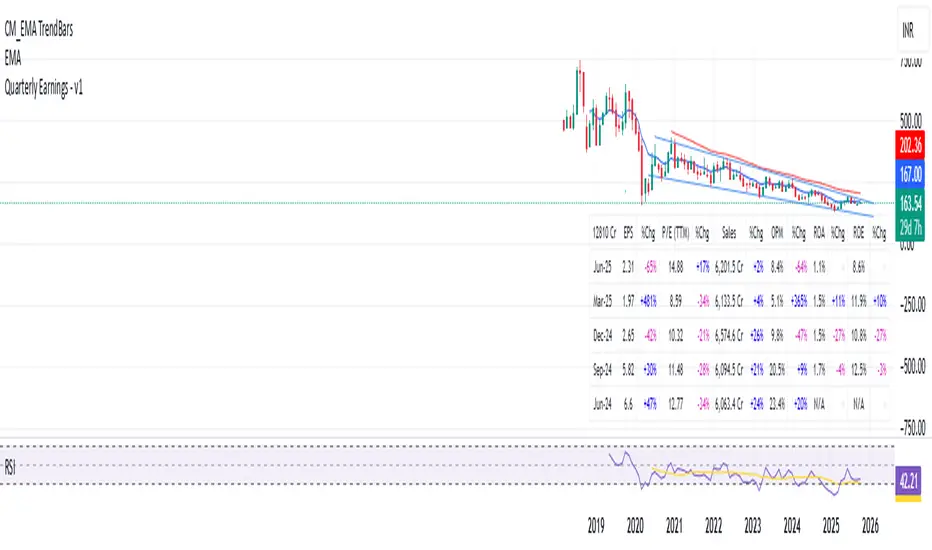
Quarterly Earnings - v1This script shows company fundamentals in a TradingView table: Earnings Per Share (EPS), Price-to-Earnings Ratio (P/E, TTM), Sales (in Crores), Operating Margin (OPM %), Return on Assets (ROA %), and Return on Equity (ROE %).
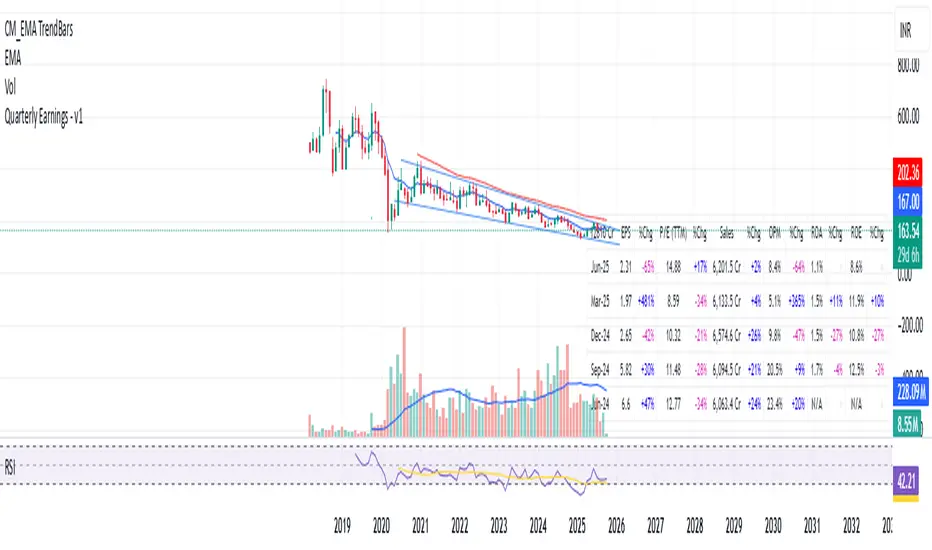
Quarterly Earnings - v1This script shows company fundamentals in a TradingView table: Earnings Per Share (EPS), Price-to-Earnings Ratio (P/E, TTM), Sales (in Crores), Operating Margin (OPM %), Return on Assets (ROA %), and Return on Equity (ROE %).
12Q PerformanceShows a table of 12 quarters with Revenue, Net Income, and Net Profit Margin. Highlights QoQ changes in green/red and places the table at bottom-right for quick performance glance.

Quarterly EarningsEarnings Per Share (EPS), Price-to-Earnings Ratio (P/E, TTM), Sales (in Crores), Operating Margin (OPM %), Return on Assets (ROA %), and Return on Equity (ROE %). Each metric includes its absolute value and quarter-over-quarter or year-over-year percentage change.

Quarterly EarningsEarnings Per Share (EPS), Price-to-Earnings Ratio (P/E, TTM), Sales (in Crores), Operating Margin (OPM %), Return on Assets (ROA %), and Return on Equity (ROE %). Each metric includes its absolute value and quarter-over-quarter or year-over-year percentage change.
