QQE v3.0 [v6] - AI-Powered Trend Signal📊 QQE Signal v3.0 - AI-Powered Quantitative Trend Detection
━━━━━━━━━━━━━━━━━━━━━━━━━━━━━━━━━━━━
■ What is QQE?
QQE (Quantitative Qualitative Estimation) is an advanced oscillator that evolves the traditional RSI. It significantly reduces false signals by applying ATR-based dynamic bands to smoothed RSI values.
【Mathematical Principle】
1. Calculate RSI (default 14 periods)
2. Smooth RSI with EMA (noise reduction)
3. Apply ATR to RSI for dynamic bands
4. Signal generated on band/RSI crossover
This methodology captures "qualitative" trend changes "quantitatively" - detecting shifts that RSI alone would miss.
━━━━━━━━━━━━━━━━━━━━━━━━━━━━━━━━━━━━
■ HMA Integration
This indicator combines QQE with HMA (Hull Moving Average) for dual confirmation.
【HMA Characteristics】
- Faster response, less lag than traditional MAs
- Formula: WMA(2×WMA(n/2) - WMA(n), √n)
- Ideal for trend direction confirmation
【Dual Confirmation Logic】
- QQE: Detects momentum turning points
- HMA: Confirms price trend direction
- Both aligned = High-confidence signal
━━━━━━━━━━━━━━━━━━━━━━━━━━━━━━━━━━━━
■ AI Score System (60-100)
Signal confidence quantified as 0-100 score, integrating multiple factors.
【Score Components】
1. Signal Base (QQE×HMA alignment bonus)
2. QQE Strength (deviation from RSI midpoint 50)
3. Volatility State (ATR ratio evaluation)
4. Volume Confirmation (anomaly detection vs average)
【Signal Levels】
┌────────────────────────────────────────┐
│ 💰 BIG CHANCE (90+) │
│ → All factors aligned at high level │
│ → Highest confidence │
├────────────────────────────────────────┤
│ ⚡ SUPER (80-89) │
│ → Major factors strongly aligned │
│ → High confidence │
├────────────────────────────────────────┤
│ 🚀 POWER (70-79) │
│ → QQE+HMA simultaneous signal │
│ → Medium-high confidence │
├────────────────────────────────────────┤
│ 💪 STRONG (60-69) │
│ → Basic signal triggered │
│ → Standard confidence │
└────────────────────────────────────────┘
━━━━━━━━━━━━━━━━━━━━━━━━━━━━━━━━━━━━
■ MTF (Multi-Timeframe) Function
Display signals from different timeframes on your current chart.
【Use Cases】
- View 5min signals on 1min chart
- Monitor higher timeframe direction while scalping
- Improve entry timing precision
【Auto-Optimization by Asset】
- USD/JPY, EUR/USD: QQE Factor 4.238
- Gold (XAU/USD): QQE Factor 8.0 (volatility adjusted)
- BTC: QQE Factor 12.0 (high volatility adjusted)
- NASDAQ: QQE Factor 4.238
━━━━━━━━━━━━━━━━━━━━━━━━━━━━━━━━━━━━
■ Trading Strategies
【Strategy 1: Trend Following】
1. Wait for 80+ score signal
2. Confirm HMA direction
3. Set stop-loss at recent high/low
4. Target 1:2+ risk-reward ratio
【Strategy 2: Range Breakout】
1. Multiple 60-70 signals occurring
2. Price approaching range boundary
3. 90+ signal confirms breakout
4. Enter in breakout direction
【Strategy 3: MTF Confirmation】
1. Identify trend on higher TF (4H/Daily)
2. Find entry on lower TF (5-15min)
3. Both timeframes aligned = highest confidence
━━━━━━━━━━━━━━━━━━━━━━━━━━━━━━━━━━━━
■ Recommended Settings
【Scalping (1-5min)】
- RSI Period: 14
- Smoothing: 5
- Min Score: 70
- MTF: 5min recommended
【Day Trading (15-60min)】
- RSI Period: 14
- Smoothing: 5
- Min Score: 60
- MTF: Same as chart
【Swing (4H-Daily)】
- RSI Period: 14
- Smoothing: 5
- Min Score: 60
- MTF: OFF (use chart timeframe)
━━━━━━━━━━━━━━━━━━━━━━━━━━━━━━━━━━━━
■ Pro Version Available
For advanced features, check "QQE×HMA Showtime v3.5" (invite-only):
- P/L Counter (real-time profit/loss tracking)
- BIG WIN visual effects
- Detailed statistics panel
- Enhanced algorithm accuracy
See my profile for details.
⚠️ DISCLAIMER
This indicator is for educational and analytical purposes. Past performance does not guarantee future results. Always use proper risk management.
━━━━━━━━━━━━━━━━━━━━━━━━━━━━━━━━━━━━
【日本語】
━━━━━━━━━━━━━━━━━━━━━━━━━━━━━━━━━━━━
■ QQEとは?(Quantitative Qualitative Estimation)
QQEは、RSI(相対力指数)を進化させた高度なオシレーターです。従来のRSIの弱点である「ダマシ」を大幅に軽減し、より信頼性の高いシグナルを生成します。
【数学的原理】
1. RSIを計算(デフォルト14期間)
2. RSIをEMAでスムージング(ノイズ除去)
3. ATR(真のレンジ)をRSIに適用し、動的バンドを生成
4. バンドとスムージングRSIのクロスでシグナル発生
この手法により、RSI単体では検出できない「質的な」トレンド変化を「量的に」捉えることが可能になります。
━━━━━━━━━━━━━━━━━━━━━━━━━━━━━━━━━━━━
■ HMA(Hull Moving Average)との統合
本インジケーターはQQEにHMAを組み合わせ、ダブル確認システムを構築しています。
【HMAの特徴】
- 従来のMAより反応が速く、ラグが少ない
- 計算式:WMA(2×WMA(n/2) - WMA(n), √n)
- トレンド方向の確認に最適
【ダブル確認の意義】
- QQE:モメンタムの転換点を検出
- HMA:価格トレンドの方向を確認
- 両者が一致 → 高確度シグナル
━━━━━━━━━━━━━━━━━━━━━━━━━━━━━━━━━━━━
■ AIスコアシステム(60-100点)
シグナルの信頼度を0-100点で数値化。複数の要素を統合評価します。
【スコア算出要素】
1. シグナル基盤(QQE×HMA一致で加点)
2. QQE強度(RSI中央値50からの乖離度)
3. ボラティリティ状態(ATR比率による評価)
4. 出来高確認(平均比での異常検出)
【シグナルレベル】
┌────────────────────────────────────────┐
│ 💰 BIG CHANCE(90点以上) │
│ → 全要素が高水準で一致 │
│ → 最高確度、大きなポジション検討可 │
├────────────────────────────────────────┤
│ ⚡ SUPER(80-89点) │
│ → 主要要素が強く一致 │
│ → 高確度、標準ポジション推奨 │
├────────────────────────────────────────┤
│ 🚀 POWER(70-79点) │
│ → QQE+HMA同時シグナル │
│ → 中高確度、慎重なエントリー │
├────────────────────────────────────────┤
│ 💪 STRONG(60-69点) │
│ → 基本シグナル発生 │
│ → 標準確度、小ポジションから │
└────────────────────────────────────────┘
━━━━━━━━━━━━━━━━━━━━━━━━━━━━━━━━━━━━
■ MTF(マルチタイムフレーム)機能
異なる時間足のシグナルを現在のチャートに表示。
【活用例】
- 1分足チャートで5分足シグナルを確認
- スキャルピング中に上位足の方向を把握
- エントリータイミングの精度向上
【銘柄別自動最適化】
- USD/JPY、EUR/USD:QQE係数 4.238
- Gold(XAU/USD):QQE係数 8.0(ボラ対応)
- BTC:QQE係数 12.0(高ボラ対応)
- NASDAQ:QQE係数 4.238
━━━━━━━━━━━━━━━━━━━━━━━━━━━━━━━━━━━━
■ 実践的トレード戦略
【戦略1:トレンドフォロー】
1. 80点以上のシグナルを待つ
2. HMAの方向を確認
3. 直近高値/安値をストップロスに設定
4. 1:2以上のリスクリワードを確保
【戦略2:レンジブレイク】
1. 60-70点シグナルが連続で発生
2. 価格がレンジ上限/下限に接近
3. 90点シグナルでブレイクを確認
4. ブレイク方向にエントリー
【戦略3:MTF確認】
1. 上位足(4H/日足)でトレンド方向確認
2. 下位足(5-15分)でエントリータイミング
3. 両時間足のシグナルが一致で高確度
━━━━━━━━━━━━━━━━━━━━━━━━━━━━━━━━━━━━
■ 推奨設定
【スキャルピング(1-5分足)】
- RSI期間:14
- スムージング:5
- 最低スコア:70
- MTF:5分固定推奨
【デイトレード(15-60分足)】
- RSI期間:14
- スムージング:5
- 最低スコア:60
- MTF:チャート足と同じ
【スイング(4H-日足)】
- RSI期間:14
- スムージング:5
- 最低スコア:60
- MTF:OFF(チャート足使用)
━━━━━━━━━━━━━━━━━━━━━━━━━━━━━━━━━━━━
■ 上位版のご案内
より高度な機能をお求めの方には「QQE×HMA Showtime v3.5」(招待専用)をご用意しています。
【追加機能】
- 損益カウンター(リアルタイム集計)
- BIG WIN演出(大勝利時の視覚効果)
- 詳細統計パネル
- 高精度アルゴリズム
詳細はプロフィールをご覧ください。
⚠️ 免責事項
本インジケーターは教育・分析目的です。過去の実績は将来の結果を保証しません。適切なリスク管理を行ってください。
━━━━━━━━━━━━━━━━━━━━━━━━━━━━━━━━━━━━
Developed by EduVest | 30 Years STEM Education × Professional FX Trading
For custom indicator development, visit my profile.
Signal

MarcoVieira - RSI-BB-SignalInstagram @marcovieira.oficial
TW @marco1981
# What is this indicator?
This is an advanced RSI (Relative Strength Index) indicator that generates buy and sell signals based on multiple combined strategies.
🎯 Main Objective
Identify entry and exit points in the market by analyzing RSI through 3 different methods and applying filters to reduce false signals.
# THREE TYPES OF SIGNALING
1. Moving Average Signal (MA Signal)
How it works: Generates a signal when RSI crosses a moving average.
• Example: BUY signal when RSI crosses above the moving average
• Example: SELL signal when RSI crosses below the moving average
• Configuration: You can choose among 10 different types of moving averages
2. Bollinger Bands Signal (BB Signal)
How it works: Generates a signal when RSI touches or crosses the Bollinger Bands.
• Example: BUY signal when RSI touches the lower band (oversold)
• Example: SELL signal when RSI touches the upper band (overbought)
Colors:
• Upper band: Red (sell area)
• Lower band: Green (buy area)
3. Divergence Signal
How it works: Detects when price and RSI are moving in opposite directions.
• Bullish Divergence: Price makes a lower low, RSI makes a higher low → BUY signal
• Bearish Divergence: Price makes a higher high, RSI makes a lower high → SELL signal
AVAILABLE FILTERS
1. RSI Filter (Overbought/Oversold Zones)
• Sell only between: 60–80 (overbought zone)
• Buy only between: 20–40 (oversold zone)
• Purpose: Avoid signals in neutral RSI areas
2. Re-entry Pause
• Example: If set to 5 bars, after a signal it waits 5 bars before generating a new one
• Purpose: Prevent multiple consecutive signals
3. "Wait Opposite"
• Generates a BUY signal only if the last signal was SELL (and vice versa)
• Purpose: Force alternation between buy and sell
4. "AND" Mode (Signal Conjunction)
• OR Mode (default): Generates a signal if ANY method triggers
• AND Mode: Generates a signal only if TWO or THREE methods agree
• Example AND: Buy only if MA + BB + Divergence all signal together
# GRAPH VISUALIZATION
On the RSI Panel:
• Purple line: RSI value
• Yellow line: RSI moving average (if enabled)
• Green/red bands: Bollinger Bands (if enabled)
• Light purple zone: Area between 20–40 (buy) and 60–80 (sell)
• Triangles: Specific signals from each method
On the Main Chart:
• Green triangles below candles: BUY signals
• Red triangles above candles: SELL signals
• Text identifies signal origin: "MA", "BB", "Div", or combinations
# OUTPUTS AND ALERTS
1. Visual Signals
• Colored triangles on the chart
• Text indicating type of signal
2. Sound/Visual Alerts
• Configurable alerts for final signals
3. Connector (Final Line)
• Value 1: Active BUY signal
• Value -1: Active SELL signal
• Value 0: No signal
• Used by other scripts to automate trades
# USAGE STRATEGIES
For Beginners:
• Use only 1 method (recommend MA or BB)
• Enable RSI filter
• Use a 5–10 bar pause
For Advanced Users:
• Use "AND" mode for stronger confirmation
• Combine MA + Divergence
• Adjust periods according to the asset
Recommended Settings:
• Stocks: RSI 14, MA 14, BB 14
• Forex: RSI 10, MA 10, BB 10
• Crypto: RSI 7, MA 7, BB 7 (more volatile markets)
# IMPORTANT LIMITATIONS
• Not a complete system: Does not include stop loss or take profit
• May generate false signals: Especially in sideways markets
• Does not consider trend: Only analyzes RSI, ignores main trend
• Requires confirmation: Recommended to use with other indicators
# PRACTICAL TIPS
Improve Accuracy:
• Use together with trend analysis
• Confirm with support/resistance
• Apply across multiple timeframes
• Backtest configurations on historical data
Risk Management:
• Never trade using this indicator alone
• Always use stop loss
• Start with small positions
• Perform backtesting before live trading

Perfect Reversal - LogicPrecision reversal indicator built specifically for Nasdaq (NQ) futures.
✅ No repaint — what you see stays
✅ No delay — real-time signals
✅ Optimized for 3min & 5min timeframes
✅ Built-in alerts for long & short entries
Detects high-probability reversal points before the move happens. Designed for day traders and scalpers who want an edge on timing.
Works on NQ futures. Clean signals. No noise.

The Physics Engine [@Ash_TheTrader]Here is the updated, ultra-detailed TradingView description. I have expanded the strategy
⚛️ Kinematic Impulse Engine: Measuring the G-Force of Price
By @Ash_TheTrader
Traditional technical analysis often relies on "lagging" indicators. Tools like the RSI or moving averages tell you where price has been . While useful, they are like driving a car looking only in the rearview mirror.
The Kinematic Impulse Engine (KIE) is a next-generation momentum tool.
It treats price action like a physical object moving through space to measure its Velocity (Speed) , Acceleration (G-Force) , and Mass (Volume) . By understanding the physics behind a move, we can determine if a trend is a powerful impulse or an exhausted drift waiting to reverse.
---
⚛️ The Core Concept: Trading with G-Force
If you step on the gas pedal in a car, you feel pushed back into your seat. That is acceleration (positive G-Force). When you slam on the brakes, you are thrown forward. That is deceleration (negative G-Force).
The market works the same way.
Standard momentum indicators only measure speed. The KIE measures how fast that speed is changing .
The Problem: Price can be moving higher (high speed), but the rate at which it is moving higher is slowing down. Standard indicators look bullish right up until the crash.
The Solution: The KIE detects that deceleration instantly, warning you that the "G-Force" pushing the price up has vanished, often before the price peaks.
---
🎨 Visual Decoder: Reading the Heatmap
We have eliminated the need to stare at complex oscillator lines. The KIE paints the candles directly based on their "Kinetic Energy."
1. Neon Cyan: The Impulse (High G-Force) 🚀
Physics State: High Velocity + Positive Acceleration.
The market has "pedal to the metal." Buyers are aggressive, and the move is speeding up.
Meaning: DO NOT SHORT. Look for entries or hold positions.
2. Deep Purple: Exhaustion (Braking) 🛑
Physics State: High Velocity + Negative Acceleration (Deceleration).
The car is still moving forward, but the driver has taken their foot off the gas.
Meaning: Take profits, tighten stops, or prepare for a reversal.
3. Dark Gray: Equilibrium (Chop) 💤
Physics State: Low Velocity.
No significant energy. The market is waiting for news or liquidity.
Meaning: Stay out. Save your fees.
---
🛡️ STRATEGY GUIDE: How to Leverage This Indicator
Here is the step-by-Step guide to using the Physics Engine for two distinct playstyles:
Strategy A: The "Rocket" Breakout (Trend Following)
Best for catching the meat of the move.
Step 1 (The Setup): Wait for price to be in a Gray (Chop) zone. This indicates potential energy is building up.
Step 2 (The Ignition): Wait for the first Neon Cyan candle to close outside of the range.
Step 3 (Validation): Look for the small Triangle Icon (Impulse Start). This confirms that G-Force has kicked in.
Step 4 (The Exit): Hold the trade as long as candles remain Cyan. The moment a candle turns Purple , the acceleration is gone. Exit or trail your stop loss tight.
Strategy B: The "Gravity" Reversal (Sniper Entry)
Best for catching tops and bottoms.
Step 1 (The Setup): Identify an extended trend where candles have been Cyan for a long time.
Step 2 (The Warning): Wait for candles to shift from Cyan to Deep Purple . This means the buyers are exhausted.
Step 3 (The Trigger): Look for the "GRAVITY" label. This is the strongest signal in the script. It means Price is making a New High, but G-Force is crashing.
Step 4 (Execution): Enter the reversal trade. Place your stop loss just above the high of the Gravity candle.
---
🧠 The Engine Room (Technical Details)
For the quants and data nerds, here is how @Ash_TheTrader designed the math:
1. Relative Velocity: Price changes are normalized against ATR (Average True Range). A $10 move in Bitcoin is not the same as a $10 move in Forex; the KIE adjusts automatically.
2. Mass Integration: Force = Mass x Acceleration. The script uses relative Volume as "Mass." A move on low volume will show weaker colors than a move on high volume.
3. The HUD: The dashboard gives you raw numbers. If G-Force is positive (Green), the trend is safe. If G-Force is negative (Red), the trend is in danger.
Trade smart. Trade with physics.
Developed by @Ash_TheTrader .

5 Layer Script P4 Potential Reversals Package This script is a context based potential reversal framework designed to highlight areas where directional risk may shift, not to predict exact tops or bottoms.
The script focuses on identifying exhaustion, failed continuation, and structural hesitation after price has completed an expansion or interacted with key higher-timeframe levels. It is intended to alert traders to possible inflection zones, where confirmation should be actively monitored.
How it works
-Detects conditions associated with loss of momentum or displacement failure
-Highlights potential reversal zones only after price interaction occurs
-Requires context and confirmation — no blind reversal signals
-No repainting once a zone or marker is confirmed
How to use it
-Use as an early warning tool, not an entry system
-Best applied after: Liquidity runs, Range extremes and Higher timeframe midpoint or boundary interaction
Look for confirmation such as:
-Market structure shifts
-Reaction at FVGs
-Signal Package confirmation
Entries should be executed on lower timeframes with risk defined but can be utilized on bigger timeframes as a swing if confirmed
Best practices
-Counter-trend setups require strong higher-timeframe confluence
-Not every highlighted zone will result in a reversal
-Works best during active sessions when liquidity is present
-Avoid using during low-volume or compressed ranges
This package is intentionally non-predictive and confirmation-dependent, designed to keep traders aligned with risk awareness rather than anticipation. However some signals can be treated as entries if "YOUVE IDENTIFIED THE RISK"- Mark Douglas

KINETIC GOLD NQ Velocity Breakout [Ash_TheTrader]🚀 Stop Guessing. Start Scalping with Physics.
Introducing the KINETIC GOLD NQ ⚡ VELOCITY BREAKOUT System
Author: Ash_TheTrader
Assets: Gold (XAUUSD), Nasdaq (US100), Bitcoin (BTC)
Style: High-Frequency Scalping (M1/M5)
---
🛑 The Problem: Why Most Indicators Fail
You’ve been there. The RSI says "Oversold," so you buy. But price keeps crashing. The Moving Average crosses over, so you enter. But the trend is already over.
Why? Because those indicators are lagging . They tell you what happened 10 candles ago.
⚡ The Solution: The "Physics" of Price
Markets move like objects in the real world. They have Velocity (Speed) and Momentum (Mass).
The Kinetic Velocity Breakout (KMB) system doesn't look at "Overbought" or "Oversold." It looks for FORCE .
It answers one simple question: Is the market moving fast enough to pay me?
---
🧠 The 4 "Smart Logic" Features
1. The Velocity Speedometer 🏎️
Most candles are "noise." This system ignores them. It uses a Normalized Volatility Engine to detect when price hits "WARP SPEED".
• Blue: Slow (Cruising). Don't touch.
• Yellow: Accelerating. Get ready.
• Red: WARP SPEED. Institutional money is entering.
2. The 1.5x Impulse Rule 💥
The algorithm strictly enforces the "1.5x Law." A signal ONLY fires if the breakout candle is 1.5 times larger than the average of the last 3 candles.
• Result? No more fakeouts. We only trade real expansions.
3. "Smart Mode" AI Dashboard 🖥️
A heads-up display (HUD) lives on your chart, auto-detecting your trading environment:
• Auto-Session: Tells you if you are in London, New York, or Asia.
• Risk Mode: Shows if you are using "Aggressive" or "Normal" logic.
• Status: Gives you a text readout like "READY ⚡" or "WAIT..."
4. Auto-Pilot Risk Management 🛡️
Scalping is fast. You don't have time to calculate Pips.
• The script draws the lines for you.
• As soon as a "ROCKET" signal appears, a Green TP Line (2x Reward) and Red SL Line appear instantly.
---
🎮 How to Trade: The 3-Step "Kinetic" Strategy
This strategy is designed for Gold (XAUUSD) and Nasdaq (US100) on the 5-Minute Timeframe .
Step 1: The "Yellow" Warning ⚠️
Watch the Smart Structure Lines (Dashed Lines).
• If the candles turn Yellow or the Dashboard says "FAST" , wake up.
• This means pressure is building against a key level.
Step 2: The "Warp" Trigger 🚀
Wait for a Confirmed Breakout . You are looking for:
1. A candle closes OUTSIDE the dashed structure line.
2. The candle color is NEON CYAN (Bullish) or NEON MAGENTA (Bearish).
3. The Signal Label appears: "ROCKET" (Buy) or "DROP" (Sell).
👉 Rule: No Label? No Trade. The 1.5x Logic saves you from bad trades.
Step 3: The Execution 💰
1. Enter at the close of the signal candle.
2. Stop Loss: Place it exactly on the Red Line provided by the indicator.
3. Take Profit: Place it on the Green Line .
4. Walk away. Let the physics work.
---
⚙️ Customizing Your Style
The script comes with two built-in "Personalities":
🛡️ Normal Scalper (Default)
• Best for: New traders, Funded Accounts.
• Logic: Waits for strong confirmation. High Win Rate.
• Risk: 1:2 Risk/Reward.
⚠️ QuickScalper (Aggressive)
• Best for: Gold M1, Volatility Hunters.
• Logic: Enters earlier on 1.2x Impulse. More signals, faster exits.
• Risk: 1:1.5 Risk/Reward (Grab the cash and go).
---
👇 Get the Code
Search for: KINETIC ⚡ in the TradingView library.
"Markets are physics. Trade the Velocity, not the noise." — Ash_TheTrader

Ghost Scalp Protocol By [@Ash_TheTrader]👻 GHOST SCALP PROTOCOL
💀 Stop Getting Trapped. Start Tracking the Banks.
Most retail traders lose because they enter exactly where institutions are exiting. They get caught in "Stop Hunts" and "Fake-Outs."
The Ghost Scalp Protocol is not just an indicator; it is a complete institutional trading system designed for M1 & M5 Scalpers . It combines Smart Money Concepts (SMC) with a Physics-Based Momentum Engine (p=mv) to detect high-probability reversals.
⚛️ THE LOGIC: 3-STAGE CONFIRMATION
This algorithm does not rely on lagging indicators. It uses a 3-step "Protocol" to validate every trade:
1. THE GHOST TRAP (Liquidity Sweeps)
The script automatically draws "Ghost Lines" at key Swing Highs/Lows where retail Stop Losses are hiding. It waits for price to sweep these levels.
The Signal: A Neon Skull (☠️) appears only if price aggressively rejects the level with high volume. This is the "Turtle Soup" pattern.
2. THE PHYSICS ENGINE (p = mv)
Momentum is not just price speed; it is Mass (Volume) x Velocity (Range) . The dashboard calculates the "Force" of every candle.
The Signal: An Arrow (⬆/⬇) appears when momentum surges 5x above the average. This confirms the banks are pushing the move.
3. BANK BIAS (Elasticity Filter)
Markets move like a rubber band. The script calculates a hidden "Fair Value" baseline to create a trading Bias. It only looks for Shorts in PREMIUM (Shorting) zones and Longs in DISCOUNT (Accumulating) zones.
📊 THE SMART DASHBOARD (HUD)
A futuristic, non-intrusive Heads-Up Display keeps you focused on the data that matters:
• 🏦 BANK BIAS: Tells you if Institutions are likely Accumulating or Shorting .
• 📈 HTF TREND: Automatically checks the 1-Hour Trend . Don't fight the tide.
• 🚀 MOMENTUM: Real-time Physics calculation. Green Text = Acceleration, Red Text = Deceleration.
• 🌍 SESSION: Shows active Bank Sessions (Tokyo, London, NY). It flashes ⚠️ OVERLAP ALERT (Gold) when London & New York are open simultaneously.
🔥 STRATEGY: HOW TO TRADE
Use this checklist to execute high-probability scalps:
📉 SHORT SETUP (SELL)
1. Liquidity: Wait for price to break above a Red Ghost Line (Sweep Highs).
2. Signal: Wait for the Pink Skull ☠️ (Trap Detected).
3. Confluence: Dashboard Bias says "SHORTING" and HTF Trend is "BEARISH."
4. Entry: On the Close of the Skull candle.
5. Stop Loss: Just above the wick swing high.
📈 LONG SETUP (BUY)
1. Liquidity: Wait for price to break below a Blue Ghost Line (Sweep Lows).
2. Signal: Wait for the Blue Skull ☠️ (Trap Detected).
3. Confluence: Dashboard Bias says "ACCUMULATING" and HTF Trend is "BULLISH."
4. Entry: On the Close of the Skull candle.
5. Stop Loss: Just below the wick swing low.
🏆 RECOMMENDED PAIRS & TIMEFRAMES
• ⚡ Best Timeframes: M1 (Sniper) and M5 (Standard Scalping).
• 💎 Best Assets: Gold (XAUUSD), Nasdaq (US100), Bitcoin (BTCUSD), and Volatile Forex Pairs (GBPUSD).
🛠️ SETTINGS & CUSTOMIZATION
• Surge Factor: Default is 5.0x for high-conviction signals. Lower to 3.0 for more frequency.
• Smart Sessions: Automatically converts to New York Time (EST) regardless of your location.
• Visuals: Designed with "Ghost Glow" technology—97% transparent backgrounds that look classy and don't clutter your chart.
"The Ghost Algo sees what you can't."
~ Ash_TheTrader

BaconAlgo🥓 BaconAlgo — Auto TP/SL Signals with Confluence Dashboard (v6)
BaconAlgo is a premium TradingView indicator built to deliver high-quality BUY and SELL signals using advanced multi-indicator confluence logic, strict filtering, automatic risk-based TP/SL levels, and a real-time dashboard.
The objective is simple: fewer signals, higher quality trades, with clean visual risk management.
Key Features
Confluence-based BUY/SELL signals using trend, momentum, volatility and volume pressure
Signal strength scoring: Good / Excellent / Perfect
Automatic Entry, TP1-TP4 and dynamic Stop-Loss
Smart stop-loss engine: Swing, ATR, Swing+ATR, Swing+ATR+Fib, AI Adaptive
Confluence dashboard showing all BUY/SELL conditions
Relative Strength vs SPY or QQQ
Timeframe-aware filters with volume adaptation
Built-in alerts for signals, TP hits and SL hits
Optional Santa Mode with festive UI and score boost
This script is Public but Invite-Only.
To request access, send me a TradingView private message with:
“TRIAL BACON”
or visit 👉 baconalgo.com
Discord: discord.gg

Next Candle PredictorAdvanced TradingView Indicator for Precise Buy and Sell Signals
Overview:
The Predicta Futures - Next Candle Predictor is a cutting-edge TradingView indicator designed to forecast the next candle's direction in futures and cryptocurrency markets. Leveraging a multi-indicator confluence strategy, this tool provides traders with actionable long and short prediction percentages, enhanced by dynamic ADX-based thresholds and visual projection candles. Ideal for scalping, day trading, or swing trading on platforms like MEXC or Binance futures, it combines Supertrend, MACD, RSI, Stochastic, ADX, and volume analysis to deliver high-probability buy and sell signals while minimizing false positives.
Key Features:
* Multi-Indicator Confluence Scoring: Integrates Supertrend for trend direction, EMAs (8, 21, 50) for alignment, MACD for momentum crossovers, RSI for overbought/oversold conditions, Stochastic for divergence detection, ADX for trend strength, and volume ratios for confirmation. A customizable confluence score (0-6) ensures signals meet user-defined criteria, reducing whipsaws in volatile markets.
* Dynamic Prediction Thresholds: ADX-driven adjustments lower the required prediction percentage (e.g., 60% in strong trends) for "PERFECT TIME" entries, adapting to market conditions like ranging or trending phases.
* Visual Analysis Table: A sleek, color-coded dashboard displays progress bars for each indicator, prediction percentages, and status (e.g., "PERFECT TIME" or "WAIT"). Supports long and short analyses with intuitive ASCII bars for quick scans.
* Projection Candles: Simulates potential next-candle outcomes with volatility-scaled (via Bollinger Bands width) green long and red short candles, aiding in visualizing price targets.
Buy/Sell Signals and Alerts: Generates labeled "BUY" and "SELL" arrows on EMA crossovers within confirmed trends, with separate alerts for basic signals and high-confluence "PERFECT TIME" opportunities.
* Customizable Inputs: Adjust ATR periods, Supertrend factors, minimum confluence scores, and volume ratios to tailor the indicator for stocks, forex, or crypto perpetual futures.
How It Works:
This TradingView script calculates long and short scores using weighted contributions from key indicators, normalizing them into prediction percentages. A confluence check—factoring trend, EMA alignment, MACD, Stochastic, volume, and ADX—triggers "PERFECT TIME" only when conditions align robustly. For example:
In a downtrend (Supertrend red), with bearish MACD and Stochastic, and sufficient volume, the indicator highlights short opportunities.
Dynamic thresholds ensure aggressive entries in strong trends (ADX >25) and conservative ones in weak trends.
Backtested for reliability, it excels in identifying reversals and continuations, making it a must-have for traders seeking an edge in futures trading strategies.
Usage Instructions:
1. Add the indicator to your TradingView chart.
2. Customize settings via the inputs panel (e.g., set minConfluence to 5 for stricter signals).
3. Monitor the analysis table for predictions and confluence scores.
4. Act on "BUY/SELL" labels or "PERFECT TIME" alerts, combining with your risk management.
5. Enable projection candles for visual forecasting of the next bar.
Compatible with all timeframes, from 1-minute scalping to daily swings. Note: This is not financial advice; always verify signals with additional analysis.
Rate and review if it boosts your trades!
Thank you!

ATR-Normalized VWMA DeviationThis indicator measures how far price deviates from the Volume-Weighted Moving Average ( VWMA ), normalized by market volatility ( ATR ). It identifies significant price reversal points by combining price structure and volatility-adjusted deviation behavior.
The core idea is to use VWMA as a dynamic trend anchor, then measure how far price travels away from it relative to recent volatility . This helps highlight when price has stretched too far and may be due for a reversal or pullback.
How it works:
VWMA deviation is calculated as the difference between price and the VWMA.
That deviation is divided by ATR (Average True Range) to normalize for current volatility.
The script tracks the highest and lowest normalized deviations over the chosen lookback period.
It also tracks price structure (highest/lowest highs/lows) over the same period.
A reversal signal is generated when a historical extreme in deviation aligns with a price structure extreme, and a confirmed reversal candle forms.
You get visual signals and color highlights where these conditions occur.
Settings explained:
Lookback period defines how many bars the script uses to find recent extremes.
ATR length controls how volatility is measured.
VWMA length controls how the volume-weighted moving average is calculated.
Signal filters help refine entries based on price vs deviation behavior.
Display options let you customize how signals and levels appear on the chart.
This indicator is especially useful for spotting potential turning points where price has moved far from VWMA relative to volatility, suggesting possible exhaustion or overextension.
Tips for use:
Combine with broader trend context (higher timeframe support/resistance).
Use with risk management rules (position sizing, stops) — signals are guides, not guaranteed entries.
Adjust lookback and ATR settings based on your trading timeframe and asset volatility.

Entry Scanner Conservative Option AKeeping it simple,
Trend,
RSI,
Stoch RSI,
MACD, checked.
Do not have entry where there is noise on selection, look for cluster of same entry signals.
If you can show enough discipline, you will be profitable.
CT

SCOTTGO Advanced MACD🌟 Custom MACD: Enhanced Visuals & Crossover Signals
This indicator is a highly customized version of the traditional Moving Average Convergence Divergence (MACD) oscillator, designed to provide clear, immediate visual confirmation of signal line crossovers and zero-line crossings.
Core Features:
MACD Crossover Shadow Fill: The area between the MACD line and the Signal line is filled with a customizable shadow. This instantly visualizes whether the MACD is above (bullish crossover) or below (bearish crossover) the Signal line.
Signal Crossover Markers (Arrows & Dots):
Crossover Dot: A small, configurable solid dot is plotted exactly at the point where the MACD and Signal lines intersect, providing pinpoint accuracy for the crossover event.
Crossover Arrows: Customizable up (green) and down (red) arrows are plotted using a small numerical offset from the crossover point, ensuring visibility without cluttering the indicator lines.
Zero-Line Crossing Markers: Distinct, small markers (circles/diamonds) are used to signal when the MACD line crosses the zero line, indicating a shift in momentum relative to the baseline.
Customizable MA Type: The user can select either Exponential Moving Average (EMA) or Simple Moving Average (SMA) for both the MACD oscillator calculation and the signal line calculation.
This indicator is ideal for traders who rely on MACD crossovers and require precise, configurable visual feedback directly on the chart.

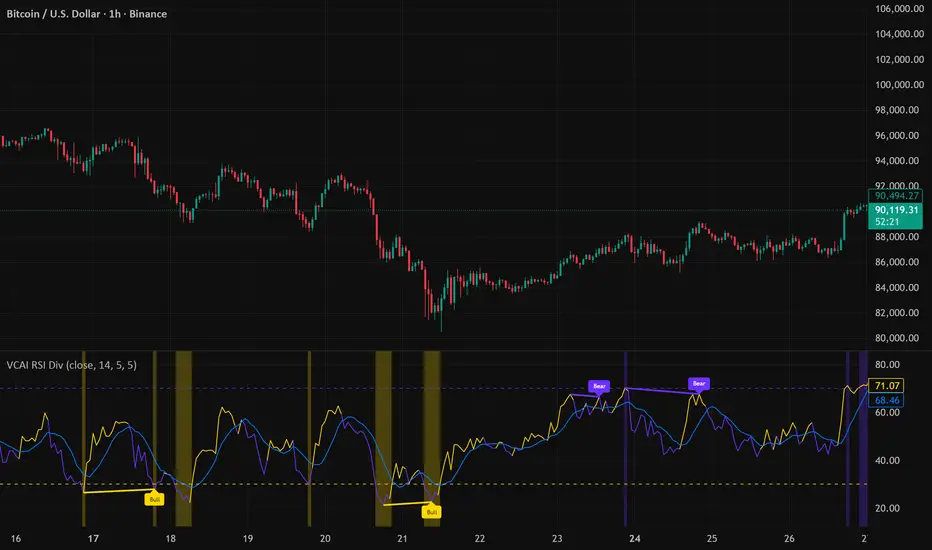
VCAI RSI Divergence +VCAI RSI Divergence+ is an RSI that shows trend, momentum, and divergence using V-CoresAI colour logic instead of a single white line.
What it shows:
Yellow RSI line → bullish momentum (RSI above its MA; buy-side pressure in control)
Purple RSI line → bearish momentum (RSI below its MA; sell-side pressure in control)
Thin blue line → fast RSI moving average that drives the colour flips
Dashed 70/30 lines → classic OB/OS zones
Background bands → soft purple in OB, soft yellow in OS to mark exhaustion areas
How to read it:
Yellow & rising → momentum shifting bullish; pullbacks into yellow OS band can be accumulation zones
Purple & falling → momentum shifting bearish; pushes into purple OB band can be distribution/sell zones
Hard colour flips (yellow ↔ purple) mark trend regime changes, not minor RSI noise
Divergence mode (on/off)
The divergence engine scans RSI and price pivot structure:
Bullish divergence (yellow) → price lower low + RSI higher low
Bearish divergence (purple) → price higher high + RSI lower high
Lines and tags appear only where a meaningful disagreement between price and RSI exists, giving early context for potential reversals or fade setups.
Together, the momentum colours + optional divergence mapping give a far clearer market read than a standard RSI, with zero clutter and no guesswork.
swing indicator Installation & Configuration - swing Indicator
⚙️ Parameter Configuration
"Settings" Group (General Parameters)
Show Moving Average: Show/hide the OI moving average
✅ Recommended: Enabled to visualize the trend
Helps identify if OI is above or below its average
MA Period: Moving average period (default: 20)
📊 Common values:
20: Short/medium term trend (responsive)
50: Medium term trend (balanced)
100: Long term trend (stable)
Compare with Volume: Display normalized volume in background
💡 Useful to compare OI evolution with volume
Helps identify divergences between Open interest (oi) and Volume
OI Significant Change Threshold: Detection threshold for significant changes
Available options: 10%, 15%, 20%, 25%, 30%, 40%
🎯 10-15%: High sensitivity (many signals, possible noise)
🎯 20-25%: Normal sensitivity (moderate signals, recommended)
🎯 30-40%: Low sensitivity (rare but very significant signals)
⚡ This threshold determines when green/red triangles appear
Manual OI Symbol (optional): Manually enter the OI symbol
📝 Leave empty for automatic detection
⚙️ Use only if your symbol is not automatically recognized
Manual example: COMEX:GC1!_OI for gold
"Visual Signals" Group
Show Triangles (Significant Changes): Show/hide triangles
▲ GREEN Triangle = Significant OI increase (> configured threshold)
▼ RED Triangle = Significant OI decrease (< -configured threshold)
✅ Recommended: Enabled to see important changes
💡 Disable if you find the chart too cluttered
Show Circles (MA Crossovers): Show/hide circles
● GREEN Circle = OI crosses MA upward
● RED Circle = OI crosses MA downward
✅ Recommended: Enabled if you use MA crossover strategy
💡 Disable if you focus only on OI variations
"Style" Group (Color Customization)
OI Color: Main Open Interest histogram color
Default: Blue
🎨 Customize according to your visual preferences
OI Rising: Histogram color when OI increases
Default: Transparent green
Subtle display of direction
OI Falling: Histogram color when OI decreases
Default: Transparent red
Subtle display of direction
MA Color: Moving average color
Default: Orange
Should contrast with OI color
Volume Color: Normalized volume background color
Default: Transparent gray
Discreet enough not to hinder reading
📊 Reading the Information Panel
The panel at the top right of the chart displays:
By: Alphaomega18
Indicator creator's signature
⚠️ WARNING: OI symbol not detected
Only appears if OI symbol is not automatically detected
Action: Check symbol or enter manually
Open Interest
Current Open Interest value
Format: number of contracts (e.g., 485.2K = 485,200 contracts)
Change
OI % change from previous bar
🟢 Green = OI increase
🔴 Red = OI decrease
Ex: +2.45% = OI increased by 2.45%
Threshold
Displays configured threshold for alerts
Ex: "25%" = alerts triggered at +25% or -25%
Yellow color for visibility
MA(20)
Current moving average value
Number in parentheses indicates period
Ex: MA(50) if you configured a 50 period
Signal
🟢 Strong Trend: OI > MA → Strong participation, solid trend
🔴 Weak Trend: OI < MA → Weak participation, fragile trend
🎯 Visual Signals on Chart
Triangles (Significant Changes)
▲ GREEN Triangle (bottom of chart)
Meaning: Significant OI increase
Trigger: OI increases more than configured threshold
Example: If threshold = 25%, triangle appears when OI +25% or more
📈 Interpretation: New contracts opened = growing interest
▼ RED Triangle (bottom of chart)
Meaning: Significant OI decrease
Trigger: OI decreases more than configured threshold
Example: If threshold = 25%, triangle appears when OI -25% or less
📉 Interpretation: Massive position closing = disengagement
Circles (Moving Average Crossovers)
🟢 GREEN Circle (bottom of chart)
Meaning: OI just crossed MA upward
Signal: Open interest back above its average
📊 Interpretation: Interest returning, potential trend start
🔴 RED Circle (top of chart)
Meaning: OI just crossed MA downward
Signal: Open interest back below its average
📊 Interpretation: Decreasing interest, potential weakening
🔔 Alert Configuration
Create an alert:
Right-click on chart → "Add Alert" (or ALT + A)
In "Condition", select "Open Interest"
Choose alert type from 4 available
Configure notification options
Click "Create"
Available alert types:
OI Significant Increase
Triggers when OI increases beyond configured threshold
Example: Threshold 25% → Alert if OI +25% or more
Use: Detect massive influx of new contracts
OI Significant Decrease
Triggers when OI decreases beyond configured threshold
Example: Threshold 25% → Alert if OI -25% or less
Use: Detect massive position closing
OI crosses MA up
Triggers when OI crosses its moving average upward
Condition: OI was below MA and crosses above
Use: Identify interest returning
OI crosses MA down
Triggers when OI crosses its moving average downward
Condition: OI was above MA and crosses below
Use: Identify decreasing interest
Notification configuration:
✉️ Email: Receive alert via email
📱 SMS: Receive alert via SMS (subscription required)
🔔 Popup: Notification on TradingView
📲 App: Notification on TradingView mobile app
🔗 Webhook: Send alert to external system
💡 Advanced Interpretation
Combined OI + Price Analysis:
Open InterestPriceInterpretationSuggested Action↑ Rising↑ Rising🟢 STRONG UptrendNew buyers entering, robust trend, consider long positions↑ Rising↓ Falling🔴 STRONG DowntrendNew sellers entering, bearish pressure, consider short positions↓ Falling↑ Rising📊 Short coveringClosing short positions, potentially temporary move↓ Falling↓ Falling📊 Long liquidationClosing long positions, potentially temporary move
OI vs Moving Average:
OI > MA (Signal: Strong Trend)
Open interest above its average
Market participation above normal
Trend supported by growing interest
✅ Increased confidence in market direction
OI < MA (Signal: Weak Trend)
Open interest below its average
Market participation below normal
Potentially fragile trend
⚠️ Caution: trend lacks conviction
OI vs Volume:
Rising OI + Rising Volume
New contracts + high trading activity
💪 Very strong trend signal
Falling OI + Rising Volume
Position closing + high activity
⚡ Potential reversal or massive profit-taking
Stable OI + Rising Volume
Transfer of positions between traders
🔄 Changing hands, no new commitments
🛠️ Troubleshooting
❌ Issue: "⚠️ WARNING - OI symbol not detected"
✅ Solutions:
Check contract symbol
Make sure you're on a continuous futures contract (e.g., GC1!, CL1!)
Not on a specific contract (e.g., GCZ2024)
Enter symbol manually
Go to Settings → Manual OI Symbol
Format: EXCHANGE:SYMBOL_OI
Examples:
Gold: COMEX:GC1!_OI
WTI Crude: NYMEX:CL1!_OI
Natural Gas: NYMEX:NG1!_OI
Check data availability
Not all markets have public OI data
Verify on TradingView if OI data exists
❌ Issue: No data displayed (empty chart)
✅ Solutions:
Change timeframe
OI is generally published daily
Switch to Daily (1D) or Weekly (1W)
Intraday timeframes may not have data
Check data connection
Refresh TradingView page
Check your TradingView subscription (some data requires subscription)
Test on another market
Try with gold (COMEX:GC1!) which always has OI data
If it works, problem comes from initial market
❌ Issue: Too many visual signals (cluttered chart)
✅ Solutions:
Increase detection threshold
Settings → OI Significant Change Threshold
Change from 20% to 30% or 40%
Fewer signals, but more significant
Disable some signals
Visual Signals → Uncheck "Show Triangles" or "Show Circles"
Keep only the most important signals for you
Adjust colors
Style → Reduce color opacity
Make signals more discreet visually
❌ Issue: Not enough signals
✅ Solutions:
Reduce detection threshold
Settings → OI Significant Change Threshold
Change to 10% or 15%
More signals, but beware of noise
Enable all signals
Visual Signals → Check "Show Triangles" AND "Show Circles"
Full display of all events
Reduce MA period
Settings → MA Period → Change from 20 to 10
More responsive MA = more crossovers
📈 Compatible Markets (Auto-detection)
✅ Energy (NYMEX)
CL, CL1!: WTI Crude Oil
BZ, BZ1!: Brent Crude
NG, NG1!: Natural Gas
RB, RB1!: RBOB Gasoline
HO, HO1!: Heating Oil
✅ Precious Metals (COMEX/NYMEX)
GC, GC1!: Gold
SI, SI1!: Silver
PL, PL1!: Platinum
PA, PA1!: Palladium
HG, HG1!: Copper
✅ Industrial Metals (LME)
ALI, ALI1!: Aluminum
ZNC, ZNC1!: Zinc
NI, NI1!: Nickel
✅ Agriculture - Grains (CBOT)
ZC, ZC1!: Corn
ZW, ZW1!: Wheat
ZS, ZS1!: Soybeans
ZM, ZM1!: Soybean Meal
ZL, ZL1!: Soybean Oil
ZO, ZO1!: Oats
ZR, ZR1!: Rice
✅ Agriculture - Softs (ICE)
SB, SB1!: Sugar
KC, KC1!: Coffee
CC, CC1!: Cocoa
CT, CT1!: Cotton
OJ, OJ1!: Orange Juice
✅ Livestock (CME)
LE, LE1!: Live Cattle
GF, GF1!: Feeder Cattle
HE, HE1!: Lean Hogs
✅ Other
LBS, LBS1!: Lumber (CME)
🎓 Usage Tips
For beginners:
Start with default parameters (threshold 25%, MA 20)
Enable all visual signals
Focus on liquid markets (gold, crude oil)
Observe how OI reacts to price movements
For intermediate traders:
Adjust threshold according to market volatility (15-30%)
Combine with other technical indicators
Create alerts for significant changes
Analyze OI/Price divergences
For advanced traders:
Use multiple MA periods (20, 50, 100)
Analyze OI/Volume/Price correlation
Configure alerts on multiple timeframes
Integrate into complete trading strategy
📊 Practical Example
Scenario: Gold Trading (COMEX:GC1!)
Initial setup:
Threshold: 20% (gold volatile)
MA: 20 days
All signals enabled
Timeframe: Daily (1D)
Observation:
Gold price: Uptrend
OI: ▲ Green triangle (increase of +22%)
Signal: 🟢 Strong Trend (OI > MA)
Interpretation:
New buyers massively entering
Uptrend supported by OI
Strong market conviction
Action:
✅ Long position validated by OI
Stop loss below technical support
Monitor if OI continues to increase
✨ Made by Alphaomega18

Swing Trading IndicatorThis script is a swing‑trading dashboard designed for BTC, ETH, S&P 500 (for now). It combines weekly RSI, USDT.D, VIX, moving averages and Fisher Transform into a single visual tool, with background highlights, an on‑chart info table and ready‑made alerts to help you time high‑probability swing entries and manage risk.
1. Overview
The indicator is intended to work on daily timeframe.
Signals are context‑aware: BTC and ETH get USDT.D conditions, SPX gets VIX and EMA‑100 logic, and all non‑ETH symbols can also use Fisher Transform as a mean‑reversion filter.
2. Conditions and background highlights
Each component sets a boolean condition and, when active, paints a background layer:
Weekly RSI condition
True when weekly RSI is below its symbol‑specific threshold.
USDT.D conditions
BTC: triggered when USDT.D is above the user threshold and the chart symbol is BTC.
ETH: same logic for ETH, but tracked separately..
VIX condition (SPX only)
True when VIX high is at or above the VIX threshold while the chart is SPX.
EMA condition (BTC & SPX)
BTC: daily close below EMA‑200.
SPX: daily close below EMA‑100.
Fisher Transform condition (non‑ETH)
Fisher Transform on the chart timeframe, using the configured period.
True when Fisher value is below the Fisher threshold.
3. Intended use and notes
This indicator is designed as a confluence tool for swing traders, not a standalone buy/sell system. It works best on assets that are in a clear uptrend, where the main idea is to accumulate during corrections within that broader bullish structure.
During larger market shocks, deep corrections, or black‑swan events, trend‑based and mean‑reversion filters can produce false signals, because volatility and correlations often behave abnormally in those periods. For that reason, this script should always be combined with independent risk management, higher‑timeframe trend analysis, and your own discretion.

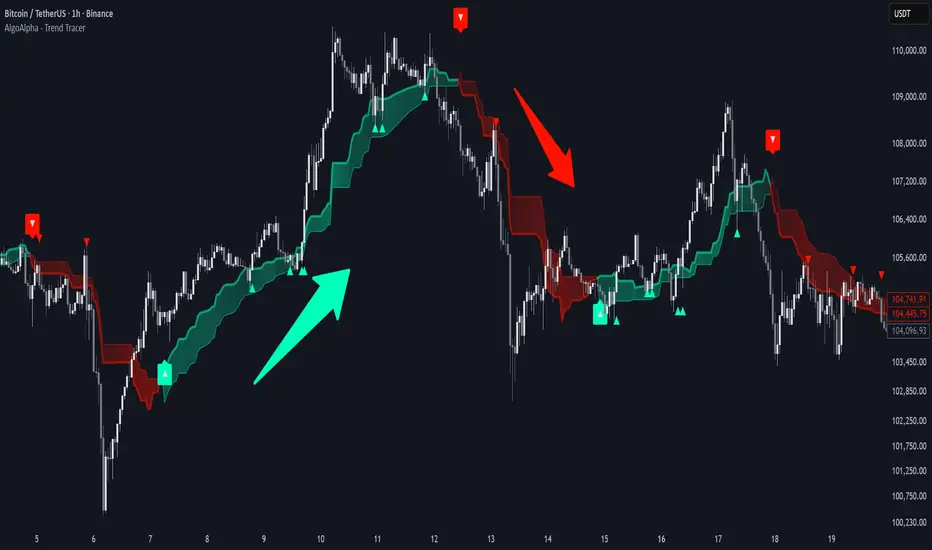
Trend Tracer [AlgoAlpha]🟠 OVERVIEW
This tool builds a two-stage trend model that reacts to structure shifts while also showing how strong or weak the move is. It uses a mid-price band (from the highest high and lowest low over a lookback) and applies two Supertrend passes on top of it. The first pass smoothens the basis. The second pass refines that direction and produces the final trail used for signals. A gradient fill between the two trails uses RSI of price-to-trail distance to show when price is stretched or cooling off. The aim is to give traders a simple way to read trend alignment, pressure, and early turns without guessing.
🟠 CONCEPTS
The script starts with a mid-range basis. This is the average of the rolling highest high and lowest low. It acts as a stable structure reference instead of raw close or typical price. From there, two Supertrend layers are applied:
• The first Supertrend uses a shorter ATR period and lower factor. It reacts faster and sets the main regime.
• The second Supertrend uses a slightly longer ATR and higher factor. It filters noise, waits for confirmed continuation, and generates the signal line.
The interaction between these trails matters. The outer Supertrend provides context by defining the broader regime. The inner Supertrend provides timing by flipping earlier and marking possible shifts. The gradient fill uses RSI of (close − supertrend value) to display when price stretches away from the trail. This shows strength, exhaustion, or compression within the trend.
🟠 FEATURES
Bullish and bearish flip markers placed at recent highs/lows
Rejection signals off the trend tracer line
Alerts for bullish and bearish trend changes
🟠 USAGE
Setup : Add the script to your chart. Timeframe is flexible; lower timeframes show more flips while higher ones give cleaner swings. Adjust Length to change how wide the basis range is. Use the two ATR settings and factors to match the volatility of the market you trade.
Read the chart : When the refined trail (stv_) sits above price the regime is bearish; when below, it is bullish. The wide trail (stv) confirms the larger move. Watch the gradient fill: darker colors appear when price is stretched from the trail and lighter colors appear when the move is weakening. Flip markers ▲ or ▼ highlight the first clean shift of the refined trail.
Settings that matter : Increasing the Main Factor slows main-trend flips and filters chop. Increasing the Signal Factor delays the timing trail but reduces noise. Shortening Length makes the basis more reactive. ATR periods change how sensitive each Supertrend pass is to volatility.
wedge hunter (Buy - Sell) signalsthis indicator can work on different options like forex and stock markets(shares).
this indicator watching charts for highs and lows and search for squeeze and pıvots for finding entrıes. i try to help to community for understand the formations and easly find an entry point. with rsi confirmation you find the best entry locations

B/S SHIVAJI (v5) ONLY FOR PAPER TRADE
// इस Buy/Sell इंडिकेटर के उपयोगकर्ताओं के लिए एक दोस्ताना संदेश
var bool shownMessage = false
if not shownMessage
label.new(bar_index, high,
text="स्वागत है! इस Buy/Sell इंडिकेटर का उपयोग करने के लिए धन्यवाद। हमें उम्मीद है कि यह आपके ट्रेडिंग सफ़र में आपकी मदद करेगा। नई सलाहों और अपडेट्स के लिए वापस आते रहें!",
style=label.style_none, color=color.blue, textcolor=color.white, size=size.normal)
shownMessage := true


Gravestone Doji ScannerSpeaks for itself. Set it on the chart. Use Arrow Keys to move through the watchlist.

Support Line [by rukich]🟠 OVERVIEW
The indicator displays a floating line that acts as a support level. It's important to remember that any support level can be broken.
🟠 COMPONENTS
The indicator is based on the percentage difference between the closes of the n-th bar back and the current bar. The resulting percentage is smoothed to remove noise.
The indicator is displayed as a green-red line (the colors don’t carry meaning — they are used just for visual variety). When the price touches the support level, the bar background turns green.
For convenience, there is a label on the right side of the indicator showing the current value of the line.
🟠 HOW TO USE
The indicator includes several settings that can be adjusted, though optimal defaults are provided.
Settings:
Timeframe — specifies which timeframe’s data is used to calculate the line.
Candles back — specifies how many bars back from the current one are used.
The indicator should be used according to general support-zone logic. Since no support zone guarantees a price bounce, the optimal approach is to confirm the reaction after the price touches the line.
Example of use:
In the current example, the Timeframe in the indicator settings is set to 1 hour, and the currently open chart is 5 minutes. This means that on the 5-minute chart we see a 1-hour line. After the price touches the support line, you need to see a confirmation of the reaction to understand whether the support zone is holding the price.
In the examples, reaction confirmation is shown through: the formation of an M5 shift and the invalidation of an FVG M5- (the latter is more risky than the M5 shift):
🟠 CONCLUSION
The indicator shows a floating support zone, and when tested, you should confirm the reaction on a lower timeframe.

Maximus imbalance
Maximus imbalance – Indicator Description
Maximus Precision Arrows is an advanced directional signal tool designed for high-accuracy intraday trading.
It detects early BUY and SELL shifts by combining:
• Delta Imbalance Analysis
• Volume-Normalized Pressure (Buy vs Sell Power)
• Trend Confirmation (MA20 / MA50)
• Signal Strength Ratio Filtering
• Smart Gap Control to avoid over-signaling
How it works
The indicator measures real-time buying and selling pressure (Delta), normalizes it by volume, and filters it through trend direction and strength-ratio logic.
Signals only appear when there is:
• A strong directional imbalance
• Confirmed trend alignment
• Valid momentum breakout
• Enough distance from the previous signal (noise reduction)
What the arrows mean
• Green Triangle (BUY):
Strong positive delta shift + bullish imbalance + price aligned with trend.
• Red Triangle (SELL):
Strong negative delta shift + bearish imbalance + price aligned with downtrend.
Best use
• Intraday scalping (1m–15m)
• Options trading (SPX, QQQ, NVDA, AAPL, futures)
• Identifying early reversals & continuation spots
• Filtering noise during consolidation
Important notes
• Signals are filtered to avoid choppy conditions.
• Works on any market, including equities, indices, futures, and CFDs.
• Not a repainting indicator.

DPPSI A+ FINDPPSI is a precision-driven ORB-based confirmation indicator built from the DPPS Framework (Databased Probable Profitable System) — a rule-based trading process backed by real data, real backtests, and real forward results.
DPPSI helps traders identify A-grade breakouts using three core pillars:
Opening Range Logic (ORB)
Automatically detects your morning OR window and plots OR High, Low, and EQ.
Volume Confirmation
Filters breakouts using relative volume strength (customizable).
Smart Retest Logic
Signals only when price breaks the OR and pulls back with clean retest structure.
Optional filters include Fair Value Gaps, signal limits per session, and adjustable sensitivity.
Designed for traders who want clean, rule-based setups without clutter or random noise.
DPPSI doesn’t replace your strategy it confirms the highest-probability moments inside it.
