ALMA v1 ATR Bands With Trend BarsALMA v1 ATR Bands With Trend Bars is a trend-context overlay indicator designed to visualize price structure, momentum direction, and volatility expansion directly on the chart.
It combines the Arnaud Legoux Moving Average (ALMA) with ATR-based dynamic bands and a dual-momentum bar-coloring model, providing a clear visual framework for interpreting trend conditions without compressing market behavior into a single decision output.
Conceptual Architecture
The indicator is built around three complementary layers, each serving a distinct analytical role:
1. ALMA Trend Curve
The core trend line is computed using the Arnaud Legoux Moving Average, which emphasizes responsiveness while maintaining smoothness through controlled offset and sigma parameters.
An optional adaptive filter suppresses minor fluctuations, allowing the curve to focus on structural price movement rather than short-term noise.
Color changes in the ALMA line reflect directional slope state, not trading actions.
2. ATR Volatility Bands
ATR-based bands are calculated around the filtered ALMA curve:
The bands expand and contract dynamically with volatility.
They provide a contextual envelope that helps visualize price dispersion relative to the underlying trend.
These bands are intended as a volatility reference, not fixed support or resistance levels.
3. Trend Bars (Momentum State Layer)
Price candles are recolored using a dual-CCI momentum model:
A fast and a slow CCI operate together to classify momentum agreement.
When both momentum measures align, bars reflect directional bias.
When momentum disagrees, bars shift to a neutral state.
This layer highlights momentum consistency, not execution timing.
Trend State Visualization:
Discrete visual markers may appear when the slope direction of the ALMA curve changes.
These markers indicate structural trend transitions based on confirmed bar closes and do not repaint.
They are intended to support visual interpretation of trend evolution, not to automate decisions.
Reliability:
No repainting: all states, colors, and markers are confirmed on bar close.
Consistent behavior across instruments and timeframes.
Designed for stable visual output during live market conditions.
Customization Options:
ALMA length, offset, sigma, and optional shift.
Adaptive filtering sensitivity.
ATR period and deviation multiplier.
Momentum sensitivity modes for bar coloring.
Fully customizable color palette.
Optional alerts for structural trend changes.
Candles


Volume Anomaly CandlesVolume Anomaly Candles — Hampel + RVOL (V-Anom)
This indicator colors candles in real time to highlight meaningful volume participation while filtering noise.
It combines two complementary engines:
• Hampel (robust anomaly detection): detects statistically rare volume spikes using median + MAD (robust σ).
• RVOL (Relative Volume tiers): measures volume relative to its baseline (volume / SMA(volume) and maps it into 3 intensity levels.
The goal is simple: make candles “stand out” only when volume is genuinely significant.
────────────────────────────────────────
Candle coloring logic
────────────────────────────────────────
A) Hampel Engine (Robust Volume Anomalies)
The Hampel engine computes a robust z-score on volume (hScore):
Typical volume = median(volume) over a rolling window
Deviation = |volume - median|
Robust dispersion = MAD → σ (sigma = 1.4826 * MAD)
hScore = (volume - median) / sigma
If volume is abnormally high, candles are colored as:
• Moderate anomaly
• Extreme anomaly
Important:
Hampel fires only on positive anomalies (hScore > 0), meaning volume is above the robust median.
This is intentional: it focuses on participation spikes (where activity matters most).
B) RVOL Engine (Relative Volume Levels)
RVOL is computed as:
RVOL = volume / SMA(volume, Baseline length)
Candles are colored by tier:
• Level 1: above-baseline participation
• Level 2: strong participation
• Level 3: exceptional participation
Bull/Bear colors are selected from candle direction (close ≥ open = bullish).
────────────────────────────────────────
Hampel vs RVOL priority
────────────────────────────────────────
Controlled by:
“Hampel overrides RVOL”
• ON (recommended):
If Hampel fires, Hampel colors the candle
Otherwise RVOL colors it
→ rare + significant gets priority
• OFF:
If RVOL fires, RVOL colors the candle
Otherwise Hampel colors it
→ more frequent coloring, more “active” tape
────────────────────────────────────────
Parameters and how they impact candles
────────────────────────────────────────
A) Adaptive Hampel thresholds (percentiles)
When enabled, thresholds adapt to market conditions by learning what is “rare” in recent score history.
• Adaptation window (hALen)
Higher: steadier thresholds, fewer Hampel candles, slower adaptation
Lower: faster adaptation, more Hampel candles, more sensitivity
• Moderate / Extreme percentile
Higher: more selective, fewer signals
Lower: more permissive, more signals
• Min σ floors
Higher: prevents overly permissive thresholds in quiet markets (fewer signals)
Lower: allows more signals in low-activity regimes
• Threshold smoothing (EMA)
Higher: smoother regime transitions
Lower: quicker threshold changes
B) Hampel window + static thresholds
• Window length (hLen)
Higher: more stable, macro anomaly detection
Lower: more reactive, may pick up micro-noise on very short TFs
• Moderate / Extreme σ thresholds
Higher: fewer Hampel candles, only premium spikes
Lower: more Hampel candles, denser highlighting
C) RVOL baseline + tiers
• Baseline length (rLen)
Higher: smoother RVOL, fewer tier switches
Lower: more reactive RVOL, more tier switches
• Tier thresholds (rThr1 / rThr2 / rThr3)
Higher: fewer RVOL candles (only big participation)
Lower: more RVOL candles (more active visualization)
Recommended spacing (default):
1.4 / 1.9 / 2.6
This keeps Level 1 meaningful, makes Level 2 clearly stronger than Level 1, and preserves Level 3 as rare.
D) Don’t color doji
Prevents coloring on neutral candles to reduce “false attention” bars.
────────────────────────────────────────
Practical use
────────────────────────────────────────
Use this tool as a participation overlay, not as a direction predictor:
• Breakout confirmation: stronger when the breakout candle is colored (RVOL L2/L3 or Hampel).
• Key level reactions: watch colored candles at VWAP, Kijun, FVG, range highs/lows.
• Volume events: extreme anomalies often mark important decision points.
Notes:
• Settings are in bars, not time. The same window behaves differently on M1 vs M15.
• The indicator highlights participation, not direction. Combine with structure and bias.
Disclaimer / Risk Warning
Trading involves substantial risk and is not suitable for everyone. Markets can move rapidly and unpredictably. You can lose part or all of your capital, and in leveraged products (futures, CFDs, margin, crypto derivatives), losses may exceed your initial deposit. Past performance is not indicative of future results.
This indicator is NOT financial advice.
Volume Anomaly Candles is a visual analysis tool designed to highlight relative and statistically unusual volume activity. It does not generate guaranteed buy/sell signals, does not predict direction, and should not be used as a standalone decision system.
Always confirm signals with your own analysis (market structure, key levels, risk management) and use appropriate position sizing, stop-losses, and risk controls. You are solely responsible for any trades you take based on this tool.
If you are unsure about the risks, seek independent financial advice from a licensed professional in your jurisdiction.
Made pinescript V6 by Onyx

All-in-one trend clarityTrendLens is a multi-layer, all-in-one overlay indicator designed to visually detect and filter market direction — not a buy/sell strategy.
It highlights early trend shifts based on candle behavior, then supports that view using Pivot High/Low structure, three customizable EMAs, and a visible daily session window to focus on active market hours.
What’s included (All inside one indicator)
Structural Trend Candles
If price closes above the highest high of the previous N bars → candle turns white (bullish structural breakout).
If price closes below the lowest low of the previous N bars → candle turns black (bearish structural breakdown).
Pivot High / Pivot Low Markers
Detects swing highs/lows using adjustable left/right bars (default 7) and plots small gray triangle markers on the chart.
Active Session Window
Highlights a fixed daily time window (default 06:00–18:00 UTC) with a transparent green background to visually mark the active trading session.
3 Customizable EMAs
EMA Fast (default 10)
EMA Mid (default 20)
EMA Long (default 100)
Each EMA supports custom length, source, color, and thickness.
How to use it
Use white/black candles as a quick trend filter and early structure shift cue.
Use EMA100 as the main trend bias reference; use EMA10/EMA20 positioning to gauge momentum.
Use Pivot High/Low to spot structure levels for potential support/resistance and risk management.
Enable the session highlight to focus analysis on high-activity hours.
Disclaimer
This indicator is a technical analysis helper, not a trading strategy.
It does not provide buy/sell recommendations. You are responsible for your own trade decisions and risk management.

Renko Reversal + Nifty Filter (Final Checked)This indicator is a trend-filtered Renko reversal system designed to capture high-probability reversal entries near key support and resistance zones, while avoiding trades against the higher-timeframe NIFTY trend.
It combines four powerful components:
Dual Renko trend confirmation
Wick-based Support & Resistance zones
Higher Timeframe (15-minute) NIFTY trend filter
Strict multi-condition validation to reduce false signals

Scalp Signal v1.0 [Scalping-Algo]═══════════════════════════════════════════════════════════════
MTF SCALP HELPER - TRADINGVIEW DESCRIPTION ═══════════════════════════════════════════════════════════════
SHORT DESCRIPTION:
-----------------------------------
Multi-timeframe confluence overlay combining directional bias scoring, volume anomaly detection, and automatic zone mapping.
FULL DESCRIPTION:
-----------------
𝗛𝗼𝘄 𝗧𝗵𝗲 𝗖𝗼𝗺𝗽𝗼𝗻𝗲𝗻𝘁𝘀 𝗪𝗼𝗿𝗸 𝗧𝗼𝗴𝗲𝘁𝗵𝗲𝗿
This is not simply indicators placed side-by-side. Each component feeds into a scoring system:
𝟭. 𝗗𝗶𝗿𝗲𝗰𝘁𝗶𝗼𝗻𝗮𝗹 𝗕𝗶𝗮𝘀 𝗘𝗻𝗴𝗶𝗻𝗲
Nine factors are evaluated on each bar: EMA ribbon alignment (8/13/21/34), dual Supertrend readings, VWAP position, Hull MA direction, RSI zone, MACD histogram slope, Stochastic RSI crossover state, ADX/DMI readings, and higher timeframe EMA structure.
Each factor that confirms the direction adds +1 to a bias score. When the score crosses a user-adjustable threshold AND the higher timeframe confirms, candles are colored to reflect the bias. This creates a visual filter - you can quickly scan and see which periods had strong directional agreement vs mixed signals.
𝟮. 𝗖𝗼𝗻𝗳𝗹𝘂𝗲𝗻𝗰𝗲 𝗦𝗰𝗼𝗿𝗶𝗻𝗴 𝗳𝗼𝗿 𝗘𝗻𝘁𝗿𝘆 𝗦𝗶𝗴𝗻𝗮𝗹𝘀
The main signals use weighted scoring across 13 factors. Not all factors are equal - for example, an RSI extreme reading adds +2 while simple VWAP position adds +0.5. This weighting reflects that some conditions are more significant than others.
Signals only appear when:
- Confluence score meets minimum threshold (adjustable: 8-11)
- Volatility is within acceptable range (ATR-based filter)
- Minimum bars have passed since last signal (prevents clustering)
- Optional: Session time filter and strict trend alignment
The score is displayed on each signal label so you can see exactly how strong the confluence was.
𝟯. 𝗩𝗖𝗥𝗘 (𝗩𝗼𝗹𝘂𝗺𝗲 𝗖𝗹𝗶𝗺𝗮𝘅 𝗥𝗲𝘃𝗲𝗿𝘀𝗮𝗹 𝗘𝗻𝗴𝗶𝗻𝗲)
This component identifies potential exhaustion points using a specific pattern:
- Price breaks below/above the lows/highs of the previous N bars (lookback adjustable)
- This breakout bar has volume exceeding 2x the 20-period average
- Within the next few bars, price reverses back through the breakout bar's range
- Confirmation volume is checked on the reversal bar
The star rating (3-5) reflects how many confirmation factors were present. This is a mechanical pattern recognition system, not a prediction.
𝟰. 𝗩𝗩𝗥𝗦 (𝗩𝗼𝗹𝘂𝗺𝗲 𝗩𝗼𝗹𝗮𝘁𝗶𝗹𝗶𝘁𝘆 𝗥𝗲𝘃𝗲𝗿𝘀𝗮𝗹 𝗦𝘆𝘀𝘁𝗲𝗺)
Uses statistical analysis (z-scores) to identify when buying or selling volume deviates significantly from the historical mean. When volume anomalies appear in one direction but a Supertrend-style indicator flips the other way within a confirmation window, it flags this divergence.
Z-score threshold is adjustable - higher values mean fewer but more statistically significant anomalies are flagged.
𝟱. 𝗔𝘂𝘁𝗼𝗺𝗮𝘁𝗶𝗰 𝗭𝗼𝗻𝗲 𝗠𝗮𝗽𝗽𝗶𝗻𝗴
Supply and demand zones are drawn when specific criteria are met:
- A candle with above-average volume and range
- Followed by N consecutive candles moving away from that area
- Zone strength (1-5) is calculated from: engulfing pattern presence, volume confirmation, ATR-relative size, and subsequent price movement
Zones extend forward and can serve as reference levels. They are not predictive - they simply mark areas where notable activity occurred.
𝟲. 𝗠𝘂𝗹𝘁𝗶-𝗧𝗶𝗺𝗲𝗳𝗿𝗮𝗺𝗲 𝗗𝗮𝘀𝗵𝗯𝗼𝗮𝗿𝗱
The panel calculates momentum, sentiment, and volatility scores across 5 timeframes using request.security() calls. These are normalized to 0-100 scales for easy comparison.
- Momentum: Weighted combination of RSI, ROC, MOM, and MACD histogram
- Sentiment: EMA stack positioning, volume-weighted price change, swing structure
- Volatility: ATR, Bollinger width, true range, and standard deviation ratios
The dashboard provides context - you can see if lower and higher timeframes are aligned or diverging.
𝟳. 𝗘𝗠𝗔 𝟮𝟬𝟬 (𝗦𝗹𝗼𝘄 𝗧𝗿𝗲𝗻𝗱 𝗥𝗲𝗳𝗲𝗿𝗲𝗻𝗰𝗲)
The 200-period EMA is plotted as a separate line for longer-term trend context.
How it integrates with other components:
- Used in confluence scoring: price position relative to EMA 200 adds to buy/sell scores (+1 for perfect alignment, +0.5 for partial)
- The "perfect stack" condition (fast EMA > medium EMA > EMA 200 with price above all) is weighted heavily in signal generation
- VCRE system references EMA 200 for its star rating - reversals occurring on the "right side" of the 200 receive higher strength scores
- Provides macro context that the shorter-term components don't capture
The combination of cloud (short-term structure) and EMA 200 (long-term structure) allows you to see both immediate trend state and broader positioning in one view.
8. 𝗘𝗠𝗔 𝗖𝗹𝗼𝘂𝗱 𝗦𝘆𝘀𝘁𝗲𝗺
The cloud is formed between a fast EMA (default 13) and medium EMA (default 48). Rather than just plotting two lines, the space between them is filled to create a visual "zone."
How it functions in this script:
- Cloud color changes based on EMA relationship (fast above slow = bullish color, fast below slow = bearish color)
- The cloud width itself provides information - wider cloud often indicates stronger trend momentum, narrow cloud suggests potential consolidation or transition
- Price position relative to cloud gives quick visual context: trading above a bullish cloud vs below it vs inside it
- The cloud edges often act as dynamic reference points where price may react
This is integrated with the bias system - EMA alignment is one of the 9 factors in the directional bias calculation. When the cloud is bullish AND price is above it, that contributes positively to the bias score.
𝗪𝗵𝗮𝘁 𝗠𝗮𝗸𝗲𝘀 𝗧𝗵𝗶𝘀 𝗗𝗶𝗳𝗳𝗲𝗿𝗲𝗻𝘁
The integration layer is the original contribution here. Specifically:
1. The weighted confluence scoring system that combines standard indicators into a single numerical output with transparent weighting
2. The interaction between the 9-factor bias engine and the signal generation (signals can optionally require bias alignment)
3. VCRE pattern recognition with its specific breakout-then-reversal sequence and volume requirements
4. VVRS statistical approach using z-scores on directional volume combined with trend flip confirmation
5. Zone mapping with multi-factor strength scoring
Each component can be enabled/disabled independently, and all thresholds are exposed as inputs so users can adjust sensitivity.
𝗜𝗺𝗽𝗼𝗿𝘁𝗮𝗻𝘁 𝗡𝗼𝘁𝗲𝘀
- This script identifies patterns and calculates scores based on the logic described above
- It does not predict future price movement
- Past patterns appearing in backtesting do not indicate future results
- All signals should be evaluated with additional context and risk management
- The effectiveness of any pattern or indicator varies with market conditions, timeframe, and instrument
- Users should thoroughly test on demo/paper before any live application
- Default settings may not be suitable for all instruments or trading styles
𝗦𝗲𝘁𝘁𝗶𝗻𝗴𝘀 𝗢𝘃𝗲𝗿𝘃𝗶𝗲𝘄
• Signal Frequency: Adjusts minimum confluence score (Lots=8, Rare=11)
• Bias Sensitivity: Aggressive/Standard/Conservative threshold for candle coloring
• Strict Filter Mode: Requires trend + session + DMI alignment for signals
• Session Filter: Limits signals to high-volume market hours (EST)
• Each component (VCRE, VVRS, Zones) can be toggled on/off
• All lookback periods, thresholds, and multipliers are adjustable
𝗨𝘀𝗮𝗴𝗲 𝗦𝘂𝗴𝗴𝗲𝘀𝘁𝗶𝗼𝗻𝘀
Start with default settings to understand baseline behavior. Observe how signals correlate with the dashboard readings. Adjust signal frequency lower (toward "Rare") if seeing too many signals. Enable strict mode for additional filtering. Test on the specific instruments and timeframes you plan to use.

LTF Distribution Analyzer█ OVERVIEW
LTF Distribution Analyzer reveals the hidden price distribution and order flow within each candle by sampling lower timeframe data. It visualizes where prices concentrated, how volume was distributed between buyers and sellers, and identifies divergences between price action and actual market participation.
Unlike traditional candlesticks showing only OHLC, this indicator exposes the statistical structure of price movement using quartile-based visualization combined with delta analysis.
█ CONCEPTS
The indicator is built on two core concepts:
1 — Statistical Price Distribution
Each candle contains many lower timeframe bars. By analyzing these bars, we calculate:
• Q1 (25th percentile) - 25% of prices traded below this level
• Q3 (75th percentile) - 75% of prices traded below this level
• Median - The middle price value
• IQR (Interquartile Range) - The Q3-Q1 spread containing 50% of all prices
2 — Volume Delta Analysis
Delta measures buying vs selling pressure:
• Delta = Buy Volume − Sell Volume
• Positive delta = More aggressive buying
• Negative delta = More aggressive selling
• Delta Ratio normalizes this as a percentage
█ HOW IT WORKS
The indicator fetches lower timeframe data using request.security_lower_tf() and processes it to create a statistical summary:
Step 1: Timeframe Calculation
• Auto mode: Chart timeframe ÷ Auto Divisor = LTF
• Example: 1H chart ÷ 1000 = ~3.6 second sampling
• Manual mode: User-specified timeframe
Step 2: Data Collection
• Collects all close prices from LTF bars within current candle
• Aggregates volume by candle direction (bullish/bearish)
Step 3: Statistical Analysis
• Calculates quartiles (Q1, Q3), median, and boundaries
• Identifies outliers using 1.5× and 3× IQR fences
• Finds Volume POC (price with highest volume)
Step 4: Delta Calculation
• Sums buy volume (from bullish LTF bars)
• Sums sell volume (from bearish LTF bars)
• Computes delta ratio for color determination
█ VISUAL ELEMENTS
┌─────────────────────────────────────────┐
│ ▲ Extreme outlier (3× IQR) │
│ △ Mild outlier (1.5× IQR) │
│ ─ Upper whisker cap │
│ ┊ Whisker line (dashed) │
│ ▄ IQR Box (Q1 to Q3 range) │
│ ━ Volume POC (highest volume) │
│ ● Median (green=bull, red=bear) │
│ ┊ Whisker line (dashed) │
│ ─ Lower whisker cap │
│ ▽ Mild outlier │
│ ▼ Extreme outlier │
└─────────────────────────────────────────┘
█ COLOR SYSTEM
Colors indicate the relationship between candle direction and order flow:
🟢 TEAL (Positive Flow)
Bullish candle + Positive delta
→ Strong buying confirmation
→ Trend continuation signal
🔴 RED (Negative Flow)
Bearish candle + Negative delta
→ Strong selling confirmation
→ Trend continuation signal
🟠 ORANGE (Mixed Signal A)
Bullish candle + Negative delta
→ Price up but sellers dominated
→ Potential weakness/reversal warning
🔵 BLUE (Mixed Signal B)
Bearish candle + Positive delta
→ Price down but buyers dominated
→ Potential accumulation/reversal signal
█ SETTINGS
Timeframe Settings
• LTF Mode — Auto or Manual selection
• Manual Timeframe — Specific LTF when in Manual mode
• Auto Divisor — Higher = finer granularity (default: 1000)
• Allow Sub-Minute — Requires Premium subscription
Visual Style
• Positive/Negative Flow colors — Customize the 4 flow colors
• Box Transparency — Opacity of the quartile box (0-100%)
Statistics Display
• Show Statistics Panel — Toggle on-chart stats table
• Show Timeframe Badge — Toggle LTF indicator badge
• Panel Position — Choose corner placement
• Panel Size — Text size selection
█ HOW TO USE
1. Divergence Detection
Look for color mismatches:
• Orange bars in uptrend = weakness, potential reversal
• Blue bars in downtrend = strength, potential reversal
• Multiple consecutive divergent bars strengthen signal
• Wait for confirmation before entry
2. Volume POC Trading
• POC marks where most volume traded
• POC clusters at similar levels = strong S/R zone
• Price often returns to POC before continuing
• Use POC for entry/exit targeting
3. Trend Confirmation
• Consecutive teal = strong uptrend
• Consecutive red = strong downtrend
• Median position shows intrabar momentum
• Wide boxes indicate high volatility
4. Outlier Analysis
• Extreme markers (▲▼) often mark stop hunts
• Consider fading extremes at key levels
• Mild markers (△▽) = areas to watch
█ RECOMMENDED SETTINGS
For different chart timeframes:
│ Chart TF │ Auto Divisor │ Resulting LTF │
├──────────┼──────────────┼───────────────┤
│ 15M │ 1500 │ ~1M │
│ 1H │ 1000 │ ~3-4s │
│ 4H │ 600 │ ~24s │
│ Daily │ 500 │ ~2-3M │
Tip: Check the TF badge to confirm active sampling timeframe.
█ BEST PRACTICES
Do:
✓ Use "Bars" chart style for cleanest display
✓ Combine with support/resistance analysis
✓ Wait for confirmation bars
✓ Note POC clusters across multiple bars
✓ Adjust divisor based on your timeframe
Avoid:
✗ Trading single bar signals alone
✗ Using during low volume periods
✗ Trading immediately after news releases
✗ Ignoring overall market context
█ LIMITATIONS
• Requires adequate market liquidity for reliable signals
• Sub-minute timeframes need Premium subscription
• Historical data depth depends on TradingView's data availability
• Delta calculation assumes volume direction matches candle direction
█ NOTES
This indicator works best on liquid markets (forex majors, major indices, popular stocks/crypto) where volume data is meaningful.
The gray dotted vertical line marks where LTF data becomes available - bars before this line won't display the indicator.
For questions or suggestions, leave a comment below.

Fractal Reversal Stage 2Fractal Reversal Stage - is a high-precision trend-following and reversal indicator designed to capture market exhaustion points with mathematical accuracy. It utilizes a multi-timeframe analysis approach, combining momentum filtering with price action confirmation.
The indicator is built on a Non-Repainting Algorithm. Once a candle closes and a signal (BUY/SELL) is printed, it is fixed and will not disappear or shift. This makes it a reliable tool for both manual trading and alert-based strategies. The system includes a built-in state machine to manage trades, trailing trend lines, and a re-entry (averaging) system to optimize positions during deep pullbacks.
Main Features
Anti-Repaint Shield: Signals are confirmed only after the candle closes.
MTF Momentum Filter: Uses a higher timeframe RSI to filter out market noise.
State Machine Logic: Automatically tracks your trade from entry to exit.
Dynamic Re-entry: Provides signals to add to a position during extreme volatility.
Manual: Arguments & Settings
1. Timeframes / Таймфреймы
Working TF (Candles): The timeframe where you look for entry patterns and where the trend line is drawn.
RSI Filter TF: The timeframe for the momentum filter. Usually set higher than the Working TF to identify the global trend.
2. RSI Settings / Настройки RSI
RSI Length: The period for RSI calculation. Lower values are more sensitive; higher values are smoother.
Auto-Adjust Levels: When enabled, the script automatically tightens or loosens entry levels based on the RSI period.
Manual OB/OS Levels: Manually set the "Pale Zone" levels where the indicator starts looking for a trade.
3. Logic & Filters / Логика
Re-entry Dist (ATR Mult): Controls how far the price must move against you before an "Add" (▲/▼) signal appears. Uses ATR for volatility adjustment.
ATR Period: The lookback period for volatility calculation.
Min. Body %: A filter for candle strength. It requires the candle body to be a certain percentage of the total candle range to validate a signal.
4. Visuals / Визуал
Trend Line Width: Adjusts the thickness of the tracking line.
Colors: Customizable colors for exit dots and overbought/oversold background zones.
BUY/SELL Labels: Primary entry signals confirmed at the close of the candle.
Chevrons (▲/▼): Averaging points (Re-entry). These appear when the price moves against the initial trade into extreme zones, signaling an opportunity to optimize the position.
Black Dots: Trade Closure. These dots at the end of the trend lines mark the final exit point where the position should be fully closed.
Trend Lines: Visual tracking of the current active trade.
💡 Recommended Settings for Ethereum (ETH/USDT)
This specific configuration is optimized for the cyclical nature of Ethereum, aiming for "peak-to-peak" trade management:
Working TF: 15 min
RSI Filter TF: 2 hours
RSI Length: 10
Re-entry Dist: 1.5
ATR Period: 14
Min. Body %: 0.6
Note: Markets are diverse. You MUST adjust these settings for each specific coin or asset to account for different volatility and liquidity levels.
For questions regarding setup or optimization, please send a private message.
//______________________________________________________________________________//
Fractal Reversal Stage — это высокоточный трендовый и разворотный индикатор, разработанный для фиксации точек истощения рынка с математической точностью. Он использует мультифрактальный анализ, сочетая импульсную фильтрацию с подтверждением ценового действия.
Алгоритм индикатора не перерисовывает график. Как только свеча закрывается и появляется сигнал (BUY/SELL), он фиксируется и больше не исчезает. Это делает его надежным инструментом как для ручной торговли, так и для стратегий на основе алертов. Система включает в себя встроенную логику управления состоянием сделки, линии сопровождения тренда и систему усреднения (Re-entry).
Основные характеристики
Защита от перерисовки: Сигналы подтверждаются только после закрытия свечи.
MTF Фильтр: Использование старшего таймфрейма RSI для фильтрации рыночного шума.
Логика состояний: Автоматическое ведение сделки от входа до выхода.
Динамическое усреднение: Сигналы для добора позиции при экстремальной волатильности.
Мануал: Аргументы и Настройки
1. Timeframes / Таймфреймы
Working TF (Candles): Рабочий таймфрейм свечей, на котором ищутся паттерны и строится линия тренда.
RSI Filter TF: Таймфрейм для RSI фильтра. Обычно ставится выше рабочего для определения глобального тренда.
2. RSI Settings / Настройки RSI
RSI Length: Период расчета RSI. Меньшие значения более чувствительны, большие — более плавные.
Auto-Adjust Levels: При включении скрипт сам корректирует уровни входа в зависимости от периода RSI.
Manual OB/OS Levels: Ручная настройка уровней «бледной зоны», где начинается поиск сделки.
3. Logic & Filters / Логика
Re-entry Dist (ATR Mult): Определяет, как далеко цена должна уйти против вас, чтобы появился сигнал «Add» (▲/▼). Использует ATR для подстройки под волатильность.
ATR Period: Период усреднения волатильности.
Min. Body %: Фильтр силы свечи. Требует, чтобы тело свечи составляло определенный % от всего диапазона свечи.
4. Visuals / Визуал
Метки BUY/SELL: Основные сигналы на вход, подтвержденные закрытием свечи.
Шевроны (▲/▼): Точки для усреднения (Re-entry). Появляются, когда цена идет против сделки в экстремальные зоны, давая сигнал на добор позиции.
Чёрные точки: Закрытие сделки. Эти точки на концах линий тренда обозначают место выхода, где позиция должна быть полностью закрыта.
Линии тренда: Визуальное сопровождение активной сделки.
💡 Пример настройки для Ethereum (ETH/USDT)
Данная конфигурация оптимизирована для цикличного движения Эфира и нацелена на максимально точный выход на пиках:
Рабочий ТФ: 15 мин
ТФ Фильтра RSI: 2 часа
Период RSI: 10
Dist. Re-entry: 1.5
ATR Period: 14
Мин. тело свечи: 0.6
Важно: Рынки различаются. Вы ДОЛЖНЫ подбирать индивидуальные настройки для каждой монеты или актива, учитывая их волатильность и ликвидность.
По вопросам настройки и оптимизации пишите в личные сообщения.

RCV Essentials════════════════════════════════════════════
RCV ESSENTIALS - MULTI-TIMEFRAME & SESSION ANALYSIS TOOL
════════════════════════════════════════════
📊 WHAT THIS INDICATOR DOES
This professional-grade indicator combines two powerful analysis modules:
1. TRADING SESSION TRACKER - Visualizes high/low ranges for major global market sessions (NY Open, London Open, Asian Session, etc.)
2. MULTI-TIMEFRAME CANDLE DISPLAY - Shows up to 8 higher timeframes simultaneously on your chart (15m, 30m, 1H, 4H, 1D, 1W, 1M, 3M)
════════════════════════════════════════════
🎯 KEY FEATURES
════════════════════════════════════════════
TRADING SESSIONS MODULE:
✓ Track up to 6 custom trading sessions simultaneously
✓ Real-time high/low range detection during active sessions
✓ Pre-configured for NYO (7-9am), LNO (2-3am), Asian Session (4:30pm-12am)
✓ 60+ global timezone options
✓ Customizable colors, labels, and transparency
✓ Daily divider lines (optional Sunday skip for traditional markets)
✓ Only displays on ≤30m timeframes for optimal clarity
MULTI-TIMEFRAME CANDLES MODULE:
✓ Display 1-8 higher timeframes with up to 10 candles each
✓ Real-time candle updates (non-repainting)
✓ Fully customizable colors (separate bullish/bearish for body/border/wick)
✓ Adjustable candle width, spacing, and positioning
✓ Smart label system (top/bottom/both, aligned or follow candles)
✓ Automatic timeframe validation (only shows TFs higher than chart)
✓ Memory-optimized with automatic cleanup
════════════════════════════════════════════
🔧 HOW IT WORKS
════════════════════════════════════════════
TECHNICAL IMPLEMENTATION:
Session Tracking Algorithm:
• Detects session start/end using time() function with timezone support
• Continuously monitors and updates high/low during active session
• Finalizes range when session ends using var persistence
• Draws boxes using real-time bar_index positioning
• Maintains session ranges across multiple days for reference
Multi-Timeframe System:
• Uses ta.change(time()) detection to identify new MTF candle formation
• Constructs candles using custom Type definitions (Candle, CandleSet, Config)
• Stores OHLC data in arrays with automatic size management
• Renders using box objects (bodies) and line objects (wicks)
• Updates current candle every tick; historical candles remain static
• Calculates dynamic positioning based on user settings (offset, spacing, width)
Object-Oriented Architecture:
• Custom Type "Candle" - Stores OHLC values, timestamps, visual elements
• Custom Type "CandleSet" - Manages arrays of candles + settings per timeframe
• Custom Type "Config" - Centralizes all display configuration
• Efficient memory management via unshift() for new candles, pop() for old
Performance Optimizations:
• var declarations minimize recalculation overhead
• Conditional execution (sessions only on short timeframes)
• Maximum display limits prevent excessive object creation
• Timeframe validation at barstate.isfirst reduces redundant checks
════════════════════════════════════════════
📈 HOW TO USE
════════════════════════════════════════════
SETUP:
1. Add indicator to chart (works best on 1m-30m timeframes)
2. Open Settings → "Trading Sessions" group
- Enable desired sessions (NYO, LNO, AS, or custom)
- Select your timezone from 60+ options
- Adjust colors and transparency
3. Open Settings → "Multi-TF Candles" group
- Enable timeframes (TF1-TF8)
- Configure each timeframe and display count
- Customize colors and layout
READING THE CHART:
• Session boxes show high/low ranges during active sessions
• MTF candles display to the right of current price
• Labels identify each timeframe (15m, 1H, 4H, etc.)
• Real-time updates on the most recent MTF candle
TRADING APPLICATIONS:
Session Breakout Strategy:
→ Identify session high/low (e.g., Asian session 16:30-00:00)
→ Wait for break above/below range
→ Confirm with higher timeframe candle close
→ Enter in breakout direction, stop at opposite side of range
Multi-Timeframe Confirmation:
→ Spot setup on primary chart (e.g., 5m)
→ Verify 15m, 1H, 4H candles align with trade direction
→ Only take trades where higher TFs confirm
→ Exit when higher TF candles show reversal
Combined Session + MTF:
→ Asian session establishes range overnight
→ London Open breaks Asian high
→ Confirm with bullish 15m + 1H candles
→ Enter long with stop below Asian high
════════════════════════════════════════════
🎨 ORIGINALITY & INNOVATION
════════════════════════════════════════════
What makes this indicator original:
1. INTEGRATED DUAL-MODULE DESIGN
Unlike separate session or MTF indicators, this combines both in a single performance-optimized script, enabling powerful correlation analysis between session behavior and timeframe structure.
2. ADVANCED RENDERING SYSTEM
Uses custom Pine Script v5 Types with dynamic box/line object management instead of basic plot functions. This enables:
• Precise visual control over positioning and spacing
• Real-time updates without repainting
• Efficient memory handling via automatic cleanup
• Support for 8 simultaneous timeframes with independent settings
3. INTELLIGENT SESSION TRACKING
The algorithm continuously recalculates ranges bar-by-bar during active sessions, then preserves the final range. This differs from static zone indicators that simply draw fixed boxes at predefined levels.
4. MODULAR ARCHITECTURE
Custom Type definitions (Candle, CandleSet, Config) create extensible, maintainable code structure while supporting complex multi-timeframe operations with minimal performance impact.
5. PROFESSIONAL FLEXIBILITY
Extensive customization: 6 configurable sessions, 8 timeframe slots, 60+ timezones, granular color/sizing/spacing controls, multiple label positioning modes—adaptable to any market or trading style.
6. SMART VISUAL DESIGN
Automatic timeframe validation, dynamic label alignment options, and intelligent spacing calculations ensure clarity even with multiple timeframes displayed simultaneously.
════════════════════════════════════════════
⚙️ CONFIGURATION OPTIONS
════════════════════════════════════════════
TRADING SESSIONS:
• Session 1-6: On/Off toggles
• Time Ranges: Custom start-end times
• Labels: Custom text for each session
• Colors: Individual color per session
• Timezone: 60+ options (Americas, Europe, Asia, Pacific, Africa)
• Range Transparency: 0-100%
• Outline: Optional border
• Label Display: Show/hide session names
• Daily Divider: Dotted lines at day changes
• Skip Sunday: For traditional markets vs 24/7 crypto
MULTI-TF CANDLES:
• Timeframes 1-8: Enable/disable individually
• Timeframe Selection: Any TF (seconds to months)
• Display Count: 1-10 candles per timeframe
• Bullish Colors: Body/Border/Wick (independent)
• Bearish Colors: Body/Border/Wick (independent)
• Candle Width: 1-10+ bars
• Right Margin: 0-200+ bars from edge
• TF Spacing: Gap between timeframe groups
• Label Color: Any color
• Label Size: Tiny/Small/Normal/Large/Huge
• Label Position: Top/Bottom/Both
• Label Alignment: Follow Candles or Align
════════════════════════════════════════════
📋 TECHNICAL SPECIFICATIONS
════════════════════════════════════════════
• Pine Script Version: v5
• Chart Overlay: True
• Max Boxes: 500
• Max Lines: 500
• Max Labels: 500
• Max Bars Back: 5000
• Update Frequency: Real-time (every tick)
• Timeframe Compatibility: Chart TF must be lower than selected MTFs
• Session Display: Activates only on ≤30 minute timeframes
• Memory Management: Automatic cleanup via array operations

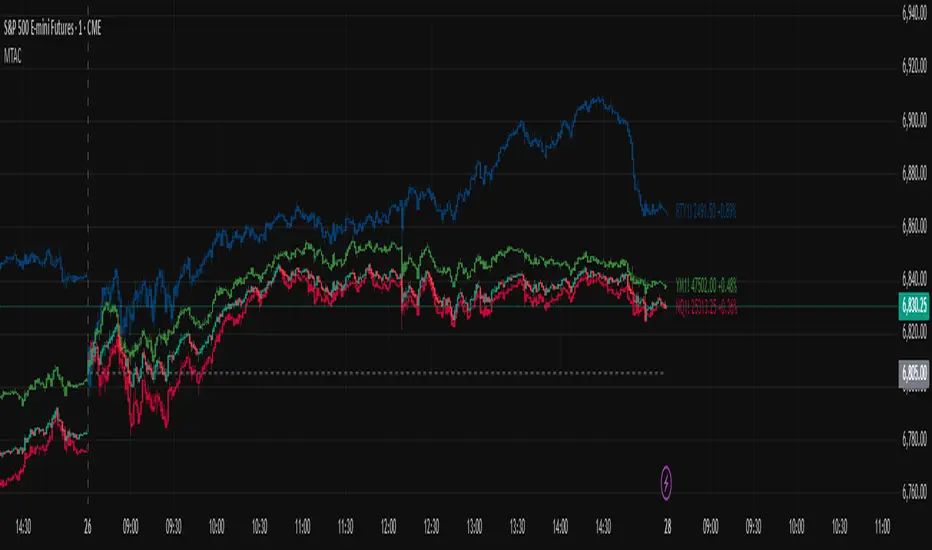
Multi-Ticker Anchored CandlesMulti-Ticker Anchored Candles (MTAC) is a simple tool for overlaying up to 3 tickers onto the same chart. This is achieved by interpreting each symbol's OHLC data as percentages, then plotting their candle points relative to the main chart's open. This allows for a simple comparison of tickers to track performance or locate relationships between them.
> Background
The concept of multi-ticker analysis is not new, this type of analysis can be extremely helpful to get a gauge of the over all market, and it's sentiment. By analyzing more than one ticker at a time, relationships can often be observed between tickers as time progresses.
While seeing multiple charts on top of each other sounds like a good idea...each ticker has its own price scale, with some being only cents while others are thousands of dollars.
Directly overlaying these charts is not possible without modification to their sources.
By using a fixed point in time (Period Open) and percentage performance relative to that point for each ticker, we are able to directly overlay symbols regardless of their price scale differences.
The entire process used to make this indicator can be summed up into 2 keywords, "Scaling & Anchoring".
> Scaling
First, we start by determining a frame of reference for our analysis. The indicator uses timeframe inputs to determine sessions which are used, by default this is set to 1 day.
With this in place, we then determine our point of reference for scaling. While this could be any point in time, the most sensible for our application is the daily (or session) open.
Each symbol shares time, therefore, we can take a price point from a specified time (Opening Price) and use it to sync our analysis over each period.
Over the day, we track the percentage performance of each ticker's OHLC values relative to its daily open (% change from open).
Since each ticker's data is now tracked based on its opening price, all data is now using the same scale.
The scale is simply "% change from open".
> Anchoring
Now that we have our scaled data, we need to put it onto the chart.
Since each point of data is relative to it's daily open (anchor point), relatively speaking, all daily opens are now equal to each other.
By adding the scaled ticker data to the main chart's daily open, each of our resulting series will be properly scaled to the main chart's data based on percentages.
Congratulations, We have now accurately scaled multiple tickers onto one chart.
> Display
The indicator shows each requested ticker as different colored candlesticks plotted on top of the main chart.
Each ticker has an associated label in front of the current bar, each component of this label can be toggled on or off to allow only the desired information to be displayed.
To retain relevance, at the start of each session, a "Session Break" line is drawn, as well as the opening price for the session. These can also be toggled.
Note: The opening price is the opening price for ALL tickers, when a ticker crosses the open on the main chart, it is crossing its own opening price as well.
> Examples
In the chart below, we can see NYSE:MCD NASDAQ:WEN and NASDAQ:JACK overlaid on a NASDAQ:SBUX chart.
From this, we can see NASDAQ:JACK was the top gainer on the day. While this was the case, it also fell roughly 4% from its peak near lunchtime. Unlike the top gainer, we can see the other 3 tickers ended their day near their daily high.
In the explanations above, the daily timeframe is used since it is the default; however, the analysis is not constrained to only days. The anchoring period can be set to any timeframe period.
In the chart below, you can observe the Daily, Weekly, and Monthly anchored charts side-by-side.
This can be used on all tickers, timeframes, and markets. While a typical application may be comparing relevant assets... the script is not limited.
Below we have a chart tracking COMEX:GCV2026 , FX:EURUSD , and COINBASE:DOGEUSD on the AMEX:SPY chart.
While these tickers are not typically compared side-by-side, here it is simply a display of the capabilities of the script.
Enjoy!

Alos Volume Profile Candles (SVP)ALOS Volume Profile Candles (SVP)
Summary
IMPORTANT: This indicator is designed to be used only with TradingView's 'Session Volume Profile' chart type. It will not work correctly with standard candle charts.
This indicator powerfully visualizes intra-session price action by dividing a single session profile into a specific number of equal-sized synthetic candles.
Instead of viewing a session as one single block, you can now break it down into parts (like quarters or thirds) to see how price behaved during each segment of the profile.
Key Features
Custom Session Slicing: Set "Candles per session" to 4 to see the session in quarters, 6 to see it in sixths, or any number you choose.
Full Session Control: Works perfectly with any custom session time, including complex overnight sessions (like '1800-1700' for CME crypto futures)
Accurate OHLC Calculation: Each synthetic candle correctly calculates and displays its own Open, High, Low, and Close for its specific time slice.
Clean Charting: Use the "Keep last sessions" input to control how many old sessions are drawn, preventing chart clutter and keeping your analysis focused on recent price action.
How to Use
On your TradingView chart, change the chart type to "Session Volume Profile".
Add the "ALOS Volume Profile Candles (SVP)" indicator to your chart.
Set your desired Session time in the indicator settings (or keep the default).
Choose the number of Candles per session you want to divide it into.
Adjust Keep last sessions to control how much history is displayed.
This tool is ideal for traders who want to analyze price behavior during the opening, middle, and closing parts of a session, or for breaking down long 24-hour crypto sessions into more manageable chunks.

High Volume Bars (Advanced)High Volume Bars (Advanced)
High Volume Bars (Advanced) is a Pine Script v6 indicator for TradingView that highlights bars with unusually high volume, with several ways to define “unusual”:
Classic: volume > moving average + N × standard deviation
Change-based: large change in volume vs previous bar
Z-score: statistically extreme volume values
Robust mode (optional): median + MAD, less sensitive to outliers
It can:
Recolor candles when volume is high
Optionally highlight the background
Optionally plot volume bands (center ± spread × multiplier)
⸻
1. How it works
At each bar the script:
Picks the volume source:
If Use Volume Change vs Previous Bar? is off → uses raw volume
If on → uses abs(volume - volume )
Computes baseline statistics over the chosen source:
Lookback bars
Moving average (SMA or EMA)
Standard deviation
Optionally replaces mean/std with robust stats:
Center = median (50th percentile)
Spread = MAD (median absolute deviation, scaled to approx σ)
Builds bands:
upper = center + spread * multiplier
lower = max(center - spread * multiplier, 0)
Flags a bar as “high volume” if:
It passes the mode logic:
Classic abs: volume > upper
Change mode: abs(volume - volume ) > upper
Z-score mode: z-score ≥ multiplier
AND the relative filter (optional): volume > average_volume * Min Volume vs Avg
AND it is past the first Skip First N Bars from the start of the chart
Colors the bar and (optionally) the background accordingly.
⸻
2. Inputs
2.1. Statistics
Lookback (len)
Number of bars used to compute the baseline stats (mean / median, std / MAD).
Typical values: 50–200.
StdDev / Z-Score Multiplier (mult)
How far from the baseline a bar must be to count as “high volume”.
In classic mode: volume > mean + mult × std
In z-score mode: z ≥ mult
Typical values: 1.0–2.5.
Use EMA Instead of SMA? (smooth_with_ema)
Off → uses SMA (slower but smoother).
On → uses EMA (reacts faster to recent changes).
Use Robust Stats (Median & MAD)? (use_robust)
Off → mean + standard deviation
On → median + MAD (less sensitive to a few insane spikes)
Useful for assets with occasional volume blow-ups.
⸻
2.2. Detection Mode
These inputs control how “unusual” is defined.
• Use Volume Change vs Previous Bar? (mode_change)
• Off (default) → uses absolute volume.
• On → uses abs(volume - volume ).
You then detect jumps in volume rather than absolute size.
Note: This is ignored if Z-Score mode is switched on (see below).
• Use Z-Score on Volume? (Overrides change) (mode_zscore)
• Off → high volume when raw value exceeds the upper band.
• On → computes z-score = (value − center) / spread and flags a bar as high when z ≥ multiplier.
Z-score mode can be combined with robust stats for more stable thresholds.
• Min Volume vs Avg (Filter) (min_rel_mult)
An extra filter to ignore tiny-volume bars that are statistically “weird” but not meaningful.
• 0.0 → no filter (all stats-based candidates allowed).
• 1.0 → high-volume bar must also be at least equal to average volume.
• 1.5 → bar must be ≥ 1.5 × average volume.
• Skip First N Bars (from start of chart) (skip_open_bars)
Skips the first N bars of the chart when evaluating high-volume conditions.
This is mostly a safety / cosmetic option to avoid weird behavior on very early bars or backfill.
⸻
2.3. Visuals
• Show Volume Bands? (show_bands)
• If on, plots:
• Upper band (upper)
• Lower band (lower)
• Center line (vol_center)
These are plotted on the same pane as the script (usually the price chart).
• Also Highlight Background? (use_bg)
• If on, fills the background on high-volume bars with High-Vol Background.
• High-Vol Bar Transparency (0–100) (bar_transp)
Controls the opacity of the high-volume bar colors (up / down).
• 0 → fully opaque
• 100 → fully transparent (no visible effect)
• Up Color (upColor) / Down Color (dnColor)
• Regular bar colors (non high-volume) for up and down bars.
• Up High-Vol Base Color (upHighVolBase) / Down High-Vol Base Color (dnHighVolBase)
Base colors used for high-volume up/down bars. Transparency is applied on top of these via bar_transp.
• High-Vol Background (bgHighVolColor)
Background color used when Also Highlight Background? is enabled.
⸻
3. What gets colored and how
• Bar color (barcolor)
• Up bar:
• High volume → Up High-Vol Color
• Normal volume → Up Color
• Down bar:
• High volume → Down High-Vol Color
• Normal volume → Down Color
• Flat bar → neutral gray
• Background color (bgcolor)
• If Also Highlight Background? is on, high-volume bars get High-Vol Background.
• Otherwise, background is unchanged.
⸻
4. Alerts
The indicator exposes three alert conditions:
• High Volume Bar
Triggers whenever is_high is true (up or down).
• High Volume Up Bar
Triggers only when is_high is true and the bar closed up (close > open).
• High Volume Down Bar
Triggers only when is_high is true and the bar closed down (close < open).
You can use these in TradingView’s “Create Alert” dialog to:
• Get notified of potential breakout / exhaustion bars.
• Trigger webhook events for bots / custom infra.
⸻
5. Recommended presets
5.1. “Classic” high-volume detector (closest to original)
• Lookback: 150–200
• StdDev / Z-Score Multiplier: 1.0–1.5
• Use EMA Instead of SMA?: off
• Use Robust Stats?: off
• Use Volume Change vs Previous Bar?: off
• Use Z-Score on Volume?: off
• Min Volume vs Avg (Filter): 0.0–1.0
Behavior: Flags bars whose volume is notably above the recent average (plus a bit of noise filtering), same spirit as your initial implementation.
⸻
5.2. Volatility-aware (Z-score) mode
• Lookback: 100–200
• StdDev / Z-Score Multiplier: 1.5–2.0
• Use EMA Instead of SMA?: on
• Use Robust Stats?: on (if asset has huge spikes)
• Use Volume Change vs Previous Bar?: off (ignored anyway in z-score mode)
• Use Z-Score on Volume?: on
• Min Volume vs Avg (Filter): 0.5–1.0
Behavior: Flags bars that are “statistically extreme” relative to recent volume behavior, not just absolutely large. Good for assets where baseline volume drifts over time.
⸻
5.3. “Wake-up bar” (volume acceleration)
• Lookback: 50–100
• StdDev / Z-Score Multiplier: 1.0–1.5
• Use EMA Instead of SMA?: on
• Use Robust Stats?: optional
• Use Volume Change vs Previous Bar?: on
• Use Z-Score on Volume?: off
• Min Volume vs Avg (Filter): 0.5–1.0
Behavior: Emphasis on sudden increases in volume rather than absolute size – useful to catch “first active bar” after a quiet period.
⸻
6. Limitations / notes
• Time-of-day effects
The script currently treats the entire chart as one continuous “session”. On 24/7 markets (crypto) this is fine. For regular-session assets (equities, futures), volume naturally spikes at open/close; you may want to:
• Use a shorter Lookback, or
• Add a session-aware filter in a future iteration.
• Illiquid symbols
On very low-liquidity symbols, robust stats (Use Robust Stats) and a non-zero Min Volume vs Avg can help avoid “everything looks extreme” problems.
• Overlay behavior
overlay = true means:
• Bars are recolored on the price pane.
• Volume bands are also drawn on the price pane if enabled.
If you want a dedicated panel for the bands, duplicate the logic in a separate script with overlay = false.

HTF Candle Profile [ChartPrime]⯁ OVERVIEW
The HTF Candle Profile visualizes higher-timeframe candle structure and its internal volume distribution directly on lower-timeframe charts. It automatically detects changes in higher-timeframe periods (daily, weekly, or monthly) and constructs a complete volume profile for each, allowing traders to see how volume is distributed across the range of that higher-timeframe candle. This helps identify whether momentum is supported by real volume strength or trapped price movement.
⯁ LOGIC
When a new higher-timeframe candle begins, the indicator starts collecting data for its open, high, low, close, and volume range.
Once sufficient bars have passed (defined by the Min Period Profile input), it calculates a full profile using adaptive bin sizing derived from the range (High–Low) and ATR for scaling precision.
The resulting bins represent the volume concentration at each price level of that higher-timeframe candle.
A Point of Control (PoC) is highlighted — the level where the most volume occurred.
The indicator then draws the higher-timeframe candle body and wicks at the chart’s right side, giving visual context of bullish or bearish sentiment.
⯁ FEATURES
Automatic HTF Detection: Identifies new Daily, Weekly, or Monthly periods and updates profiles in real time.
Dynamic Bin Calculation: Automatically adjusts bin size based on ATR and candle height for accurate volume granularity.
Volume Profile Rendering: Displays colored volume bars extending from the candle, showing where trading activity was concentrated.
Higher-Timeframe Candle Representation: Plots the full HTF candle (open, close, high, low) on the right side of the chart for visual clarity.
PoC Level & Labels: Marks the point of maximum volume within the candle profile with a line and volume label.
Configurable Levels: Toggle display of Open, Close, High, Low, and PoC for each higher-timeframe segment.
Color-coded Sentiment: Candle and profile colors reflect bullish or bearish momentum.
⯁ CONCLUSION
The HTF Candle Profile bridges lower- and higher-timeframe analysis by embedding high-resolution volume data within each major candle. It enables traders to see where liquidity and trading activity cluster inside higher-timeframe structures — revealing whether trends are volume-backed or hollow. Perfect for combining structural insight with volume confluence when analyzing market sentiment transitions across timeframes.

HTF Session Boxes H4 > H2 > H1HTF Session Boxes H4 > H2 > H1
Visualize higher timeframe candle structures on lower timeframe charts with nested, customizable boxes.
Overview
HTF Session Boxes plots 4-hour, 2-hour, and 1-hour candle ranges as nested boxes directly on your lower timeframe charts (15M and below). This provides instant visual context of higher timeframe structure without switching between different chart timeframes.
Key Features
- Three Timeframe Levels: Simultaneously displays 4H, 2H, and 1H candle boxes
- Nested Design: Boxes are layered inside each other for clear hierarchical structure
- Real-Time Updates: Boxes dynamically adjust as higher timeframe candles develop
Fully Customizable:
-Individual colors and transparency for each timeframe
-Custom border colors, widths, and styles (solid, dashed, dotted)
-Toggle each timeframe on/off independently
Best Use Cases
-Scalping & Day Trading: Maintain awareness of higher timeframe structure while trading lower
timeframes
-Session Analysis: Clearly see 4H session boundaries and internal 2H/1H divisions
-Support/Resistance: Identify key levels where higher timeframe candles open, close, or create
highs/lows
-Multi-Timeframe Confluence: Spot when multiple timeframes align at key price levels

HTF Candles with PVSRA Volume Coloring (PCS Series)This indicator displays higher timeframe (HTF) candles using a PVSRA-inspired color model that blends price and volume strength, allowing traders to visualize higher-timeframe activity directly on lower-timeframe charts without switching screens.
OVERVIEW
This script visualizes higher-timeframe (HTF) candles directly on lower-timeframe charts using a custom PVSRA (Price, Volume & Support/Resistance Analysis) color model.
Unlike standard HTF indicators, it aggregates real-time OHLC and volume data bar-by-bar and dynamically draws synthetic HTF candles that update as the higher-timeframe bar evolves.
This allows traders to interpret momentum, trend continuation, and volume pressure from broader market structures without switching charts.
INTEGRATION LOGIC
This script merges higher-timeframe candle projection with PVSRA volume analysis to provide a single, multi-timeframe momentum view.
The HTF structure reveals directional context, while PVSRA coloring exposes the underlying strength of buying and selling pressure.
By combining both, traders can see when a higher-timeframe candle is building with strong or weak volume, enabling more informed intraday decisions than either tool could offer alone.
HOW IT WORKS
Aggregates price data : Groups lower-timeframe bars to calculate higher-timeframe Open, High, Low, Close, and total Volume.
Applies PVSRA logic : Compares each HTF candle’s volume to the average of the last 10 bars:
• >200% of average = strong activity
• >150% of average = moderate activity
• ≤150% = normal activity
Assigns colors :
• Green/Blue = bullish high-volume
• Red/Fuchsia = bearish high-volume
• White/Gray = neutral or low-volume moves
Draws dynamic outlines : Outlines update live while the current HTF candle is forming.
Supports symbol override : Calculations can use another instrument for correlation analysis.
This multi-timeframe aggregation avoids repainting issues in request.security() and ensures accurate real-time HTF representation.
FEATURES
Dual HTF Display : Visualize two higher timeframes simultaneously (e.g., 4H and 1D).
Dynamic PVSRA Coloring : Volume-weighted candle colors reveal bullish or bearish dominance.
Customizable Layout : Adjust candle width, spacing, offset, and color schemes.
Candle Outlines : Highlight the forming HTF candle to monitor developing structure.
Symbol Override : Display HTF candles from another instrument for cross-analysis.
SETTINGS
HTF 1 & HTF 2 : enable/disable, set timeframes, choose label colors, show/hide outlines.
Number of Candles : choose how many HTF candles to plot (1–10).
Offset Position : distance to the right of the current price where HTF candles begin.
Spacing & Width : adjust separation and scaling of candle groups.
Show Wicks/Borders : toggle wick and border visibility.
PVSRA Colors : enable or disable volume-based coloring.
Symbol Override : use a secondary ticker for HTF data if desired.
USAGE TIPS
Set the indicator’s visual order to “Bring to front.”
Always choose HTFs higher than your active chart timeframe.
Use PVSRA colors to identify strong momentum and potential reversals.
Adjust candle spacing and width for your chart layout.
Outlines are not shown on chart timeframes below 5 minutes.
TRADING STRATEGY
Strategy Overview : Combine HTF structure and PVSRA volume signals to
• Identify zones of high institutional activity and potential reversals.
• Wait for confirmation through consolidation or a pullback to key levels.
• Trade in alignment with dominant higher-timeframe structure rather than chasing volatility.
Setup :
• Chart timeframe: lower (5m, 15m, 1H)
• HTF 1: 4H or 1D
• HTF 2: 1D or 1W
• PVSRA Colors: enabled
• Outlines: enabled
Entry Concept :
High-volume candles (green or red) often indicate market-maker activity , such zones often reflect liquidity absorption by larger players and are not necessarily ideal entry points.
Wait for the next consolidation or pullback toward a support or resistance level before acting.
Bullish scenario :
• After a high-volume or rejection candle near a low, price consolidates and forms a higher low.
• Enter long only when structure confirms strength above support.
Bearish scenario :
• After a high-volume or rejection candle near a top, price consolidates and forms a lower high.
• Enter short once resistance holds and momentum weakens.
Exit Guidelines :
• Exit when next HTF candle shifts in color or momentum fades.
• Exit if price structure breaks opposite to your trade direction.
• Always use stop-loss and take-profit levels.
Additional Tips :
• Never enter directly on strong green/red high-volume candles, these are usually areas of institutional absorption.
• Wait for market structure confirmation and volume normalization.
• Combine with RSI, moving averages, or support/resistance for timing.
• Avoid trading when HTF candles are mixed or low-volume (unclear bias).
• Outlines hidden below 5m charts.
Risk Management :
• Use stop-loss and take-profit on all positions.
• Limit risk to 1–2% per trade.
• Adjust position size for volatility.
FINAL NOTES
This script helps traders synchronize lower-timeframe execution with higher-timeframe momentum and volume dynamics.
Test it on demo before live use, and adjust settings to fit your trading style.
DISCLAIMER
This script is for educational purposes only and does not constitute financial advice.
SUPPORT & UPDATES
Future improvements may include alert conditions and additional visualization modes. Feedback is welcome in the comments section.
CREDITS & LICENSE
Created by @seoco — open source for community learning.
Licensed under Mozilla Public License 2.0 .

3D Candles (Zeiierman)█ Overview
3D Candles (Zeiierman) is a unique 3D take on classic candlesticks, offering a fresh, high-clarity way to visualize price action directly on your chart. Visualizing price in alternative ways can help traders interpret the same data differently and potentially gain a new perspective.
█ How It Works
⚪ 3D Body Construction
For each bar, the script computes the candle body (open/close bounds), then projects a top face offset by a depth amount. The depth is proportional to that candle’s high–low range, so it looks consistent across symbols with different prices/precisions.
rng = math.max(1e-10, high - low ) // candle range
depthMag = rng * depthPct * factorMag // % of range, shaped by tilt amount
depth = depthMag * factorSign // direction from dev (up/down)
depthPct → how “thick” the 3D effect is, as a % of each candle’s own range.
factorMag → scales the effect based on your tilt input (dev), with a smooth curve so small tilts still show.
factorSign → applies the direction of the tilt (up or down).
⚪ Tilt & Perspective
Tilt is controlled by dev and translated into a gentle perspective factor:
slope = (4.0 * math.abs(dev)) / width
factorMag = math.pow(math.min(1.0, slope), 0.5) // sqrt softens response
factorSign = dev == 0 ? 0.0 : math.sign(dev) // direction (up/down)
Larger dev → stronger 3D presence (up to a cap).
The square-root curve makes small dev values noticeable without overdoing it.
█ How to Use
Traders can use 3D Candles just like regular candlesticks. The difference is the 3D visualization, which can broaden your view and help you notice price behavior from a fresh perspective.
⚪ Quick setup (dual-view):
Split your TradingView layout into two synchronized charts.
Right pane: keep your standard candlestick or bar chart for live execution.
Left pane: add 3D Candles (Zeiierman) to compare the same symbol/timeframe.
Observe differences: the 3D rendering can make expansion/contraction and body emphasis easier to spot at a glance.
█ Go Full 3D
Take the experience further by pairing 3D Candles (Zeiierman) with Volume Profile 3D (Zeiierman) , a perfect complement that shows where activity is concentrated, while your 3D candles show how the price unfolded.
█ Settings
Candles — How many 3D candles to draw. Higher values draw more shapes and may impact performance on slower machines.
Block Width (bars) — Visual thickness of each 3D candle along the x-axis. Larger values look chunkier but can overlap more.
Up/Down — Controls the tilt and strength of the 3D top face.
3D depth (% of range) — Thickness of the 3D effect as a percentage of each candle’s own high–low range. Larger values exaggerate the depth.
-----------------
Disclaimer
The content provided in my scripts, indicators, ideas, algorithms, and systems is for educational and informational purposes only. It does not constitute financial advice, investment recommendations, or a solicitation to buy or sell any financial instruments. I will not accept liability for any loss or damage, including without limitation any loss of profit, which may arise directly or indirectly from the use of or reliance on such information.
All investments involve risk, and the past performance of a security, industry, sector, market, financial product, trading strategy, backtest, or individual's trading does not guarantee future results or returns. Investors are fully responsible for any investment decisions they make. Such decisions should be based solely on an evaluation of their financial circumstances, investment objectives, risk tolerance, and liquidity needs.
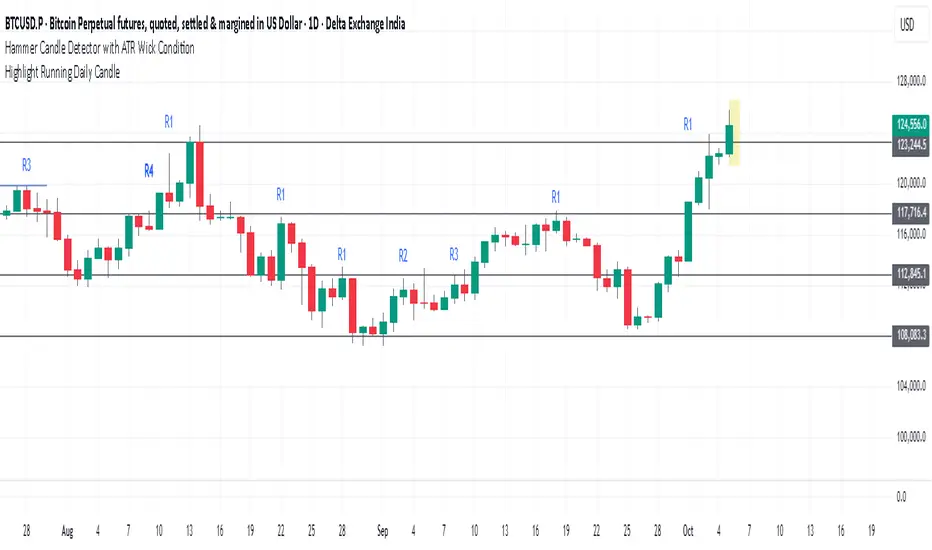
Highlight Running Daily Candlehighlights the currently forming Daily candle
with a shaded box extending slightly beyond the candle’s range.
Disappears as soon as the candle closes.
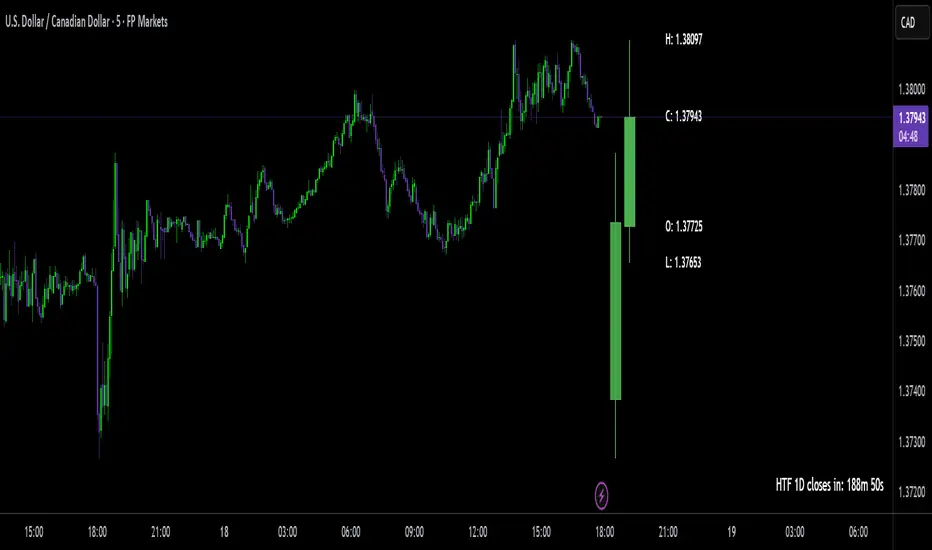
Delta Volume Signals by Claudio [hapharmonic]Modifications:
Percentages without decimals.
I replaced the 'Current Volume' row with two boxes: "Δ Vol" and its value, which changes color depending on the direction of the bearish/bullish candle.
Signals can change color in the settings.
Box spacing so the table doesn't constantly change size.
To be modified:
The Net Volume sign shouldn't change to negative when the candle is red.
If anyone does this, let me know...
claudio.ventola@hotmail.com
Best regards!

HTF Big Candle ProjectionsWhat it does
This indicator overlays higher-timeframe (HTF) “big candles” at the right edge of any chart and keeps them perfectly parallel with price while you zoom or pan. In End-of-Chart (EOC) mode, all objects are anchored by bar index (not time) and clamped to TradingView’s ≤500 bars into the future rule, so they move 1:1 with the chart—no drift, no lag. A fallback mode preserves time-anchored labels if you prefer them.
Why it’s different / useful
Most MTF overlays drift when you scale or pan because they anchor by time or mix coordinate systems. This script anchors every end-of-chart object (bodies, wicks, OHLC guide lines, labels, range readout) in bar-index space, so the overlay scales identically to real bars. It also includes a safe-clamp to the 500-bar forward limit, automatic TF mapping for D/W/M charts, and optional projections from the previous HTF candle.
How it works (technical overview)
HTF data: The indicator fetches HTF OHLC using request.security() (no lookahead) and updates the current HTF candle live on each chart bar.
EOC placement (ON): Big candles are rendered with index-anchored boxes + wicks (box.new + line.new). X-positions are computed from bar_index + offset, then clamped to stay within the forward limit.
Fallback placement (OFF): Label coordinates switch to time-anchored for familiarity; candle bodies remain parallel via index logic.
OHLC helpers: Optional high/low/close guide lines extend right from the active HTF candle; OHLC labels and a range label can be placed to the side; a remaining-time widget shows how long until the HTF bar closes.
No lookahead / repaint caveat: The current HTF candle naturally evolves until it closes; that’s expected behavior for real-time HTF overlays.
Inputs & features
Place at end of chart (EOC mode toggle): index-anchored layout with ≤500-bar clamp.
Right Candle Timeframe: auto-map for D/W/M (D→W, W→M, M→3M) or set manually.
Offsets & width: right-edge offset (bars), left-candle offset, body width (bars), minimum gap between candles.
Wicks: show/hide (fallback mode draws wicks; index mode draws them via lines).
OHLC guide lines: toggle H/L/C, choose style/width/color, with right-side projection distance.
OHLC labels: side selection, text size, background/text colors, side offset.
Range label: toggle, side offset, size; option to show pip units (1/mintick).
Prev candle projections: optional HTF high/low lines from the left candle.
Remaining-time panel: live countdown to the HTF bar close.
Colors: bullish/bearish bodies and wicks.
How to use
Add to any chart (works best on intraday charts when viewing D/W/M candles).
Keep “Place at end of chart” ON for perfect parallel tracking while zooming/panning.
Choose Right Candle Timeframe (or use auto for D/W/M).
Adjust Body Width and Label/Line Offsets to taste. If you push offsets too far, the script auto-clamps objects to respect the 500-bar forward limit.
Optionally enable Prev Candle HL projections, OHLC labels, and the Range readout.
Publish with a clean chart so the overlay is easy to understand at a glance.
Notes & limitations
Forward plotting limit: TradingView only allows drawing ≤500 bars into the future. The script clamps all end-of-chart objects automatically; if you request more, it will shorten projections to remain compliant.
Sessions & symbols: Exotic sessions or illiquid symbols may produce uneven HTF boundaries. If needed, set the Right Candle Timeframe manually.
No signals, no promises: This is a visualization tool—it does not generate trade signals or promise performance. Use it alongside your own analysis and risk management.
Settings quick reference
EOC mode: ON (index-anchored) / OFF (time-anchored labels).
Right Candle TF: Auto D→W→M→3M or manual TF.
Offsets: Right edge, left candle, label/range/line projections.
Body Width: Candle thickness in bars.
Lines/Labels: OHLC guides, OHLC labels, Range label.
Prev HL: Previous HTF high/low projections.
Timer: Remaining time in the current HTF bar.
Colors: Bull/Bear bodies, wicks.
Disclaimer
For educational purposes only. Not financial advice. Past performance does not guarantee future results. Always test on your own and trade responsibly.
Author’s note on originality
This script focuses on bar-index anchored EOC rendering with comprehensive forward-clamping and dual label modes, aiming to solve the common drift/desync issues seen in MTF overlays during chart scaling.
Precision Candle Marker – OL/OH/OC ScreenerThis indicator highlights high-probability precision candles on any perpetual contract, designed especially for scalpers and short-term traders.
It marks three unique candle setups on the 1-minute chart (works on other timeframes too):
🟢 Open = Low (OL) → Strong bullish momentum, buyers took control instantly.
🔴 Open = High (OH) → Strong bearish momentum, sellers took control instantly.
🔵 Open = Close (OC) → Doji / indecision candle, potential reversal or continuation signal.
Use cases:
Identify breakout entry points in uptrend/downtrend.
Filter noise and focus on precision candles.
Combine with trend indicators (EMA, VWAP, RSI) for confirmation.
This tool is best suited for scalping perpetual contracts (e.g., BTCUSDT, ETHUSDT) but works on any symbol and timeframe.
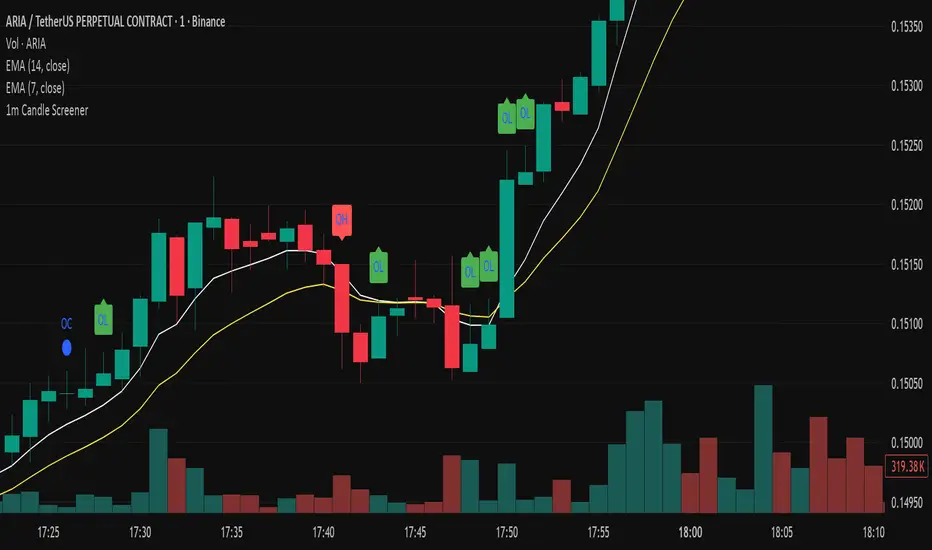
Bionic Candlestick IndikatorBionic Candlestick Indicator for TradingViewOverviewThe Bionic Candlestick Indicator is a customizable Pine Script Version 6 indicator designed for TradingView. It visually highlights key candlestick patterns to identify bullish, bearish, and Doji signals, helping traders analyze market trends and potential reversals. The indicator offers flexible display options, allowing users to plot custom candlesticks or color the chart background based on detected patterns, with optimized performance for large charts.FeaturesCandlestick Patterns:Strong Bullish: Close = High and Close > Open (e.g., strong buying pressure).
Strong Bearish: Close = Low and Close < Open (e.g., strong selling pressure).
Bullish Pullback: Close > Open with a larger High-to-Close distance.
Bearish Pullback: Close < Open with a larger Low-to-Close distance.
Doji Patterns: Bullish Doji, Bearish Doji, Equilibrium Doji (Open = Close with balanced wicks), and Empty Doji (High = Low and Open = Close).
Customizable Colors: Choose colors for each pattern (e.g., yellow/green for bullish, blue/red for bearish, purple for Equilibrium Doji).
Display Options:Plot custom candlesticks over the chart or color the background.
Toggle visibility of specific patterns (bullish, bearish, Doji, Equilibrium).
Performance Optimization: Limits calculations to a user-defined number of bars (max_bars) to reduce lag on large charts.
How to UseAdd the Indicator:Copy the provided Pine Script code into TradingView’s Pine Editor.
Click “Add to Chart” to apply the indicator.
Adjust Visual Order:To ensure the indicator displays correctly, go to the indicator list in TradingView, click the gear icon next to “Bionic Candlestick Indikator,” and select “Visual Order > Bring to Front.”
If “Draw Above Chart” is enabled, hide the chart’s default candlesticks:Go to Chart Settings > Symbol > uncheck “Candles” to avoid overlap.
Configure Settings:Open the indicator’s settings and adjust the following:Bullish/Bearish/Doji/Equilibrium Signals: Enable or disable specific candlestick patterns.
Candlestick Colors: Select colors for each pattern (e.g., yellow, green, blue, red, purple, gray).
Draw Above Chart: Check to plot custom candlesticks; uncheck to color the chart background.
Maximum Bars to Calculate: Set to a value like 2000–5000 to limit calculations and improve performance (set to 0 for no limit).
Save the settings.
Interpretation:Bullish Signals (Yellow/Green): Indicate potential buying opportunities or upward momentum.
Bearish Signals (Blue/Red): Suggest selling pressure or downward momentum.
Doji Patterns (Dark Green/Dark Red/Purple/Gray): Highlight market indecision or potential reversals.
Combine with other indicators (e.g., RSI, moving averages) for confirmation.
Performance Tips:Set “Maximum Bars to Calculate” to a lower value (e.g., 2000) to reduce lag on charts with many bars.
Use TradingView’s Pine Profiler to identify performance bottlenecks.
Test on smaller timeframes or chart ranges to ensure smooth rendering.
NotesVisual Order: If the indicator only appears after clicking the chart, ensure it is set to “Bring to Front” in the visual order, and disable default candlesticks if plotting custom ones.
Performance: Lowering “Maximum Bars to Calculate” reduces computational load but may skip older signals. Adjust based on your chart size and needs.
Compatibility: The indicator uses Pine Script Version 6. If TradingView does not support Version 6, change @version=6 to @version=5 and retest.
Debugging: If issues persist, check for conflicts with other indicators or chart settings, and ensure the chart is refreshed.
This indicator is ideal for traders looking to visually identify key candlestick patterns with customizable options, optimized for performance on TradingView charts. For support or further customization, refer to TradingView’s documentation or community forums.

CNS - RSI CandlesPlots RSI candles instead of a line, although user still has option to use line type RSI.
My version corrects inconsistencies I have found in all the other available RSI candle indicators and should be more accurate.
Both options allow use of fast and slow double EMAs for crossover strategies.
User also has the option to apply Heikin-Ashi smoothing to the RSI candles without having to use Heikin-Ashi candles on the main price chart for the underlying ticker.

The Bravo KitThe Bravo Suite is an all-encompassing toolset that provides traders with various indicators and technical analysis tools. It is designed for ease of use, with simple inputs and intuitive visuals, to assist the average trader in making informed decisions. This guide will provide an overview of the different features included in the Bravo Suite and delve into some of the more intricate details.
Features of the Bravo Suite
Bravo Candles
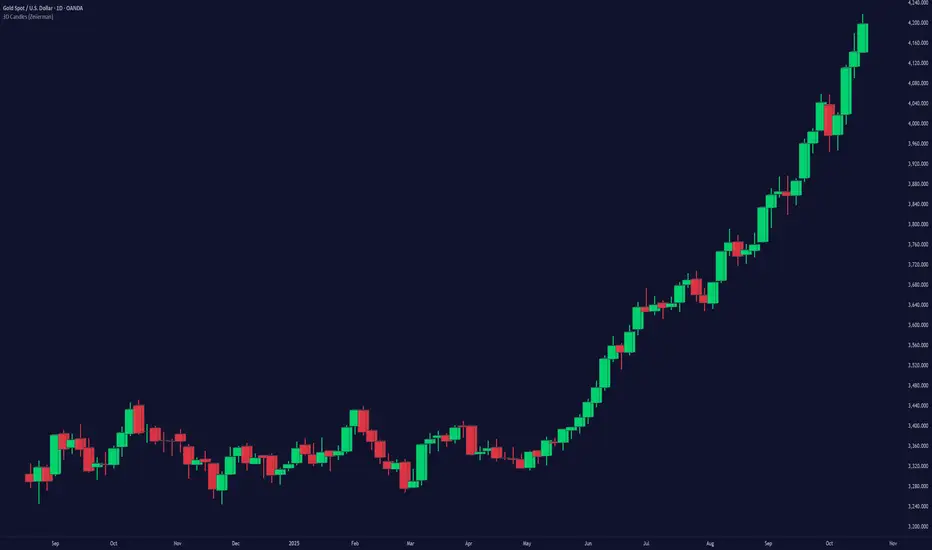
These candles provide a unique way of visualizing price action by color-coding the candles based on their angle relative to the past price. Users have the option to enable or disable the Bravo Candles theme.
As shown below purple shades start to appear when price is overextended - leveraging the trend angle calculation:
Bravo Sequential
The Bravo Sequential system is a unique take on the traditional 9 count system that aims to identify potential trend exhaustion points. The major difference in the Bravo Sequential is that it uses the trend angle once again, instead of the generic method of counting candlesticks. By incorporating trend angle, it can potentially provide better insights into the momentum behind the current price trend and identify trend exhaustion points more effectively.
This approach allows the Bravo Sequential system to take into account not only the number of consecutive price increases or decreases but also the strength of these movements. Consequently, it can provide a more accurate depiction of the underlying trend, especially if the momentum of the price action is changing.
While the traditional 9 count system only counts the number of sequential candles based on consecutive higher or lower closes, the Bravo Sequential system uses the angle of the trend to identify if the trend is losing strength. It displays a 9 count when it detects a possible trend exhaustion point, accompanied by an optional label for better visibility on the chart.
+ Icons are also produced at the custom 9 count levels making it clearer to see these potential exhaustion zones.
Bravo Fibonacci Bands
The Bravo Fibonacci Bands are an advanced and innovative feature of the Bravo Suite, specifically designed to offer a more precise and dynamic price channel using a custom blend of Fibonacci numbers and weighted averages. This powerful combination allows traders to observe potential support and resistance levels, providing valuable insights into market direction and price movements.
Fibonacci numbers are a well-known and incredibly important concept in mathematics, with various applications in trading and technical analysis.
The Bravo Suite harnesses the power of Fibonacci numbers in the Bravo Fibonacci Bands by building a custom low lag weighted average from the input length. This is achieved by applying the metallic mean (also known as the "golden mean" or "silver mean") to the input series. By leveraging Fibonacci numbers in this manner, the weighted average effectively shifts more weight to the most recent values, emphasizing the importance of the current market trend.
The Bravo Fibonacci Bands dynamically adjust to the ever-changing market conditions, offering the trader an powerful level of precision in identifying crucial price levels. This approach blends the best of both worlds.
The end result is a reliable, easy-to-read price channel that gives traders the confidence to make informed decisions no matter what the market throws their way.
Moving Averages
The Bravo 9 Moving Average is included in the suite, alongside other useful Moving Averages for various timeframes, such as 200-day Moving Average, and 200-week Moving Average. Traders can toggle the visibility of each Moving Average. These are custom designed lower lag moving averages designed as assistive and supporting features in the toolkit.
