AI BUY SELL BOT Indicator(KEWME)This strategy is primarily a Trend Following and Scalping strategy. It relies on the crossover of two Exponential Moving Averages (EMA) to identify short-term momentum shifts. The "AI" or "KEWME" part usually refers to the filtering logic added to standard EMAs to reduce false signals during choppy (sideways) markets.
1. Core Components
Fast EMA (Period 9): This tracks the most recent price data very closely. It reacts quickly to price changes.
Slow EMA (Period 15): This acts as the baseline or immediate support/resistance level. It reacts slower than the 9 EMA.
2. Buy Signal Logic (Long Entry)
A Buy signal is generated when the short-term momentum shifts upwards.
Crossover Condition: The EMA 9 (Fast) must cross ABOVE the EMA 15 (Slow).
Candle Confirmation: The candle causing the crossover should ideally close green (bullish) and above both EMA lines.
AI/Filter Logic:
Slope Check: The "AI" logic checks if the slope of the EMA 15 is pointing up. If the lines are flat (horizontal), the signal is often ignored to avoid sideways markets.
Volume: There should be higher than average volume during the crossover to confirm the strength of the move.
Trader's Action: Enter a Buy position immediately after the candle closes.
3. Sell Signal Logic (Short Entry)
A Sell signal is generated when the short-term momentum shifts downwards.
Crossunder Condition: The EMA 9 (Fast) must cross BELOW the EMA 15 (Slow).
Candle Confirmation: The candle causing the crossover should ideally close red (bearish) and below both EMA lines.
AI/Filter Logic:
Slope Check: The "AI" logic checks if the slope of the EMA 15 is pointing down.
Volume: Selling pressure (volume) should be visible.
Trader's Action: Enter a Sell position immediately after the candle closes.
4. The "AI" filtering (Why it is different from basic EMA)
Standard EMA crossovers often fail in "Choppy Markets" (when price moves up and down within a small range), causing losses. The KEWME/AI version usually adds these extra rules:
Range Filter: If the distance between EMA 9 and EMA 15 is very small (the lines are hugging each other), the AI suppresses the signal. It waits for the lines to "fan out" or separate.
Trend Alignment: It might check a higher timeframe (like 200 EMA). If the price is above the 200 EMA, it might only show Buy signals and hide Sell signals (Trend Filtering).
5. Exit Strategy (Stop Loss & Target)
Stop Loss (SL):
For Buy: Just below the recent Swing Low or below the EMA 15.
For Sell: Just above the recent Swing High or above the EMA 15.
Take Profit (TP): usually taken when the EMAs cross back in the opposite direction, or at a 1:1.5 Risk-Reward ratio.
3 minutes ago
Release Notes
This strategy is primarily a Trend Following and Scalping strategy. It relies on the crossover of two Exponential Moving Averages (EMA) to identify short-term momentum shifts. The "AI" or "KEWME" part usually refers to the filtering logic added to standard EMAs to reduce false signals during choppy (sideways) markets.
1. Core Components
Fast EMA (Period 9): This tracks the most recent price data very closely. It reacts quickly to price changes.
Slow EMA (Period 15): This acts as the baseline or immediate support/resistance level. It reacts slower than the 9 EMA.
2. Buy Signal Logic (Long Entry)
A Buy signal is generated when the short-term momentum shifts upwards.
Crossover Condition: The EMA 9 (Fast) must cross ABOVE the EMA 15 (Slow).
Candle Confirmation: The candle causing the crossover should ideally close green (bullish) and above both EMA lines.
AI/Filter Logic:
Slope Check: The "AI" logic checks if the slope of the EMA 15 is pointing up. If the lines are flat (horizontal), the signal is often ignored to avoid sideways markets.
Volume: There should be higher than average volume during the crossover to confirm the strength of the move.
Trader's Action: Enter a Buy position immediately after the candle closes.
3. Sell Signal Logic (Short Entry)
A Sell signal is generated when the short-term momentum shifts downwards.
Crossunder Condition: The EMA 9 (Fast) must cross BELOW the EMA 15 (Slow).
Candle Confirmation: The candle causing the crossover should ideally close red (bearish) and below both EMA lines.
AI/Filter Logic:
Slope Check: The "AI" logic checks if the slope of the EMA 15 is pointing down.
Volume: Selling pressure (volume) should be visible.
Trader's Action: Enter a Sell position immediately after the candle closes.
4. The "AI" filtering (Why it is different from basic EMA)
Standard EMA crossovers often fail in "Choppy Markets" (when price moves up and down within a small range), causing losses. The KEWME/AI version usually adds these extra rules:
Range Filter: If the distance between EMA 9 and EMA 15 is very small (the lines are hugging each other), the AI suppresses the signal. It waits for the lines to "fan out" or separate.
Trend Alignment: It might check a higher timeframe (like 200 EMA). If the price is above the 200 EMA, it might only show Buy signals and hide Sell signals (Trend Filtering).
5. Exit Strategy (Stop Loss & Target)
Stop Loss (SL):
For Buy: Just below the recent Swing Low or below the EMA 15.
For Sell: Just above the recent Swing High or above the EMA 15.
Take Profit (TP): usually taken when the EMAs cross back in the opposite direction, or at a 1:1.5 Risk-Reward ratio.
Buysell

EMA 9/15 AI Buy Sell Signal (KEWME)This strategy is primarily a Trend Following and Scalping strategy. It relies on the crossover of two Exponential Moving Averages (EMA) to identify short-term momentum shifts. The "AI" or "KEWME" part usually refers to the filtering logic added to standard EMAs to reduce false signals during choppy (sideways) markets.
1. Core Components
Fast EMA (Period 9): This tracks the most recent price data very closely. It reacts quickly to price changes.
Slow EMA (Period 15): This acts as the baseline or immediate support/resistance level. It reacts slower than the 9 EMA.
2. Buy Signal Logic (Long Entry)
A Buy signal is generated when the short-term momentum shifts upwards.
Crossover Condition: The EMA 9 (Fast) must cross ABOVE the EMA 15 (Slow).
Candle Confirmation: The candle causing the crossover should ideally close green (bullish) and above both EMA lines.
AI/Filter Logic:
Slope Check: The "AI" logic checks if the slope of the EMA 15 is pointing up. If the lines are flat (horizontal), the signal is often ignored to avoid sideways markets.
Volume: There should be higher than average volume during the crossover to confirm the strength of the move.
Trader's Action: Enter a Buy position immediately after the candle closes.
3. Sell Signal Logic (Short Entry)
A Sell signal is generated when the short-term momentum shifts downwards.
Crossunder Condition: The EMA 9 (Fast) must cross BELOW the EMA 15 (Slow).
Candle Confirmation: The candle causing the crossover should ideally close red (bearish) and below both EMA lines.
AI/Filter Logic:
Slope Check: The "AI" logic checks if the slope of the EMA 15 is pointing down.
Volume: Selling pressure (volume) should be visible.
Trader's Action: Enter a Sell position immediately after the candle closes.
4. The "AI" filtering (Why it is different from basic EMA)
Standard EMA crossovers often fail in "Choppy Markets" (when price moves up and down within a small range), causing losses. The KEWME/AI version usually adds these extra rules:
Range Filter: If the distance between EMA 9 and EMA 15 is very small (the lines are hugging each other), the AI suppresses the signal. It waits for the lines to "fan out" or separate.
Trend Alignment: It might check a higher timeframe (like 200 EMA). If the price is above the 200 EMA, it might only show Buy signals and hide Sell signals (Trend Filtering).
5. Exit Strategy (Stop Loss & Target)
Stop Loss (SL):
For Buy: Just below the recent Swing Low or below the EMA 15.
For Sell: Just above the recent Swing High or above the EMA 15.
Take Profit (TP): usually taken when the EMAs cross back in the opposite direction, or at a 1:1.5 Risk-Reward ratio.

Volume-Edge Trend [wjdtks255]🚀 Volume-Edge Trend
1. Overview This indicator is designed to capture high-probability trend reversals by combining Market Structure Breakouts with Volume Confirmation. Instead of chasing every price movement, it analyzes the highest highs and lowest lows over a set period to identify true structural shifts. By filtering these moves with a 20-period volume average, it effectively eliminates weak "fakeouts" and focuses on high-conviction momentum.
2. How to Trade
📈 LONG Entry: * Enter when a green BUY label appears below the candle.
This signal confirms that price has broken above the previous structural high with significant buying volume.
💀 SHORT Entry: * Enter when a red SELL label appears above the candle.
This signal confirms that price has breached the previous structural low, backed by strong selling pressure.
🎯 Exit (TP/SL):
Use the thick, dynamic Trend Line as your trailing stop-loss.
For Longs, exit if the price closes below the green support line.
For Shorts, exit if the price breaks above the red resistance line.
3. Key Features
Structural Breakout Engine: Tracks price action across a customizable "Length" to detect when a market moves out of a consolidation zone.
Volume Surge Filter: Includes a built-in toggle to ensure signals only fire when trading volume exceeds its 20-period average, confirming institutional participation.
Real-time Trend Navigation: Features a dynamic background fill and a reinforced trend line that provides instant visual feedback on the current market bias.
4. Recommended Settings
Length (Analysis Period): 14 (Optimized for standard trend following).
Volume Filter: Keep "On" to maximize signal accuracy.
Timeframe: Highly effective on 15m, 1H, and 4H charts for volatile assets like BTC, ETH, and NASDAQ.

HMA Trend Scalper [wjdtks255]🚀 HMA Trend Scalper V1: Ultimate Precision Strategy
1. Overview
This indicator captures immediate market trend reversals based on the high-responsiveness of the HMA (Hull Moving Average). It doesn't just show direction; it simultaneously calculates ATR-based volatility to generate optimal Take Profit (TP) and Stop Loss (SL) lines in real-time.
2. How to Trade
🚀 LONG Entry:
The HMA line must be Green, and the price must be positioned above the line.
Enter when the price breaks above the high of the last 5 bars and the 🚀 LONG label appears.
💀 SHORT Entry:
The HMA line must be Red, and the price must be positioned below the line.
Enter when the price breaks below the low of the last 5 bars and the 💀 SHORT label appears.
🎯 Exit (TP/SL):
Close the position immediately when the price touches the Aqua line (TP) or the Yellow line (SL).
3. Key Features
Smart Cleaning: By enabling the 'Hide Past Records' option, the indicator automatically removes previous labels and lines when a new signal occurs, keeping your chart clean and focused.
Real-time Tracking: TP and SL lines extend candle-by-candle as the price moves, providing superior readability for active trades.
High Visibility: Status panels like 🎯 TP Hit or ⚠️ SL Hit are generated upon trade completion, allowing you to intuitively track your trading results.
4. Recommended Settings
Sensitivity: 15 (Optimized for Scalping).
TP/SL Multipliers: Fully customizable to fit your personal risk-to-reward strategy.

AI Smart Signal (MASTER)# User Guide: AI Smart Signal (MASTER)
**The Ultimate All-In-One Trading System**
This comprehensive indicator combines the power of trend following, momentum analysis, and market structure into a single, intelligent tool. It is designed to act as your "Co-Pilot" in the market, providing clear signals and filtering out noise.
---
## 1. Visual Overview
### The Quantum Dots (Wave)
The core of the system is the **Smoothed Heiken Ashi** ribbon, displayed as dynamic dots by default.
- **Green Dots**: Bullish Trend (Look for BUY).
- **Red Dots**: Bearish Trend (Look for SELL).
- **Dot Size**:
- *Small*: Weak market / Ranging.
- *Medium*: Strong Trend.
- *Large*: **HIGH MOMENTUM** (Powerful Move).
### The Instruction Overlay
A dashboard on the chart provides real-time guidance:
- **TREND**: Shows if the market is currently Up or Down.
- **MOMENTUM**: Analyzes the strength of the move (Weak/Strong/Power).
- **ACTION**: Suggests to "HOLD", "BiUY", "SELL", or "WAIT".
---
## 2. Key Features
### A. Signal Strategy
You can choose your preferred entry signal logic in the settings:
1. **AI Smart Signal (Default)**: Uses a SuperTrend-based adaptive algorithm.
2. **Heiken Ashi Reversal**: Signals when the Quantum Wave changes color.
3. **Market Structure**: Signals on Higher Highs (HH) and Lower Lows (LL).
4. **EMA Crossover**: Signals when Fast EMA crosses Slow EMA.
### B. Smart Filters
- **Sideways Filter**: Automatically hides signals when the ADX (trend strength) is low (< 15), preventing losses during choppy markets.
- **Auto Timeframe**: The indicator automatically adjusts its sensitivity based on the chart timeframe (e.g., faster settings for 1-minute, stable settings for Daily).
### C. Additional Tools (Toggle ON/OFF)
- **Demand & Supply Zones**: Auto-draws support and resistance rectangles.
- **Market Structure**: Labels Highs and Lows (HH, HL, LH, LL).
- **Volume Profile**: Shows value areas on the side of the chart.
- **Turtle Channels**: Donchian Channel breakout levels.
- **Multi-Timeframe**: See trend status of higher timeframes on your current chart.
---
## 3. How to Trade
### Long Setup (BUY)
1. **Trend Check**: The Quantum Dots or Ribbon must be **GREEN**.
2. **Signal**: Wait for a **BUY** label or "Cycle Hijau" confirmation.
3. **Validation**: Ensure the "ACTION" dashboard says "BUY" or "HOLD".
4. **Stop Loss**: Place below the recent Swing Low or Demand Zone.
### Short Setup (SELL)
1. **Trend Check**: The Quantum Dots or Ribbon must be **RED**.
2. **Signal**: Wait for a **SELL** label or "Cycle Merah" confirmation.
3. **Validation**: Ensure the "ACTION" dashboard says "SELL" or "HOLD".
4. **Stop Loss**: Place above the recent Swing High or Supply Zone.
---
## 4. Settings Guide
- **Visual Settings**: Change "Visual Style" from Dots to Candles, Line, or Ribbon.
- **Signal Strategy**: Switch entry logic here.
- **Dashboard**: Toggle the AI Dashboard ON/OFF or change its size.

BLACKBOX AI Trade Sniper [12CROWNS]BLACKBOX AI Trade Sniper
Stop guessing. Start targeting.
The BLACKBOX AI Trade Sniper is an institutional-grade algorithmic trading system designed exclusively for BLACKBOX Trade Journal Pro users. Built for precision scalping and swing trading, this tool eliminates market noise to reveal the true trend.
THE PROBLEM:
Most indicators lag or get chopped up in ranging markets, leading to false signals and drawdown.
THE SOLUTION:
The Trade Sniper synthesizes Renko Brick Construction with Heikin Ashi Smoothing to create a "MagLock" effect. It ignores minor price fluctuations and only fires a signal when a statistically significant structural break is confirmed by volatility (ATR).
---
MISSION CRITICAL FEATURES:
1. Renko-Based Trend Engine (Noise Cancellation)
Instead of reacting to every tick, the AI runs a background simulation using Dynamic Renko Bricks. It auto-adjusts to market volatility using Average True Range (ATR).
- Result: You stay in the trade during chop and only exit when the trend actually reverses.
2. Target Lock Visuals (The Cockpit)
A clean, military-inspired HUD keeps your chart professional and clutter-free.
- Green Target (⌖): Confirmed Bullish Structural Break (Long Entry).
- Red Target (⌖): Confirmed Bearish Structural Break (Short Entry).
- Yellow Warning: Early detection system signaling that price has moved 80% toward a reversal.
3. Volatility "G-Force" Filter
Bad trades happen in low volume. The integrated G-Force monitor analyzes real-time volume vs. baseline averages to filter out weak moves (Crab Market) and highlight high-conviction breakouts.
---
HOW TO USE:
- Scalpers: Use on lower timeframes (1m - 15m) to catch rapid trend shifts with the Renko Engine.
- Swing Traders: Use on higher timeframes (1H - 4H) to filter out intraday noise and ride major moves.
- Risk Management: Utilize the "Sniper Warning" (Yellow Target) to tighten stop-losses before a trend flip occurs.
ACCESS:
This is a proprietary Invite-Only Script protected by 12CROWNS. Access is restricted to active members of the BLACKBOX Trade Journal ecosystem.
For access details and documentation:
12crowns.com
Note: This tool does not repaint. All signals are confirmed upon candle close.
---
Keywords: Trend Analysis, Renko, Volatility, Buy Sell, Scalping, Algo Trading, Sniping, Support Resistance, 12CROWNS, BlackBox

Alpha Hunter Integrated MACD & Oscillator [wjdtks255]Indicator Title: Alpha Hunter Integrated MACD & Oscillator Pro
Short Description
A high-precision hybrid oscillator that integrates MACD dynamics with a secondary-smoothed histogram to eliminate market noise and capture trend reversals with minimal lag.
Detailed Description
Overview
The Alpha Hunter Integrated MACD & Oscillator is designed to overcome the inherent lag of standard MACD indicators. By applying an exponential moving average (EMA) filter to the histogram itself and incorporating a momentum direction check, this tool identifies high-probability entry points while filtering out "whipsaws" commonly found in choppy markets.
Key Technical Pillars
Dual-Smoothed Histogram: Unlike standard oscillators, this script smooths the raw histogram values using a secondary filtering period. This reveals the true underlying momentum before price action fully shifts.
Momentum Directional Filter: Entry signals are only triggered when the MACD line’s slope aligns with the crossover, ensuring you don't enter against a stalling trend.
Dynamic Trend Clouds: The visual fill between the MACD and Signal lines acts as a "Trend Cloud," providing immediate visual feedback on the strength and duration of the current trend.
The Winning Trading Strategy (How to Use)
To maximize win rates, it is highly recommended to use this indicator as a Confirmation Oscillator alongside a Long-term Trend Filter (like a 200 EMA) on your main chart.
1. Long Setup (Buy)
Context: Price must be trading above the 200 EMA on the main chart.
Signal: A green "BUY" triangle and label appear on the oscillator.
Confirmation: The Histogram should be green and rising.
Exit: Exit at a pre-defined Take Profit (TP) box or when a bearish MACD crossunder occurs.
2. Short Setup (Sell)
Context: Price must be trading below the 200 EMA on the main chart.
Signal: A red "SELL" triangle and label appear on the oscillator.
Confirmation: The Histogram should be red and falling.
Exit: Exit at the designated Stop Loss (SL) or when a bullish MACD crossover occurs.
Input Parameters & Optimization
Fast/Slow/Signal: Default 12, 26, 9. (Standard for most markets).
Signal Smoothing: Set to 5 for a balance of speed and reliability. Increase to 8+ for swing trading on higher timeframes.
Recommended Timeframes: 15m, 1h, and 4h for the best signal-to-noise ratio.
Author's Note
This indicator is a "No-Repaint" script. Signals are confirmed at the close of the candle to ensure reliability during live trading. Always use proper risk management.

Liquidity Hunter - Buy/Sell Signals🎯 What Is This Indicator?
Liquidity Hunter is a professional-grade indicator designed to detect **Institutional Liquidity Sweeps** and generate high-probability **BUY/SELL signals**. It identifies areas where retail traders' stop losses cluster (liquidity pools) and alerts you when smart money sweeps these levels before reversing.
The indicator tracks two types of liquidity:
- SSL (Sell Side Liquidity) — Stop losses below swing lows
- BSL (Buy Side Liquidity) — Stop losses above swing highs
When price sweeps these levels and shows a reversal pattern, you get a clear ◈ signal.
🔥 Key Features
📊 Dual-Side Liquidity Detection
Automatically identifies and draws liquidity levels at:
- Swing Lows (SSL)** — Where buyers place stop losses
- Swing Highs (BSL)** — Where sellers place stop losses
🎨 Smart Visual Feedback
- Solid lines = Active liquidity levels
- Dashed lines = Broken levels (swept by price)
- ◈ Symbols = Buy/Sell signal confirmations
🛡️ Multi-Level Confirmation System
Signals require multiple confirmations:
1. ✅ Liquidity sweep detected
2. ✅ Bullish/Bearish candle pattern validated
3. ✅ Body expansion check passed
4. ✅ Older-body violation filter passed
⚡ Advanced Filters (Optional)
Enable any combination for stricter signals:
- ATR Filter — Filters small, noisy movements
- Volume Filter — Confirms with above-average volume
- Trend Filter — Only signals in trend direction (EMA-based)
🔔 Detection Modes
- Confirmed — Signals after bar closes (no repainting) ✅
- Realtime — Signals during bar formation (faster, may repaint)
📈 How It Works
Step 1: Liquidity Detection
The indicator scans for **pivot highs and lows** using configurable strength. Each pivot creates a liquidity level where stop losses likely cluster.
Step 2: Sweep Detection
When price breaks through a liquidity level (sweeping stop losses), the line changes from solid to dashed.
Step 3: Pattern Validation
After the sweep, the indicator checks for a **reversal candle pattern**:
- BUY Signal: Price sweeps SSL + bullish engulfing pattern
- SELL Signal: Price sweeps BSL + bearish engulfing pattern
Step 4: Signal Generation
If all conditions pass, a ◈ symbol appears:
- Blue ◈ below bar = BUY Signal
- Orange ◈ above bar = SELL Signal
💎 Key Advantages
| 🎯 High Accuracy | Multi-level confirmation reduces false signals |
| 🛡️ No Repainting | Confirmed mode ensures signals don't disappear |
| ⚙️ Fully Customizable | Colors, sizes, styles — everything adjustable |
| 📊 Works All Timeframes | From 15-second scalping to monthly swing trading |
| 🔔 Smart Alerts | Get notified when signals trigger |
| 💡 Institutional Insight | Trade with the flow of smart money |
⚙️ Settings Overview
MODE
| Setting | Description |
|---------|-------------|
| Detection Mode | Confirmed (reliable) or Realtime (fast) |
CORE
| Setting | Description |
|---------|-------------|
| Pivot Strength | Bars on each side to confirm swing (1-50) |
| Max Liquidity Levels | Maximum lines to display per side |
| Body Violation Lookback | How far back to check for body violations |
FILTERS
| Setting | Description |
|---------|-------------|
| Enable ATR Filter | Filter small price movements |
| Enable Volume Filter | Require above-average volume |
| Enable Trend Filter | Only trade with the trend |
| Trend EMA Colors | Customize uptrend/downtrend colors |
SSL / BSL
| Setting | Description |
|---------|-------------|
| Line Color | Active liquidity line color |
| Broken Color | Color + opacity for broken lines |
| Line Width | Thickness (1-4 pixels) |
| Line Style | Solid, Dashed, or Dotted |
SIGNALS
| Setting | Description |
|---------|-------------|
| Signal Colors | Customize buy/sell ◈ colors |
| Signal Size | Tiny, Small, or Normal |
ALERTS
| Setting | Description |
|---------|-------------|
| Enable Alerts | Toggle alert notifications |
📚 Trading Tips
Best Practices
1. Use Confirmed mode for reliable signals
2. Enable Trend Filter to trade with the trend
3. Combine with Volume Filter for stronger confirmations
4. Watch for confluences with support/resistance levels
Recommended Settings by Timeframe
| Timeframe | Pivot Strength | ATR Filter |
|-----------|----------------|------------|
| 1m - 5m | 3-5 | ON |
| 15m - 1H | 5-8 | Optional |
| 4H - Daily | 8-15 | OFF |
| Weekly+ | 15-25 | OFF |
⚠️ Disclaimer
This indicator is a **tool to assist your analysis** , not a guarantee of profits. Always:
- Use proper risk management
- Confirm signals with other analysis
- Never risk more than you can afford to lose
- Backtest on your preferred instruments
💬 Feedback
If you find this indicator useful, please leave a **like** 👍 and **comment** below! Your feedback helps improve future updates.
Happy Trading! 🚀📈

MACD Sticky Dots Bull & Bear
**Sticky Dots – Multi-Confirmation Momentum & Trend Indicator**
What is it?
Dots designed to show momentum of trend, weak or strong illustrated through size and color. Certain thresholds give GREEN DOTS OR RED DOTS, when strong the dots are LARGER. Colors of candles are plotted along with Buy and Sell signals and rare reversal signals (these are all plotted based on inputs in the indicator). Along with these Dots is a moving average derived from Bollinger Bands, this acts as both support and resistance to price. Also Pivot Highs and Pivot Lows get plotted based on all these inputs and price action combined.
BELOW IS MORE DETAILS
**Key Visual Elements & Color/Symbol Meaning**
**1. Candlestick Colors** (toggle: "Show Candle Colors")
- **Bright Green** (#00FF00 shades): Price closes ≥ upper dispersion band (close ≥ disp_up). Strong bullish momentum.
- **Bright Red** (#FF0000 shades): Price closes ≤ lower dispersion band (close ≤ disp_down). Strong bearish momentum.
- **Yellow** (#FFEA00): Price inside the dispersion bands (neutral zone). Trend is consolidating or weak.
**2. Basis Moving Average Line** (20-period EMA, toggle: "Show Price Basis MA")
The thick line on price follows the same coloring logic as candles derived from thresholds that deem them bullish(green), consolidating(yellow) or bearish(red):
- **Dark Green** (rgb(0,162,30)): Strong bullish
- **Lime Green** (rgb(153,253,2)): Moderate bullish
- **Yellow** (#FFEA00): Neutral or weak.
- **Red** (rgb(243,13,13)): Bearish
**3. MACD Dots/Circles** (below bars, toggle: "Show Dots")
Normalized & sigmoid-compressed MACD histogram plotted as sticky dots:
- **small Green Dots** MACD positive:
- Solid bright green (#00FF00): Increasing momentum.
- Slightly transparent green (#16FF0A): Decreasing but still bullish.
- **Large Circle** (instead of small dot): Stochastic Momentum is in strong bull zone→ overbought emphasis.
- **Red Dots/Circles** (condensed_histNorm < 50):
- Solid bright red (#FF0000): Decreasing momentum (stronger bearish).
- Slightly transparent red (#FF0707): Increasing but still bearish.
- **Large Circle**: Stochastic Momentum is in strong bear zone → oversold emphasis.
**4. Buy/Sell Signals**
- **"B"** (green, below bar): Buy signal – confluence of all inputs in indicator in bullish state prints B
- **"S"** (red, above bar): Sell signal – confluence of all inputs in indicator in bearish state prints S
- **"R"** (yellow, below bar): Reversal – appears only after a completed downswing when price closes back above basis with new green dots (signals potential bottom).
**5. Pivot High / Pivot Low Lines** (horizontal) DESIGNED TO FIND PIVOT TOPS/BOTTOMS
- **Red horizontal line** (from swing high): Marks confirmed Pivot High during an active long (buy) position. Triggered when red circles appear after a bright red condition.
- **Green horizontal line** (from swing low): Marks confirmed Pivot Low during an active short (sell) position. Triggered on fresh green circles.
**6. Optional Plots**
- **Outer Bollinger Bands**: Standard Bollinger bands by the Great John Bollinger.
- **Dispersion Bands** (white, with translucent fill matching Trend color)
**How to Read & Trade the Indicator**
1. **Overall Trend Direction**
- Look at the Basis MA color first:
- Green → Uptrend bias.
- Red → Downtrend bias.
- Yellow → Range/Consolidation.
2. **Momentum Strength**
- Green dots/circles (especially large ones) = bullish momentum building.
- Red dots/circles (especially large) = bearish momentum building.
- Brighter dots + price outside dispersion = stronger conviction.
3. **Candle Coloring for Quick Bias**
- Green candles = price in strong bullish zone.
- Red candles = strong bearish zone.
- Yellow = indecision/consolidation – wait for breakout.
4. **Entry Signals**
- Wait for a **"B"** in a green/yellow candle context with green dots appearing.
- Best entries when price is above basis and Green dots are Large
- **"R"** label =potential big Reversal
5. **Exit / Reversal Management**
- Active long → watch for red circles → confirmed PH line = potential exit zone.
- Active short → watch for green circles → confirmed PL line = potential cover zone.
- **"R"** label = early warning of possible reversal after a downswing.

Adaptive Trend Envelope [BackQuant]Adaptive Trend Envelope
Overview
Adaptive Trend Envelope is a volatility-aware trend-following overlay designed to stay responsive in fast markets while remaining stable during slower conditions. It builds a dynamic trend spine from two exponential moving averages and surrounds it with an adaptive envelope whose width expands and contracts based on realized return volatility. The result is a clean, self-adjusting trend structure that reacts to market conditions instead of relying on fixed parameters.
This indicator is built to answer three core questions directly on the chart:
Is the market trending or neutral?
If trending, in which direction is the dominant pressure?
Where is the dynamic trend boundary that price should respect?
Core trend spine
At the heart of the indicator is a blended trend spine:
A fast EMA captures short-term responsiveness.
A slow EMA captures structural direction.
A volatility-based blend weight dynamically shifts influence between the two.
When short-term volatility is low relative to long-term volatility, the fast EMA has more influence, keeping the trend responsive. When volatility rises, the blend shifts toward the slow EMA, reducing noise and preventing overreaction. This blended output is then smoothed again to form the final trend spine, which acts as the structural backbone of the system.
Volatility-adaptive envelope
The envelope surrounding the trend spine is not based on ATR or fixed percentages. Instead, it is derived from:
Log returns of price.
An exponentially weighted variance estimate.
A configurable multiplier that scales envelope width.
This creates bands that automatically widen during volatile expansions and tighten during compression. The envelope therefore reflects the true statistical behavior of price rather than an arbitrary distance.
Inner hysteresis band
Inside the main envelope, an inner band is constructed using a hysteresis fraction. This inner zone is used to stabilize regime transitions:
It prevents rapid flipping between bullish and bearish states.
It allows trends to persist unless price meaningfully invalidates them.
It reduces whipsaws in sideways conditions.
Trend regime logic
The indicator operates with three regime states:
Bullish
Bearish
Neutral
Regime changes are confirmed using a configurable number of bars outside the adaptive envelope:
A bullish regime is confirmed when price closes above the upper envelope for the required number of bars.
A bearish regime is confirmed when price closes below the lower envelope for the required number of bars.
A trend exits back to neutral when price reverts through the trend spine.
This structure ensures that trends are confirmed by sustained pressure rather than single-bar spikes.
Active trend line
Once a regime is active, the indicator plots a single dominant trend line:
In a bullish regime, the lower envelope becomes the active trend support.
In a bearish regime, the upper envelope becomes the active trend resistance.
In neutral conditions, price itself is used as a placeholder.
This creates a simple, actionable visual reference for trend-following decisions.
Directional energy visualization
The indicator uses layered fills to visualize directional pressure:
Bullish energy fills appear when price holds above the active trend line.
Bearish energy fills appear when price holds below the active trend line.
Opacity gradients communicate strength and persistence rather than binary states.
A subtle “rim” effect is added using ATR-based offsets to give depth and reinforce the active side of the trend without cluttering the chart.
Signals and trend starts
Discrete signals are generated only when a new trend regime begins:
Buy signals appear at the first confirmed transition into a bullish regime.
Sell signals appear at the first confirmed transition into a bearish regime.
Signals are intentionally sparse. They are designed to mark regime shifts, not every pullback or continuation, making them suitable for higher-quality trend entries rather than frequent trading.
Candle coloring
Optional candle coloring reinforces regime context:
Bullish regimes tint candles toward the bullish color.
Bearish regimes tint candles toward the bearish color.
Neutral states remain visually muted.
This allows the chart to communicate trend state even when the envelope itself is partially hidden or de-emphasized.
Alerts
Built-in alerts are provided for key trend events:
Bull trend start.
Bear trend start.
Transition from trend to neutral.
Price crossing the trend spine.
These alerts support hands-off trend monitoring across multiple instruments and timeframes.
How to use it for trend following
Trend identification
Only trade in the direction of the active regime.
Ignore counter-trend signals during confirmed trends.
Entry alignment
Use the first regime signal as a structural entry.
Use pullbacks toward the active trend line as continuation opportunities.
Trend management
As long as price respects the active envelope boundary, the trend remains valid.
A move back through the spine signals loss of trend structure.
Market filtering
Periods where the indicator remains neutral highlight non-trending environments.
This helps avoid forcing trades during chop or compression.
Adaptive Trend Envelope is designed to behave like a living trend structure. Instead of forcing price into static rules, it adapts to volatility, confirms direction through sustained pressure, and presents trend information in a clean, readable form that supports disciplined trend-following workflows.

Market Divergence Index (MDI)MDI - Specialized indicator for BTC, ETH and dominance analysis.
⚠️ FREE BETA - Временный открытый доступ для тестирования
Recommended pairs:
• BTC/USDT or ETH/USDT → Benchmark: USDT.D
• USDT.D → Benchmark: BTC
Adjust Quality Threshold (1-10) for signal filtering.
📱 Telegram: @belfort94

Quantum Ribbon Pro📊 WHAT IS QUANTUM RIBBON PRO?
Quantum Ribbon Pro is a trend trading system built on a 5-layer adaptive EMA ribbon with multi-timeframe confirmation, advanced risk management, and custom alert automation.
It's designed for traders who want clear entries, precise risk control, and the flexibility to automate their trading — all from one indicator.
If you've used Quantum Ribbon Lite, this is the full system with HTF filtering, partial take profits, break-even automation, session control, and webhook-ready alerts.
🚀 PRO FEATURES
Multi-Timeframe Confirmation
Filter your signals using a secondary timeframe for trend alignment. Choose any timeframe from 15m to Weekly. Option to display the MTF ribbon directly on your chart.
Partial Take Profits
Scale out of positions like a professional. Set TP1, TP2, and final target levels with customizable percentages. The indicator tracks your remaining position size in real-time.
Break-Even Protection
Automatically move your stop loss to entry price after hitting TP1 or TP2. Lock in gains and let winners run with zero risk.
Session Filter
Trade only during your preferred market hours. Fully customizable start and end times. Avoid choppy overnight sessions or news events.
Custom Alert Templates
Four built-in alert formats including JSON for webhook and bot integrations. Or build your own template using placeholders for entry price, stop loss, take profit, position size, and more.
Custom Signal Codes
Add your own identifiers to each signal for automation workflows. Useful if you're routing alerts to multiple bots or tracking different setups.
🔧 HOW THE CORE SYSTEM WORKS
The Ribbon System
The indicator uses 5 pairs of EMAs (10 moving averages total) that create colored "clouds" on your chart:
Blue/Teal ribbons indicate bullish alignment
Red/Pink ribbons indicate bearish alignment
Mixed colors indicate neutral or transitional periods
The ribbon spacing automatically adjusts from a fast EMA (21) to a slow EMA (60), creating layers that show trend strength and direction.
Signal Generation
Signals appear when multiple conditions align:
For LONG signals:
Fast EMAs above slow EMAs
Price momentum positive and strong (> 0.5 ATR)
Volume above average (> 1.1x)
Ribbon confirms bullish state
Confidence threshold met
MTF trend aligned (if enabled)
Within active session (if enabled)
For SHORT signals:
Opposite conditions apply.
Green "BUY" or Red "SELL" labels appear at candle close. All signals confirmed — no repainting.
Risk Management Lines
Lines appear when you have an active position:
White dotted line = Entry price
Red dotted line = Stop loss level
Green dotted lines = Take profit targets (TP1, TP2, Final TP in Pro)
Performance Dashboard
The stats table shows:
Current position status (In Long/Short or Waiting for signal)
Entry, stop, and target prices when in a trade
Win/loss record
Win rate percentage with color coding
⚙️ SETTINGS
Signal Settings
Signal Sensitivity (1-10): Controls the minimum time between signals (cooldown period)
1 = 2 bars between signals (most frequent)
5 = 10 bars between signals (balanced)
10 = 20 bars between signals (most selective)
Signal Mode: Choose ribbon-based or momentum-based signal generation
Break-Even
Break-Even Trigger: Choose which TP level moves stop to entry
Options: After TP1 / After TP2 / Disabled
Multi-Timeframe
Enable MTF Confirmation: Filter signals by higher/lower timeframe trend
Select from 15m, 30m, 1H, 2H, 4H, Daily, Weekly
Display higher/lower timeframe ribbon directly on your chart
Session Filter
Enable Session Filter: Only generate signals during specified hours
Session Start: Set start time (e.g., 09:30)
Session End: Set end time (e.g., 16:00)
Timezone: Select your local timezone
Alerts
Alert Format: Choose from 4 formats
Standard: Basic signal info
Detailed: Full trade parameters
JSON: For webhook/bot integrations
Custom: Build your own templat
🎯 RISK MANAGEMENT
Stop Loss Calculation
Stops are based on ATR (Average True Range) which measures recent price volatility:
In quiet markets: Stops are placed closer to entry
In volatile markets: Stops are placed further away
This adaptive approach helps prevent stop-hunting while maintaining appropriate risk levels.
Alternatively, use percentage-based stops for fixed distance regardless of volatility.
Take Profit Calculation
Targets are calculated as a multiple of your stop distance:
If stop is 50 points away and you use 2R, target is 100 points away
Maintains consistent risk-reward ratios across all trades
Partial Take Profits
Scale out of positions to lock in profits while letting winners run
TP1: Close first portion (e.g., 50%) at conservative target
TP2: Close second portion (e.g., 25%) at intermediate target
Final: Remaining position (e.g., 25%) runs to full target
Combined with break-even protection, this creates a "risk-free" trade after TP1.
Required Win Rates
To break even after fees:
1.5R requires ~40% win rate
2R requires ~34% win rate
3R requires ~25% win rate
📊 RECOMMENDED USAGE
Timeframes
Daily charts show strongest performance in testing
1H, 4H works well with HTF confirmation enabled
Lower timeframes generate more signals but reduced quality — use tight filters
Markets
Works on all instruments: Stocks, Forex, Crypto, Futures, Indices
Best suited for trending markets
May generate false signals in tight ranges or choppy conditions
Use HTF filter to avoid counter-trend trades in ranging markets
Works on any market (Forex, Crypto, Stocks, Futures, Indices)
Free Lite version available for testing core functionality before purchase. No leverage recommendations — risk management is your responsibility.
📌 DISCLAIMER
This indicator is a tool to assist your trading decisions, not a guarantee of profits. Past performance does not guarantee future results. Always use proper risk management and never trade with money you cannot afford to lose. You are solely responsible for your trading decisions.

Market Compression & Entropy VectorOverview
This indicator measures market energy states and directional bias using concepts from information theory. It detects when markets are "coiling" (compression) versus "expanding" (decompression), and predicts early pivot points before they fully form.
Core Concepts
Compression-Decompression (0-1 scale)
Compression (blue): Low volatility, narrow ranges. Energy building for breakout.
Decompression (orange): High volatility, trending. Energy releasing.
Entropy Vector (-1 to +1)
Derived from buy/sell pressure using Shannon entropy:
Positive: Bullish bias (buyers dominating)
Negative: Bearish bias (sellers dominating)
Near zero: Indecision
Early Pivot Detection
Predicts reversals using 5 confluence factors:
Entropy vector crossing zero
Momentum exhaustion (rate of change reversal)
Compression exit (breakout from consolidation)
Price-entropy divergence
Extreme entropy readings
Signals
Signal Meaning
BUY Exiting compression with bullish entropy
SELL Exiting compression with bearish entropy
TOP (diamond) High probability of downward reversal
BTM (diamond) High probability of upward reversal
Key Settings
Pivot Sensitivity (1-10): Higher = more pivot signals
Pivot Score Threshold (30-90): Minimum score to trigger pivot marker
Compression/Decompression Thresholds: Define phase boundaries
Info Table
Displays real-time metrics including compression score, entropy vector, directional bias, and pivot prediction scores for tops/bottoms.
Best Use
Wait for compression phase (blue background)
Watch entropy vector for directional bias
Enter when pivot signal aligns with entropy direction
Use decompression phase for trend-following
Tags: entropy, compression, pivot detection, reversal, momentum, volatility

Buy / Sell Signals With Take Profits (Non-Repaint)This indicator generates automatic BUY/SELL flip signals based on trend direction, volatility status, and ATR dynamics.
Labels are placed based on actual High/Low and do not shift.
Features
✔ Dynamic ATR Multipliers
✔ Volatility Stretch (calm market → narrow, aggressive → wide)
✔ Trend Memory (25-bar direction memory)
✔ Automatic TP1–TP5 (%1 – %5) calculation
✔ Desktop & Mobile compatible TP Panel
✔ Bull/Bear Flip labels
✔ TradingView alert support
Suitable Markets
Forex, Crypto, Stocks, Indices, Gold, Oil
Works on all timeframes (5min – 1min – 4min – Daily).
⚠ Important Note
This tool is not investment advice.
It does not provide any buy–sell recommendations.
All trading decisions are yours; risk management is entirely the user's responsibility.

Reversal Buy and Sell SignalsThis indicator is fast and minimalistic reversal-detection indicator designed to capture high-probability turning points in the market. It combines engulfing candlestick patterns, a strong candle body filter, and RSI momentum analysis to generate precise BUY and SELL signals with minimal noise.

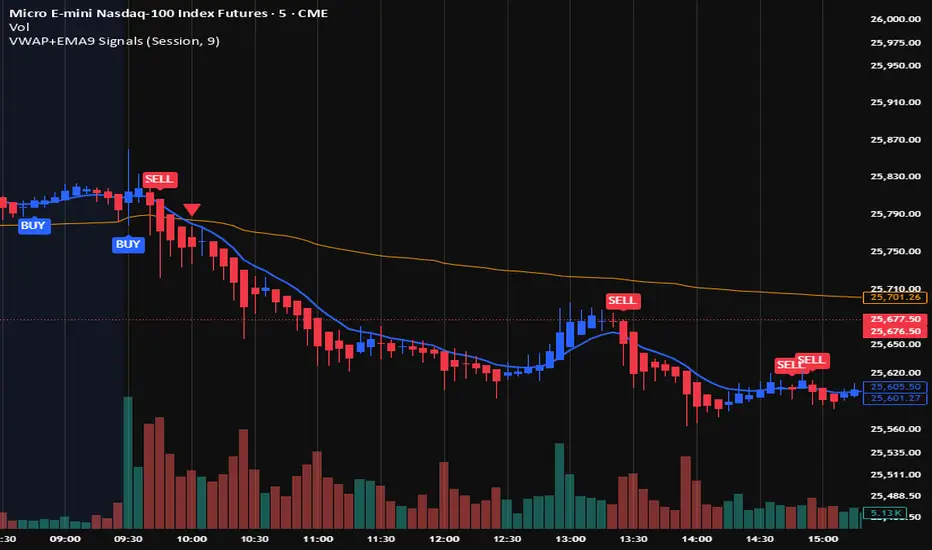
VWAP + EMA9 With SignalsThis script is for scalping on the 5 minute timeframe. It contains signals that indicate intersection of VWAP by the EMA9. It contains Buy signals when a candle closes above both lines indicating a quick continuation of a long position (quick scalp) as well as Sell signals when a candle closes below both lines indicating a quick continuation of a short position (quick scalp). Please note that i do not recommend entries at Buy and Sell signals during Accumulation/Consolidation. Positions should be taken with volume.
Quantum Ribbon Lite📊 WHAT IS IT?
Quantum Ribbon Lite is a trend trading indicator built on a 5-layer exponential moving average ribbon system. It analyzes price momentum, volume, and ribbon alignment to generate entry signals with pre-calculated stop loss and take profit levels.
The indicator is designed for traders who want a straightforward approach to trend trading without managing complex configurations.
🔧 HOW IT WORKS
The Ribbon System
The indicator uses 5 pairs of EMAs (10 moving averages total) that create colored "clouds" on your chart:
Blue/Teal ribbons indicate bullish alignment
Red/Pink ribbons indicate bearish alignment
Mixed colors indicate neutral or transitional periods
The ribbon spacing automatically adjusts from a fast EMA (21) to a slow EMA (60), creating layers that show trend strength and direction.
Signal Generation
Signals appear when multiple conditions align:
For LONG signals:
Fast EMAs are above slow EMAs
Price momentum is positive and strong (> 0.5 ATR)
Volume is above average (> 1.1x average)
Ribbon confirms bullish state
Minimum confidence threshold met (filters weak setups)
For SHORT signals:
Fast EMAs are below slow EMAs
Price momentum is negative and strong
Volume is above average
Ribbon confirms bearish state
Minimum confidence threshold met
📈 VISUAL COMPONENTS
Entry Signals
Green "BUY" label = Long entry signal at candle close
Red "SELL" label = Short entry signal at candle close
Signals only trigger on confirmed candle closes (no repainting).
Risk Management Lines
Three lines appear when you have an active position:
White dotted line = Entry price
Red dotted line = Stop loss level
Green dotted line = Take profit target
Performance Dashboard
The stats table shows:
Current position status (In Long/Short or Waiting for signal)
Entry, stop, and target prices when in a trade
Win/loss record
Win rate percentage with color coding
⚙️ SETTINGS
1. Signal Sensitivity (1-10)
Controls the minimum time between signals (cooldown period):
1 = 2 bars between signals (most frequent)
5 = 10 bars between signals (balanced)
10 = 20 bars between signals (most selective)
Lower values generate more signals, higher values filter for better setups.
2. Stop Loss Distance
Determines how stops are calculated using ATR (Average True Range):
Tight = 1.5x ATR from entry
Normal = 2.0x ATR from entry
Wide = 2.5x ATR from entry
ATR adapts to market volatility, so stops are tighter in calm markets and wider in volatile markets.
3. Take Profit Target
Sets your risk-to-reward ratio:
1.5R = Target is 1.5 times your risk
2R = Target is 2 times your risk
3R = Target is 3 times your risk
Example: With a $100 stop distance and 2R setting, your take profit will be $200 away from entry.
4. Show Stats Table
Toggle to show/hide the performance dashboard in the top-right corner.
5. Show Risk Lines
Toggle to show/hide the entry/stop/target lines on the chart.
📋 HOW TO USE
Step 1: Apply to Chart
Add the indicator to your preferred instrument and timeframe (daily recommended).
Step 2: Wait for Signal
A BUY or SELL label will appear on the chart when conditions align.
Step 3: Enter Position
Enter at the close of the signal candle in the indicated direction.
Step 4: Set Risk Parameters Use the displayed lines:
Red line = Your stop loss
Green line = Your take profit
Step 5: Hold Position
Wait for the position to hit either the stop or target. No new signals will appear while you're in a position.
Step 6: Review Results
Check the stats table to track your win rate and adjust settings if needed.
🎯 RISK MANAGEMENT
Stop Loss Calculation
Stops are based on ATR (Average True Range) which measures recent price volatility:
In quiet markets: Stops are placed closer to entry
In volatile markets: Stops are placed further away
This adaptive approach helps prevent stop-hunting while maintaining appropriate risk levels.
Take Profit Calculation
Targets are calculated as a multiple of your stop distance:
If stop is 50 points away and you use 2R, target is 100 points away
Maintains consistent risk-reward ratios across all trades
Required Win Rates To break even after fees:
1.5R requires ~40% win rate
2R requires ~34% win rate
3R requires ~25% win rate
📊 RECOMMENDED USAGE
Timeframes:
Daily charts show strongest performance in testing
4H and 1H timeframes work but may have lower win rates
Lower timeframes generate more signals but reduced quality
Markets:
Works on all instruments: Stocks, Forex, Crypto, Futures, Indices
Best suited for trending markets
May generate false signals in tight ranges or choppy conditions

VWAP SESSION BUY SELL STRATEGY (INDICATOR) (PDK1977)VWAP SESSION BUY SELL STRATEGY (INDICATOR) (PDK1977)
This indicator combines the proven UT Bot breakout engine but with VWAP directional filtering and ATR-based take profit levels.
It delivers clean, high-probability trend entries and automatic volatility-calibrated exits.
How it works:
Buy only when price is above VWAP
Sell only when price is below VWAP
UT Bot confirms momentum with ATR-based trailing logic
ATR Take Profit gives consistent exits based on volatility
Bars turn green/red only while in a trade, back to normal after TP
Best For:
Intraday and swing trading
Indices, FX, crypto, and high-volume stocks but also for Forex with right TF and settings
Traders who want clean signals and minimal noise
2. Trade Checklist:
Use this before every entry. Quick, simple, reliable.
BUY Checklist:
Price confirmed above VWAP
Label prints BUY
Enter on Buy label (on bar close)
→ Hold until ATR TP hits
SELL Checklist:
Price below VWAP
Label prints SELL
Enter on Sell label
→ Hold until ATR TP hits
Avoid Entries When:
Price is chopping tightly around VWAP
Major news events are about to release
Volume is extremely low
ATR is shrinking rapidly (market compression)
3. Risk-Management Guide
This is tailored to how your system actually behaves.
1. Use ATR TP as Primary Exit:
The system automatically calculates a TP based on volatility:
High volatility → larger TP
Low volatility → smaller TP
This keeps trades consistent and avoids lingering too long.
2. Stop-Loss Recommendation
This strategy is designed for TP-only exits, but if you want a SL:
Recommended Stop-Loss:
Use ATR’s opposite trail, OR
Use 1 × ATR behind your entry candle
This matches the system's internal logic.
3. Position Sizing
Since this system enters during momentum expansions, use:
1–2% max risk per trade
Reduce risk during high-impact news sessions
4. Understand VWAP Environment
Different VWAP conditions require different expectations:
Strong Trend (price far from VWAP)
Higher TP probability
Fewer whipsaws
Excellent continuation setups
Chop Zone (price flips above/below VWAP)
Do NOT trade
Signals lose edge
Wait for a clean break + UT confirmation
5. Choose Correct VWAP Reset for your trading and session
This dramatically improves results.
Market Recommended VWAP Reset
US Stocks New York Session
Indices Daily
Forex London or New York
Crypto Daily or None
4. Final Tips for Best Performance
✔ Enter only in the direction of VWAP
✔ Don’t chase signals far away from entry candle
✔ Avoid trading right into major support/resistance
✔ ATR TP will handle exits mostly
Disclaimer
This script is provided for educational and informational purposes only.
It does not constitute financial advice, investment advice, trading advice, or any form of recommendation to buy or sell any financial instrument. The auto take no responsibility for loss or error in the script.

HalfTrend + Trend AliThis indicator combines the structural logic of the HalfTrend system with a trend filter built on the Hull Moving Average to provide a clearer view of potential market turning points.
The HalfTrend method reacts to price extremes using adaptive deviations, offering a dynamic representation of local highs and lows. By integrating a Hull MA trend filter, the script focuses only on signals that appear in harmony with the prevailing directional bias, helping reduce noise that may occur during counter-trend fluctuations.
🔹 How It Works
The HalfTrend algorithm tracks price swings using amplitude-based detection and ATR-derived channel deviation.
A trend switch is detected when price moves beyond the boundaries of the current swing structure.
The Hull Moving Average acts as a fast-reacting trend reference. Only signals that align with the Hull direction are highlighted.
To maintain clarity and avoid clustered notifications, the script displays only one signal per confirmed trend phase.
🔹 What the Signals Represent
Buy signals appear when the HalfTrend structure shifts upward and the Hull MA confirms an uptrend.
Sell signals appear when the structure shifts downward and the Hull MA confirms a downtrend.
Both signal types include optional alerts for traders who want to be notified immediately when conditions change.
🔹 Purpose
This tool is intended for traders who want to observe structural trend shifts together with a clean and responsive trend filter. It does not attempt to predict the market; instead, it highlights moments when short-term reversals and broader trend direction are aligned.
🔹 Notes
The indicator does not repaint the signals once confirmed.
It can be applied to any market or timeframe.
Users may combine it with their own risk management or additional confirmation tools.

SuperTrend Dual RMAOverview
The SuperTrend Dual RMA is a hybrid volatility-based trend-following system that merges two Relative Moving Averages (RMAs) with an Average True Range (ATR)–anchored SuperTrend framework. The primary purpose of this indicator is to offer a smoother and more reliable depiction of directional bias while maintaining sensitivity to price volatility and market volume.
Traditional SuperTrend implementations typically rely on a single moving average and a fixed volatility envelope. This dual RMA structure introduces an adaptive central tendency line that reacts proportionally to both price and volume, allowing for more nuanced identification of trend reversals and continuation patterns.
**Core Concept**
The indicator is built around two key principles — smoothing and volatility adaptation.
1. **Smoothing:** The use of two separate RMAs with configurable lengths creates a dynamic equilibrium between short-term responsiveness and long-term stability. The first RMA captures near-term directional shifts, while the second provides broader market context. The average of both becomes the foundation of the SuperTrend bands.
2. **Volatility Adaptation:** The ATR multiplier and period define the distance between upper and lower bands relative to recent volatility. This ensures that the SuperTrend line remains flexible across varying market conditions — expanding during high volatility and contracting during calm phases.
**Calculation Steps**
* The indicator first computes two volume-weighted RMAs based on the typical price (`hlc3`) multiplied by trading volume.
* Each RMA is normalized by the smoothed volume to maintain proportional weighting.
* These two RMAs are averaged to produce a “basis line” that reflects the current market consensus price.
* The ATR is calculated over a user-defined period, then multiplied by a volatility factor (ATR multiplier).
* The resulting ATR value defines dynamic upper and lower thresholds around the basis line.
* Trend direction is determined by price closing behavior relative to these thresholds:
* When the closing price exceeds the upper band, the trend is considered bullish.
* When it drops below the lower band, the trend turns bearish.
* If price remains within the bands, the prior trend direction is maintained for consistency.
**Visual Structure**
The SuperTrend Dual RMA provides multiple layers of visual feedback for enhanced interpretation:
* Two distinct RMA lines (short and long) are plotted with complementary colors for contrast and clarity.
* A soft fill between the RMA lines highlights the interaction between short- and medium-term momentum.
* The ATR-based SuperTrend bands are drawn above and below the basis, with adaptive coloring that corresponds to the prevailing trend direction.
* Bar colors automatically adjust to reflect bullish or bearish bias, making it easy to identify trend shifts without relying solely on crossovers.
* Optional triangle markers appear below or above bars to signal potential buy or sell opportunities based on crossover logic.
**Signals and Alerts**
The indicator provides real-time crossover detection:
* **Buy Signal:** Triggered when the closing price moves above the SuperTrend line, confirming potential bullish continuation or reversal.
* **Sell Signal:** Triggered when the closing price drops below the SuperTrend line, indicating possible bearish momentum or reversal.
Both conditions have built-in `alertcondition()` functions, allowing users to set automated alerts for trading or monitoring purposes. This enables integration with TradingView’s alert system for push notifications, emails, or webhook connections.
**Usage Guidelines**
* **Trend Identification:** Use the color-coded trend line and bar color as a visual guide to the current directional bias.
* **Entry and Exit Timing:** Consider entering trades when a new crossover alert appears, preferably in the direction of the overall higher-timeframe trend.
* **Parameter Tuning:** Adjust the RMA lengths and ATR parameters based on asset volatility. Shorter RMA and ATR settings provide faster reactions, suitable for intraday or high-frequency trading, while longer configurations better fit swing or position strategies.
* **Risk Management:** Because the SuperTrend inherently acts as a dynamic stop level, traders can use the opposite band or SuperTrend line as a trailing stop or exit signal.
**Practical Applications**
* Trend confirmation in multi-timeframe strategies.
* Adaptive trailing stop placement using the lower or upper band.
* Visual comparison of volume-weighted price movement against volatility envelopes.
* Integration into algorithmic trading systems as a signal filter or trend bias component.
* Identification of overextended conditions when price significantly diverges from the SuperTrend basis.
**Originality and Advantages**
The SuperTrend Dual RMA differentiates itself from conventional SuperTrend scripts through three innovative design choices:
1. **Dual Volume-Weighted RMAs:** By incorporating two RMAs weighted by trading volume, the indicator accounts for liquidity dynamics, producing smoother and more reliable averages compared to price-only calculations.
2. **Anchored SuperTrend Framework:** The SuperTrend bands are not derived from a fixed source (such as a single close or median price) but from a blended RMA basis, making them more adaptable to varying market behaviors.
3. **Integrated Multi-Layer Visualization:** The inclusion of filled regions between RMAs, dynamic band coloring, and bar tinting enhances readability and analytical depth without overwhelming the chart.
These improvements collectively create a more balanced and data-rich representation of market structure, offering a higher degree of analytical precision. It’s suitable for traders seeking both discretionary and systematic use, as the indicator’s logic is transparent and compatible with alert-based or automated workflows.
**Summary**
The SuperTrend Dual RMA is a refined evolution of the classic SuperTrend, optimized for traders who value smoother directional tracking and more intelligent volatility adaptation. It blends two time-sensitive, volume-aware moving averages with an ATR-derived volatility system to deliver reliable, actionable trend information. Its visual design, adaptive responsiveness, and integrated alert functionality make it a complete solution for identifying and managing trends across multiple asset classes and timeframes.

Volume Heatmap + Buy/Sell splitits the most powerful volume based heatmap you can see on this platform. It tells you when the high volume is coming into the market with clear signs.
Sell - You will see the red bar below the split to confirm its a sell and the strength or the sell you can see above the split line in various colors e.g. lite green (low) to Dark red (extra high).
Buy - If there is a Buying trade being registered, it will appear above the spit line in opaque green with the heatmap colors to show the strength of volume.
This tool will help you identify the volume strength and based on that you can plan your trade.
PS, its always recommended to not to rely on a single oscillator and combine few. I would recommend you to use RSI and S/R lines with this for better decision.
Note, this tool has been put together for educational purposes and I do not take any responsibility of your trade.

Machine Learning Price Predictor: Ridge AR [Bitwardex]🔹Machine Learning Price Predictor: Ridge AR is a research-oriented indicator demonstrating the use of Regularized AutoRegression (Ridge AR) for short-term price forecasting.
The model combines autoregressive structure with Ridge regularization , providing stability under noisy or volatile market conditions.
The latest version introduces Bull and Bear signals , visually representing the current momentum phase and model direction directly on the chart.
Unlike traditional linear regression, Ridge AR minimizes overfitting, stabilizes coefficient dynamics, and enhances predictive consistency in correlated datasets.
The script plots:
Fit Line — in-sample fitted data;
Forecast Line — out-of-sample projection;
Trend Segments — color-coded bullish/bearish sections;
Bull/Bear Labels 🐂🐻 — dynamic visual signals showing directional bias.
Designed for researchers, students, and developers, this tool helps explore regularized time-series forecasting in Pine Script™.
🧩 Ridge AR Settings
Training Window — number of bars used for model training;
Forecast Horizon — forecast length (bars ahead);
AR Order — number of lags used as features;
Ridge Strength (λ) — regularization coefficient;
Damping Factor — exponential trend decay rate;
Trend Length — period for trend/volatility estimation;
Momentum Weight — strength of the recent move;
Mean Reversion — pullback intensity toward the mean.
🧮 Data Processing
Prefilter:
None — raw close price;
EMA — exponential smoothing;
SuperSmoother — Ehlers filter for noise reduction.
EMA Length, SuperSmoother Length — smoothing parameters.
🖥️ Display Settings
Update Mode:
Lock — static model;
Update Once Reached — rebuild after forecast horizon;
Continuous — update every bar.
Forecast Color — projection line color;
Bullish/Bearish Colors — colors for trend segments.
🐂🐻 Bull/Bear Signal System
The Bull/Bear Signal System adds directional visual cues to highlight local momentum shifts and model-based trend confirmation.
Bull (🐂) — appears when upward momentum is confirmed (momentum > 0) .
Displayed below the bar, colored with Bullish Color.
Bear (🐻) — appears when downward momentum is dominant (momentum < 0) .
Displayed above the bar, colored with Bearish Color.
Signals are generated during model recalculations or when the directional bias changes in Continuous mode.
These visual markers are analytical aids , not trading triggers.
🧠 Core Algorithmic Components
Regularized AutoRegression (Ridge AR):
Solves: (X′X+λI)−1X′y
to derive stable regression coefficients.
Matrix and Pseudoinverse Operations — implemented natively in Pine Script™.
Prefiltering (EMA / Ehlers SuperSmoother) — stabilizes noisy data.
Forecast Dynamics — integrates damping, momentum, and mean reversion.
Trend Visualization — color-coded bullish/bearish line segments.
Bull/Bear Signal Engine — visualizes real-time impulse direction.
📊 Applications
Academic and educational purposes;
Demonstration of Ridge Regression and AR models;
Analysis of bull/bear market phase transitions;
Visualization of time-series dependencies.
⚠️ Disclaimer
This script is provided for educational and research purposes only.
It does not provide trading or investment advice.
The author assumes no liability for financial losses resulting from its use.
Use responsibly and at your own risk.

Volume-Confirmed Reversal Engine [AlgoPoint]Volume-Confirmed Reversal Engine v2.0
Overview
A price pattern alone is not enough to signal a high-probability reversal. True market turning points—moments of capitulation or euphoria—are almost always confirmed by a significant spike in volume.
The Volume-Confirmed Reversal Engine is designed to identify these exact moments. It filters out low-conviction price movements and focuses only on reversal patterns that are backed by meaningful volume activity.
How It Works
The indicator's logic is based on a sequential confirmation process:
- High-Volume Anchor Candle: The engine first scans for an "Anchor Candle"—a candle that makes a new high or low over a user-defined look_back period. Critically, this candle's volume must also be significantly higher than the recent average. Low-volume breakouts are ignored.
- Setup Activation & Visualization: When a valid Anchor Candle is detected, the indicator enters a "setup" phase. It visually marks this on your chart by drawing a Setup Box around the high and low of the Anchor Candle, extending it forward for the duration of the confirm_in window.
- Confirmation & Signal: A final signal is only triggered if the price breaks out of the opposite side of the Setup Box within the confirmation window. This action, combined with the initial volume spike, confirms the reversal.
- Setup Box Visualization: See exactly which candle the indicator is watching and the key price levels (the box boundaries) that need to be broken for a signal.
Signal Strength Score (1-4): Every signal now comes with a score, providing insight into its quality based on four factors:
- The base price pattern is met.
- The initial Anchor Candle had high volume.
- The final Confirmation Candle also had high volume.
- The signal is aligned with the long-term macro trend (e.g., a BUY signal above the 200 EMA).
Status Dashboard: A simple panel on your chart tells you what the indicator is doing in real-time ("Scanning for Setups," "Watching Bullish Setup," etc.) and displays a countdown for how many bars are left for a confirmation.
How to Interpret & Use
- The Box: When a colored box appears, it's an early warning that a reversal setup is active. Watch the boundaries of the box for a potential breakout.
- The Score: Use the score to gauge the quality of a signal. A 3/4 or 4/4 score represents a very high-conviction setup where multiple technical factors are aligned.
- The Dashboard: Use the panel to understand the indicator's current state and the time-sensitivity of an active setup.
- The BUY/SELL Labels: These are the final, actionable triggers, appearing only after the full price and volume confirmation process is complete.
