First 5-Min Candle DetectorHighlights the high and low of the first 5-minute candle of the regular trading session, beginning at 9:30am EST.Pine Script® göstergesiStephC6 tarafından8
Open Range BreakoutOpen Range Breakout (ORB) The Open Range Breakout (ORB) is a classic intraday strategy used across stocks, indices, FX and futures. It focuses on how price behaves during the first minutes of a major session, when liquidity and volatility are highest. This indicator fully automates the ORB process with session detection, box drawing, breakout & retest logic, and final Buy/Sell signals. Multi-Session Support Choose between the three most important global opens: Asia (Tokyo) – JPY pairs, Asian indices, gold, crypto London – FX majors, European indices, strong volatility New York – US indices, USD pairs, gold, oil, highest volume The Opening Range is calculated only during the selected session. ORB Range (5 / 15 / 30 min) The indicator builds the ORB High/Low from the first X minutes of the session, draws the box, and waits for price action once the range is complete. How It Works ORB Window → High/Low of the opening minutes are recorded. Breakout → Price closes above/below the ORB → “BREAKOUT” label. Retest → Price returns to the ORB box → “RETEST” label. Confirmation Levels Freeze → Upper/lower structure set. Final Signal Close above frozen upper level → BUY Close below frozen lower level → SELL This filters out false breakouts and provides structured continuation signals. Alerts Includes built-in alert conditions for: ORB BUY Signal ORB SELL Signal Alerts trigger exactly when the Buy or Sell label appears. Works On Stocks & indices Forex FuturesPine Script® göstergesiebecihalil tarafındanGüncellendi 134
Intermarket Swing Projection [LuxAlgo]The Intermarket Swing Projection allows traders to plot price movement swings from any user-selected asset directly onto the chart in the form of zigzags and/or horizontal support and resistance levels. This tool rescale the external asset price on the user chart, enabling traders to make direct comparisons. It answers the question of how different the price behavior is between two assets, accounting for each asset's volatility. 🔶 USAGE This tool is based on swing detection of two different assets: the chart and a user-selected asset. It allows traders to compare two assets on an equal footing while accounting for volatility and price behavior. Traders can customize the detection by selecting a custom ticker, timeframe, the number of swings and length for swing detection. This makes the tool a Swiss army knife for asset comparison. As we can see in the image below, the Show Last, Pivot Length, and Spread parameters are key to defining the final output of the tool. "Show Last" defines how many pivots are displayed. "Pivot Length" is used for pivot detection; a larger value will detect larger market structures. "Spread" defines how far apart the horizontal levels will be from their original location in terms of volatility. 🔹 Comparing different assets This image shows the Nasdaq 100 futures contract compared to four other futures contracts: S&P 500, gold, bitcoin, and euro/U.S. dollar. Plotting all of these assets in Nasdaq 100 terms makes it easy to compare and analyze price behaviors and identify key levels. In the top left chart, we have NQ vs. ES. It's no surprise that they are practically an exact match; a large portion of the S&P 500 is technology. In the top right chart, NQ vs. GC, we see totally different behaviors. We can clearly see the summer consolidation in gold and the resumption of the uptrend, which took gold above 29,200 NQ points, up from 21,200. In the bottom right chart, we see bitcoin making new highs, way above the Nasdaq in May, July, and October. However, the last high was way below the Nasdaq prices on October 27—the first lower high in a while. Sellers are pushing down. Finally, the bottom left chart is NQ vs. 6E. We can see large volatility in the uptrend since February, with NQ unable to catch up until now. The last swing low was almost a match, and 6E is in a range. As we can see, this tool allows us to perform intermarket analysis properly by accounting for each asset's volatility and price behavior. Then, we plot them on the same scale on equal terms, which makes performing this kind of analysis easy. As we can see in the chart above, the assets are the same as in the previous image, but the timeframe is 1H with different settings. Note the horizontal levels acting as support and resistance, as well as how NQ prices react to the zones marked with white circles. These levels are derived from custom assets selected by the user. 🔹 Displaying Elements Zig-zag allows traders to clearly see the path that the selected asset's price took, as well as its turning points. Horizontal levels are displayed from those turning points to the present and can be used as support or resistance. Traders can adjust the spread parameter in the settings panel to expand or contract those levels' volatility. There are two color modes for the levels: average and pivots. In the first mode, green is used for levels below the average and red for levels above the average. The second uses green for swing lows and red for swing highs. The backpaint feature is enabled by default and allows the swings to be displayed in the correct location. With this feature disabled, the swings will be displayed in the current location when a new swing is detected. 🔶 DETAILS On a more technical note, the rescaling is formed by calculating three main elements from all the swings detected on the custom and chart assets: The chart asset's average of all swing points The chart asset's standard deviation of all swing points The custom asset's z-score for each swing point Then, the re-scaled swing point is calculated as the average plus the z-score multiplied by the standard deviation. This makes it possible to plot AAPL swings on an NQ chart, for example. Thanks to re-scaling, we can directly compare the price behavior of two assets with different price ranges and volatility on the same chart. 🔶 SETTINGS 🔹 Trendlines Ticker: Select the custom ticker. Timeframe: Select a custom timeframe. Show Last: Select how many swing points to display. Pivot Length: Select the size for swing point detection. Spread: Volatility multiplier for horizontal levels. Larger values mean the levels are farther apart. Backpaint: Enable or disable the backpaint feature. When enabled, the drawings will be displayed where they were detected. When disabled, the drawings will be displayed at the moment of detection. 🔹 Style Show ZigZag: Enable or disable the ZigZag display and choose a line style. Show Levels: Enable or disable the levels display and choose a line style. Color Mode: Choose between Average Mode, which colors all levels below the average bullish and all levels above bearish, and Pivot Mode, which colors swing highs bearish and swing lows bullish. Bullish: Select a bullish color. Bearish: Select a bearish color. ZigZag: Select the ZigZag color. Pine Script® göstergesiLuxAlgo tarafından22 1.8 K
OHLC HistoryOHLC History is a Pine Script v6 overlay that snapshots up to 32 historical OHLC-derived levels from a selectable higher (or different) timeframe and projects them onto the active chart. It uses request.security to fetch the chosen source (Close/High/Low/Open), rounds each value to the instrument’s minimum tick, and stores them in an array. A “Max Number Lookback” input limits how many of those levels are rendered. For each retained level the script draws a horizontal line extended both ways, coloring it dynamically based on whether the level is above (customizable “above” color) or below (customizable “below” color) the current price, and places compact labels (01–32) with optional price text offset by a user-defined label distance. Prior bar artifacts (lines and labels) are explicitly deleted each update to keep the chart clean, while small white plot markers ensure the levels appear in the price scale and data window for quick reference.Pine Script® göstergesigggoaaat tarafındanGüncellendi 25
Rolling Volume Profile [Matrix Volume Heatmap] by NXT2017Description This indicator offers a unique visual approach to Volume Profile analysis. Instead of the traditional histogram bars or boxes, this script renders a Rolling Volume Profile as a background "Matrix Heatmap" directly on your chart. By dividing the price action of the most recent N-candles into 30 horizontal zones (buckets), it visualizes where the most trading activity has occurred within your defined lookback period. The visualization uses dynamic transparency to highlight the Point of Control (POC) and high-volume nodes, while fading out low-volume areas. 🧠 How it Works The script operates on a "Rolling Window" basis, meaning it recalculates the profile at every bar to reflect the immediate market context. Dynamic Range: It calculates the highest High and lowest Low of the user-defined Lookback Length (default: 1000 bars). Bucket Slicing: This vertical range is divided into 30 equal price buckets. Volume Distribution (Overlap Logic): The script iterates through the historical data. If a candle is large and spans multiple buckets, its volume is distributed proportionally across those buckets. This ensures a more realistic profile compared to simply assigning volume to the close price. Heatmap Visualization: The script calculates the Maximum Volume (POC) within the profile. It uses a Reference Length to normalize this maximum. Dynamic Opacity: Zones with volume close to the maximum are rendered opaque (solid). Zones with low relative volume become highly transparent. This creates an automatic "Heatmap" effect, allowing you to instantly spot the most significant price levels. ⚙️ Settings Lookback Length (candles): Defines how far back the profile calculates volume (e.g., 1000 bars). POC Reference Length: Defines the smoothing window for the 100% volume baseline. Increasing this stabilizes the color changes; decreasing it makes the heatmap more reactive to sudden volume spikes. Profil Color: Choose the base color for the matrix. The transparency is calculated automatically. 💡 Use Case This tool is ideal for traders who want to see the "Value Area" of the current range without cluttering the chart with complex boxes or side-bars. It works excellent as a background context tool to identify: High Volume Nodes (Support/Resistance) Low Volume Nodes (Price gaps/Rejection areas) Migrating Points of Control (Trend direction) Pine Script® göstergesiNXT2017 tarafından37
TrendlinesDowntrend lines are one of the most important tools in technical analysis. A downtrend line is created by connecting a series of lower highs which forms a clear visual line where price repeatedly finds resistance. Traders use these lines to understand trend direction, time entries, plan exits, and quickly recognize when momentum is shifting. This indicator automatically finds and maintains the strongest downtrend lines on any timeframe. It removes the guesswork and inconsistency that comes with manually drawing trendlines. Unlike most other trendline indicators that just draw lines from swing highs to the current high, this indicator actively scans for new pivot highs, tests each potential line against live price action and only promotes a line to valid status once it has proven itself as a true trendline by price touching or respecting the line a user defined number of times, with the default set to three. This filters out noise and leaves only the most meaningful and reliable trendlines on your chart. When price eventually breaks a respected downtrend line the indicator highlights the breakout immediately. Traders often use these moments for entries confirmation signals or to prepare for a potential shift in market behavior. The breakout alert is built directly into the indicator so you never miss an important move. This indicator also works with the Pine Screener to find tickers with current valid trendlines. How are trendlines determined? The indicator begins by anchoring to the most recent pivot high. From there it draws a temporary line to the current bar and evaluates every bar between the two points. Each time a high comes within a user selected buffer zone around that line it is counted as a touch. Once the required number of touches is confirmed and price has never exceeded the buffer to the upside the trendline becomes valid and is displayed on the chart as an active downtrend line. Pine Script® göstergesiAmphibiantrading tarafındanGüncellendi 2222 1.3 K
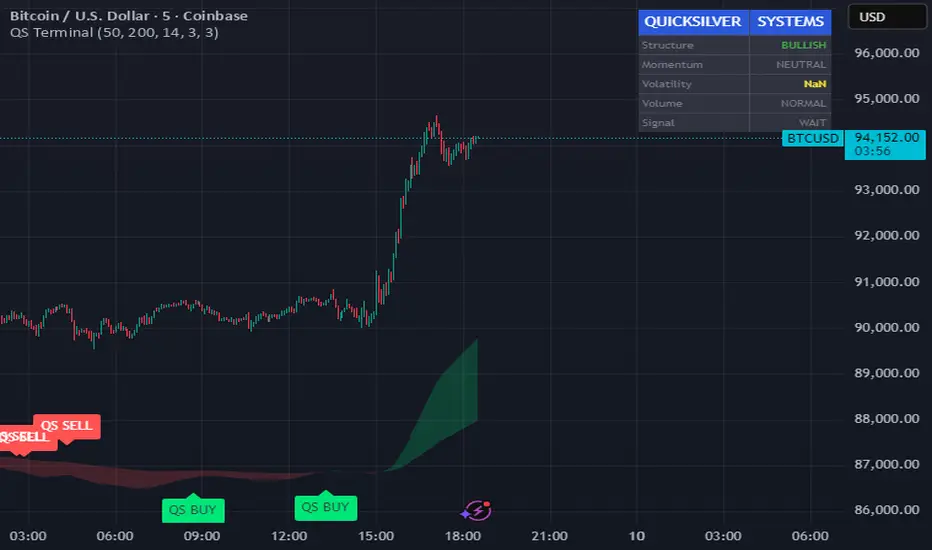
Quicksilver Master Terminal [Institutional]Overview The Quicksilver Master Terminal is a comprehensive data visualization interface designed to bring institutional-grade market awareness to the retail chart. It replaces the need for multiple cluttered indicators by consolidating Trend, Momentum, Volatility, and Structure into a single Heads-Up Display (HUD). Designed by Quicksilver Algo Systems, this tool is engineered for precision scalpers and prop firm traders who require instant situational awareness without switching timeframes. Features 1. The Institutional HUD (Heads-Up Display) Located in the top-right corner, this live dashboard provides real-time metrics on: Market Structure: Instantly identifies if the asset is in a Bullish or Bearish regime relative to the 200 EMA. Momentum Status: Tracks overbought/oversold conditions using smoothed Stochastic logic. Volatility (ATR): Displays live Average True Range data for precise Stop Loss placement. Volume Flow: Detects institutional volume spikes (1.5x average). 2. The Trend Cloud A dynamic visual ribbon that fills the space between the Fast EMA (50) and Slow EMA (200). Green Cloud: Strong Bullish Trend (Look for Longs). Red Cloud: Strong Bearish Trend (Look for Shorts). Cross: Visual warning of trend reversals. 3. Sniper Signal Logic The script paints "INSTITUTIONAL BUY" and "INSTITUTIONAL SELL" labels only when high-probability confluence occurs: Exhaustion: Stochastic RSI breaches extreme levels (<20 or >80). Confirmation: Price action aligns with Heikin Ashi smoothing to filter noise. Momentum: Fast %K crosses Slow %D. How to Use For Scalping (1m - 5m): Wait for the Trend Cloud to align with the Signal. Take "BUY" signals only when the Cloud is Green. For Risk Management: Use the live "Volatility" number in the HUD to set your Stop Loss (e.g., 1.5x the current Volatility value). About the Developer This script is part of the Quicksilver Ecosystem. We build algorithmic solutions focused on capital preservation and risk management for funded traders. Disclaimer: This tool is for educational market analysis only. Past performance is not indicative of future results. Pine Script® göstergesiTyFuGotchu tarafından60
PRICE ACTION TRAKKERThis indicator isolates the core price-phase engine from the full Price Action Tracker (PAT) system. It identifies and visualises structural phases of price, including: Upper phase boundary (dynamic resistance) Lower phase boundary (dynamic support) Phase average (mean-reversion anchor) Pivot markers (LPH, LPL, oLPH, oLPL) The phase engine dynamically adapts to evolving market structure using pivot behaviour and structural breaks. This creates a real-time visual map of how price is organising itself — independent of time-based indicators and without the lag associated with classical moving averages. This version focuses exclusively on price action structure, making it clean, fast, and ideal as a core tool on its own. However, it is also designed as a foundation for more advanced analysis and will expand over time as additional modules are released. This phase engine works exceptionally well in combination with my other indicators, such as moving-average structure tools, volume-weighted frameworks, and trend-strength models. Together, they provide a layered view of market behaviour: phase structure → trend bias → volume confirmation → entry logic. This makes the indicator valuable for: Intra-day and swing traders Wyckoff and liquidity-based traders Mean-reversion and range-trading strategies Understanding where accumulation/distribution behaviour is forming Identifying when a phase is likely ending or breaking Future updates will add modular expansion paths (trend scoring, VWAP phase weighting, multi-phase confluence, and signal logic), while maintaining the simplicity and reliability of this core engine. Works Best With: This indicator is part of a broader toolkit designed to analyse structure, trend, and behaviour. When used alongside my other published tools — such as trend-strength MAs, VWMA frameworks, and higher-timeframe bias indicators — it provides a complete, multi-layered view of market conditions.Pine Script® göstergesipc75 tarafındanGüncellendi 22
VOLX+ VWAP Range BandsVOLX+ plots multiple VWAP-weighted high/low channels across different lookback periods to show how price behaves relative to short-term and long-term value zones. Instead of using a single VWAP line, this tool creates four rolling VWAP envelopes: Short-term range (fast reaction) Mid-term range Mid-mid range (transitional layer) Long-term range (macro context) Each band is computed as: VWAP-High = SMA(high × volume, length) ÷ SMA(volume, length) VWAP-Low = SMA(low × volume, length) ÷ SMA(volume, length) This produces dynamic price channels that account for both price and traded volume, offering a clearer sense of where the market is accepting or rejecting value. What It Shows Four VWAP-weighted high/low bands A short-term VWAP midline Price line Three SMAs for trend context Optional visibility switches for each VWAP band The filled regions between VWAP highs and lows create a layered “value map,” helping you interpret: Trend continuation (price hugging outer VWAP bands) Mean reversion (price returning toward inner bands) Volatility contraction/expansion Shifts in short-term vs long-term balance 🧠 How to Use Use the short-term band for day-trading context or detecting short-term excess. Use mid-term and mid-mid bands to confirm developing structure. Use the long-term VWAP band to understand broader value zones. Combine VWAP bands with SMAs and structure analysis for confluence. This indicator is intended for price interpretation and analytical support. ✔ Does Not Repaint The script uses rolling VWAP formulas and standard MAs; everything is stable and non-repainting.Pine Script® göstergesipc75 tarafındanGüncellendi 29
Box TheoryBox Theory – Description This indicator is based on the popular “Box Theory” concept, where the previous session’s High–Low range acts as the most important structure for the next session. Traders use this because the market often reacts to the same areas where liquidity, orders, and imbalances were created in the prior session. At every new session open, the indicator automatically records: Previous High Previous Low Middle (50% level) These three levels form a box, which becomes your roadmap for the new session. This method is widely used because it highlights where most reversals, sweeps, and reactions occur—without needing any extra indicators. How the Zones Are Calculated Previous High The highest price of the last session. This forms the top edge, which acts as resistance and the basis for the Sell Zone. Previous Low The lowest price of the last session. This forms the bottom edge, acting as support and the basis for the Buy Zone. Middle Line (50% Level) The exact midpoint between High and Low. This is the fair-value zone, where price often consolidates and becomes directionless. No signals are triggered near the middle, because trades taken here historically have low accuracy. Buy Zone (Green Area) The lower part of the box. Price often reacts here because this area held buyers in the previous session. When price enters this green zone inside the box, the indicator can show a Buy Zone label. Sell Zone (Red Area) The upper part of the box. Price commonly rejects here because this area acted as resistance previously. When price enters this red zone inside the box, the indicator can show a Sell Zone label. How Zone Size Is Set (Sensitivity %) You can adjust how big the Buy/Sell zones are using the Sensitivity (%) input. Lower % → Smaller zones → More precise signals Higher % → Larger zones → Signals appear earlier and from farther away Formula: Zone Size = (Previous High − Previous Low) × (Sensitivity % ÷ 100) This lets you customize how tight or how early your signals appear. Inside-Box Only Logic The indicator only works inside the previous session’s range. If price breaks above the previous High → No sell signal If price breaks below the previous Low → No buy signal This avoids false signals during breakouts or trending markets. Alerts The indicator includes two alerts: Buy Zone Alert → Triggers when price enters the Buy Zone Sell Zone Alert → Triggers when price enters the Sell Zone Just enable them in TradingView’s alert panel.Pine Script® göstergesiebecihalil tarafındanGüncellendi 22258
Vassago & Tesla Ex-Machina 197 45 21 [Hakan Yorganci]Vassago & Tesla Ex-Machina 197 45 21 "Any sufficiently advanced technology is indistinguishable from magic." — Arthur C. Clarke 🌑 The Genesis: Algorithmic Esotericism This script is not merely a technical indicator; it is a digital artifact born from the convergence of Software Engineering and Hermetic Tradition. As a developer and researcher dedicated to "Technomancy"—the study of applying esoteric logic to computational systems—I designed this algorithm using a custom, experimental programming environment I am currently developing. My goal was to move beyond standard, arbitrary financial inputs (like the default 200 SMA or 14 RSI) and instead derive parameters based on Universal Harmonics and Historical Archetypes. This indicator, Ex-Machina, is the result of that transmutation. It applies ancient numeric precision to modern market chaos. 🔢 Decoding the Protocol: 197 - 45 - 21 Why these specific numbers? They were not chosen randomly; they were calculated through specific harmonic reductions to filter out market noise. 1. The Harmonic Trend (Tesla Protocol) * The Logic: Standard analysis uses the 200-period Moving Average simply out of habit. However, applying Nikola Tesla’s 3-6-9 vibrational principles, the engine reduced the period to 197. * The Numerology: 1+9+7 = 17 \rightarrow 1+7 = \mathbf{8}. In esoteric numerology, 8 represents infinite power, authority, and financial flow. This creates a baseline that aligns more organically with market accumulation than the static 200. 2. The Hidden Dip (Solomonic Sight) * The Archetype: Based on the attributes of Vassago, the archetype of discovering "hidden things," the algorithm identified 45 as the precise threshold for a "Sniper Entry." * The Function: Unlike the standard 30 RSI, this level identifies the exact moment a correction matures within a bullish trend—catching the dip before the crowd returns. 3. The Prophetic Vision * The Logic: Using the Fibonacci Sequence, the indicator projects the support line 21 bars into the future. * The Utility: This allows you to visualize where the support will be, granting you foresight before price action arrives. ⚖️ The Dual Mode Engine: Sealed vs. Living Respecting the user's will, I have engineered this script as a Hybrid System. You can choose how the "spirit" of the code interacts with the market via the settings menu. 1. The Sealed Ritual (Default - Unchecked) * Philosophy: "Trust in the Constants." * Behavior: Strictly adheres to the 197 SMA and 45 RSI. * Visual: Displays a Blue Trend Line. * Best For: Traders who value stability, long-term trends, and the unyielding nature of harmonic mathematics. 2. The Living Spirit (Adaptive Mode - Checked) * Philosophy: "As the market breathes, so does the code." * Behavior: * Transmutation: The trend line shifts from a Simple Moving Average (SMA) to an Exponential Moving Average (EMA 197) for faster reaction. * Adaptive Volatility: The RSI entry level (45) becomes dynamic. It expands and contracts based on ATR (Average True Range). In high volatility, it demands a deeper dip to trigger a signal, protecting you from fake-outs. * Visual: Displays a Fuchsia (Pink) Trend Line. * Best For: Volatile markets (Crypto/Forex) and traders who want the algorithm to "sense" the fear and greed in the air. ⚙️ How to Trade * Timeframe: Optimized for 4H (The Builder) and 1D (The Architect). * The Signal: Wait for the "EX-MACHINA ENTRY" label. This signal manifests ONLY when: * Price is holding above the 197 Harmonic Trend. * Momentum crosses the Optimized Threshold (45 or Adaptive). * Trend Strength is confirmed via ADX. Author's Note: I built this tool for those who understand that code is the modern spellbook. Use it wisely, risk responsibly, and let the harmonics guide your entries. — Hakan Yorganci Technomancer & Full Stack Developer Pine Script® göstergesihknyrgnc tarafından223
Institutional Trend & Liquidity Nexus [Pro]Concept & Methodology The core philosophy of this script is "Confluence Filtering." It does not simply overlay indicators; it forces them to work together. A signal is only valid if it aligns with the macro trend and liquidity structure. Key Components: Trend Engine: Uses a combination of EMA (7/21) for fast entries and SMA (200) for macro trend direction. The script includes a logical filter that invalidates Buy signals below the SMA 200 to prevent counter-trend trading. Liquidity Imbalance (FVG): Automatically detects Fair Value Gaps to identify areas where price is likely to react. Unlike standalone FVG scripts, this module is visually optimized to show support/resistance zones without obscuring price action. Smart Confluence Zones (Originality): The script calculates a background "State" based on multiple factors. Bullish Zone (Green Background): Triggers ONLY when Price > SMA 200 AND RSI > 50 AND Price > Baseline EMA. Bearish Zone (Red Background): Triggers ONLY when Price < SMA 200 AND RSI < 50 AND Price < Baseline EMA. This visual aid helps traders stay out of choppy markets and only focus when momentum and trend are aligned. █ How to Use Entry: Wait for a "Triangle" signal (Buy/Sell). Validation: Check the Background Color. Is it highlighting a Confluence Zone? Example: A Buy Signal inside a Green Confluence Zone is a high-probability setup. Example: A Buy Signal with no background color suggests weak momentum and should be taken with caution. Targets: Use the plotted FVG boxes as potential take-profit targets or re-entry zones. Pine Script® göstergesiTHF84 tarafından33
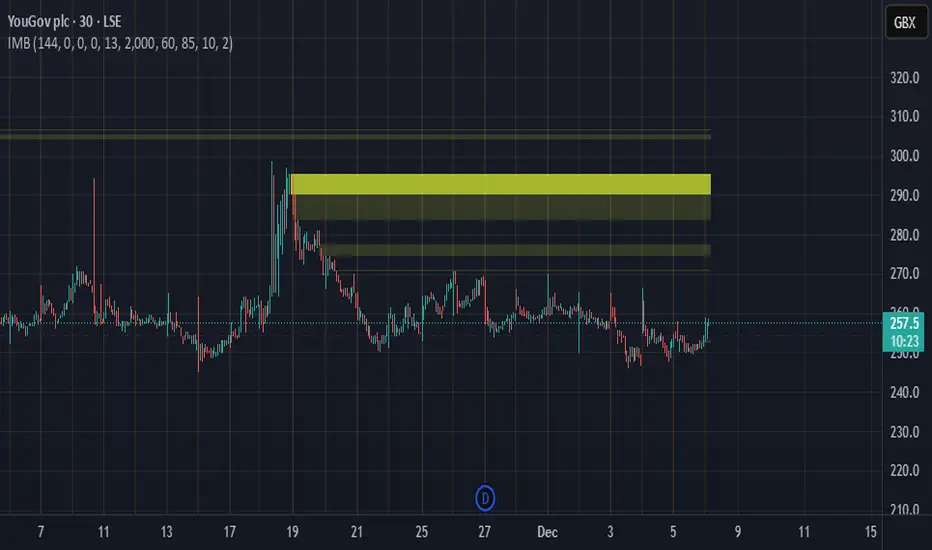
Imbalance Heatmap (Free) – pc75A clean, efficient visualisation of liquidity voids, 3-bar imbalances, and price inefficiency zones. This indicator highlights where the market left gaps in the order flow — areas price often revisits to rebalance. Imbalances are displayed as stacked horizontal “heatmap strips,” making it easy to see: Where aggressive buying/selling left a void Whether multiple voids overlap (stronger zones) Whether price is likely to return to fill the imbalance How old a void is (older zones are marked differently) This is a refined v6 rewrite based on a script I liked, completely modernised with cleaner logic, better performance, and optional labels. 🔍 Features 3-bar liquidity void detection (ICT-style logic) Bullish imbalance when price displaces upward with no wick overlap Bearish imbalance for downward displacement ✔ Heatmap-style visualisation Each imbalance is sliced into multiple thin horizontal bands to create a visual density effect. ✔ Stacking intelligence If a new void overlaps previous ones, the heatmap is drawn brighter, showing areas where the market left multiple inefficiencies. ✔ “Void xN” labels Optional labels show how many overlapping voids existed at the moment the imbalance formed. ✔ Automatic deletion when filled As soon as price trades back through a slice, that slice is removed. This keeps the chart clean and focuses only on active inefficiencies. ✔ Smart ageing Older voids are marked with a subtle border so you can distinguish freshly formed inefficiencies from historical ones. ✔ Alerts Set alerts for when price taps a stacked imbalance zone (“Void x2” and above). ⚙ Inputs & Customisation ATR threshold (optional) Minimum tick size gap Number of heatmap slices Bullish / bearish toggles Label toggles Colour and transparency configuration Max slice memory for performance 💡 How to Use Imbalance zones often behave as: Magnets → price gravitates toward them Support/resistance → structure respects inefficiencies Continuity points → used with market structure shifts Targets → for both scalpers and swing traders Strong (stacked) voids typically represent areas of institutional displacement, where the market is more likely to return for rebalancing. 📢 Notes This is the free version. Educational only — not financial advice.Pine Script® göstergesipc75 tarafındanGüncellendi 74
T-DOW-FLOW: Final Edition T-DOW-FLOW: Market Structure & Smart Pivot Zones This indicator is a comprehensive technical analysis tool designed to visualize "Market Structure" based on Dow Theory and precise Supply/Demand Zones. It helps traders identify the true market trend and high-probability reaction levels by analyzing raw price action (ZigZag Pivots) rather than lagging indicators. The script integrates three core systems: ZigZag Trend Cloud: Visualizes the market bias (Uptrend/Downtrend). Smart Pivot Zones (Type 1): Highlights the specific "Wick-to-Body" area of recent pivots. Auto Density Channels (Type 2): Detects historical support/resistance clusters. 1. ZigZag Trend Identification Logic: The script utilizes ta.highestbars and ta.lowestbars to detect Swing Highs and Swing Lows. Trend Cloud: If the structure creates a Higher High, the background cloud turns Green (Uptrend). If the structure creates a Lower Low, the background cloud turns Red (Downtrend). This provides an instant visual filter for "Trend Flow," encouraging traders to trade only in the direction of the dominant market structure. 2. SR Type 1: Smart Pivot Zones (Wick-to-Body) Unlike standard indicators that draw thin lines at the absolute High/Low, this script focuses on the "Imbalance Zone". It calculates the price range between the Pivot's Wick and the Pivot's Body (Open/Close) and fills this area with a colored zone. Why? The area between the wick and body often represents the precise zone where institutional orders were filled, acting as a more reliable support/resistance level than a single price point. 3. SR Type 2: Auto Density Channels This module scans a significant amount of historical data (default: 300 bars) to find clusters of pivot points. Areas where multiple pivots align within a specific width are drawn as Channels. These represent strong, long-term psychological levels. Trend Filter: Check the Trend Cloud color. Green: Look for Long opportunities. Red: Look for Short opportunities. Entry Trigger: Wait for the price to retrace into a Smart Pivot Zone (Type 1) or an Auto Channel (Type 2). Look for price rejection (wicks) at these zones in the direction of the Trend Cloud. Structure Confirmation: Use the ZigZag lines and labels (HH, HL, etc.) to confirm that the market structure is still intact before entering. ZigZag Settings: Adjust the sensitivity of the trend detection. SR Type 1: Toggle the "Wick-to-Body" fill and choose between Wicks or Bodies as the primary source. SR Type 2: Adjust the historical loopback period and channel width sensitivity. This script is for educational and technical analysis purposes only. Past performance does not guarantee future results. (以下、日本語説明 / Japanese Description) このインジケーターは、「ダウ理論」に基づくトレンド判定と、精密な「需給ゾーン(Supply/Demand)」を可視化するための市場構造分析ツールです。 遅行指標を使わず、純粋なプライスアクション(ZigZagピボット)に基づいて、機関投資家の意識する価格帯を特定します。 1. ZigZagトレンドクラウド ロジック: 一定期間の高値・安値を検出し、ダウ理論に基づいてトレンドを判定します。 視覚化: 高値切り上げ(上昇トレンド)なら「緑」、安値切り下げ(下落トレンド)なら「赤」の背景色を表示します。これにより、トレードすべき方向(順張り)を一目で判断できます。 2. SR Type 1: スマートピボットゾーン (Wick-to-Body) 単なる水平線ではなく、ローソク足の**「ヒゲ先」から「実体」までの価格差**をゾーンとして塗りつぶして表示します。 理由: ヒゲと実体の間の領域は、大口の注文が執行された(需給の不均衡が発生した)重要なエリアであることが多く、ピンポイントのラインよりも信頼性の高い反発ゾーンとして機能します。 3. SR Type 2: オート・デンシティ・チャネル 過去の長期間(デフォルト300本)のデータをスキャンし、ピボットが密集している価格帯を自動で「チャネル」として描画します。長期的に意識される強力なレジサポ帯です。 環境認識: 背景のトレンドクラウドの色に従い、目線を固定します。 エントリー: 価格がSRゾーン(Type 1)やチャネル(Type 2)に引きつけて、反発する動きを確認してエントリーします。 構造確認: ZigZagラインとラベル(HH/HLなど)を見て、トレンドが崩れていないことを確認します。Pine Script® göstergesina-gi tarafından44169
DAILY AND WEEKLY MID LINESDAILY AND WEEKLY MID LINES INDICATOR Description: This indicator calculates and visualizes the dynamic midpoint (mid) of the current day and week in real-time. It provides traders with key reference levels based on developing price action. Features: Daily Mid Line: Color: Orange Thickness: 3 pixels Style: Solid line Updates: Automatically recalculates with each new candle Calculation: Average of the day's highest high and lowest low from market open Weekly Mid Line: Color: Blue Thickness: 3 pixels Style: Dashed line Updates: Continuously recalculates throughout the week Calculation: Average of the week's highest high and lowest low from week start How It Works: At the start of each new trading day (00:00), the daily mid line resets and begins calculating from the first candle At the start of each new trading week (typically Monday), the weekly mid line resets and begins fresh calculations Both lines extend automatically to the right as new candles form The lines are dynamic - they adjust as new highs/lows are made during the day/week Trading Applications: Support/Resistance Levels: The mid lines act as natural equilibrium points where price may find temporary support or resistance Daily mid can serve as intraday pivot, weekly mid as broader market balance point Trend Analysis: Price consistently above mid lines suggests bullish momentum Price consistently below mid lines suggests bearish momentum Relationship between daily and weekly mid lines shows multi-timeframe alignment Entry/Exit Signals: Price crossing above daily mid may indicate short-term bullish momentum Price crossing below daily mid may indicate short-term bearish momentum Weekly mid breaks can signal more significant trend changes Market Context: Distance between price and mid lines indicates market extremity Steeper mid line slopes suggest stronger directional momentum Flat mid lines suggest range-bound or consolidating markets Confluence Trading: Combine with other indicators (RSI, MACD, moving averages) for confirmation Use as dynamic levels for stop-loss placement or take-profit targets Best Practices: More effective on higher timeframes (1H, 4H, Daily) for clearer signals Works well in trending markets where mid lines act as moving support/resistance Monitor for price rejection or acceptance at mid levels for trading decisions Use in conjunction with volume analysis for confirmation Psychological Significance: Mid points often represent fair value areas where buyers and sellers find temporary equilibrium, making them natural decision points for market participants. This indicator is particularly useful for day traders, swing traders, and position traders looking for dynamic, real-time reference points that adapt to current market conditions rather than relying on static historical levels. Pine Script® göstergesiPipsPilot tarafından17
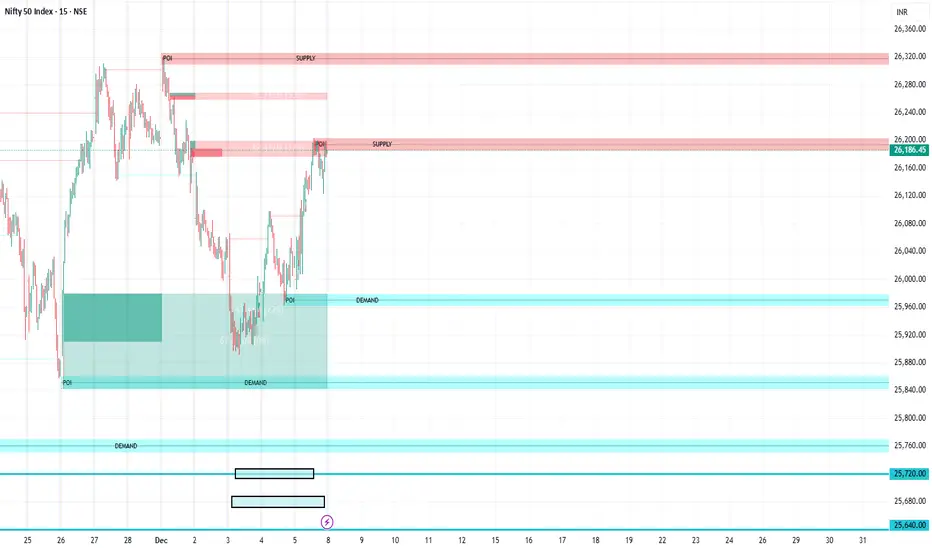
FVG Supply and DemandThis indicator combines powerful tools into one: • Supply & Demand Zones built from swing highs/lows with ATR-based zone width, POI markers, and Break-of-Structure (BOS) detection. • Volumized Fair Value Gaps (FVGs) showing bullish/bearish gaps, total volume inside the gap, volume distribution, optional zone-combining, and auto-cleanup. • Swing TSL Line and manage bar color. It helps visualize key imbalance areas, institutional zones, and price reaction points. Credits to the Author. ⚠️ Disclaimer This indicator is provided for educational and analytical purposes only. It does not provide trading advice. Past results do not guarantee future outcomes. Use responsibly and in conjunction with your market analysis.Pine Script® göstergesivinothblr2015 tarafından22 1.1 K
Liquidation Heatmap [Alpha Extract]A sophisticated liquidity zone visualization system that identifies and maps potential liquidation levels based on swing point analysis with volume-weighted intensity measurement and gradient heatmap coloring. Utilizing pivot-based pocket detection and ATR-scaled zone heights, this indicator delivers institutional-grade liquidity mapping with dynamic color intensity reflecting relative liquidity concentration. The system's dual-swing detection architecture combined with configurable weight metrics creates comprehensive liquidation level identification suitable for strategic position planning and market structure analysis. 🔶 Advanced Pivot-Based Pocket Detection Implements dual swing width analysis to identify potential liquidation zones at pivot highs and lows with configurable lookback periods for comprehensive level coverage. The system detects primary swing points using main pivot width and optional secondary swing detection for increased pocket density, creating layered liquidity maps that capture both major and minor liquidation levels across extended price history. 🔶 Multi-Metric Weight Calculation Engine Features flexible weight source selection including Volume, Range (high-low spread), and Volume × Range composite metrics for liquidity intensity measurement. The system calculates pocket weights based on market activity at pivot formation, enabling traders to identify which liquidation levels represent higher concentration of potential stops and liquidations with configurable minimum weight thresholds for noise filtering. 🔶 ATR-Based Zone Height Framework Utilizes Average True Range calculations with percentage-based multipliers to determine pocket vertical dimensions that adapt to market volatility conditions. The system creates ATR-scaled bands above swing highs for short liquidation zones and below swing lows for long liquidation zones, ensuring zone heights remain proportional to current market volatility for accurate level representation. 🔶 Dynamic Gradient Heatmap Visualization Implements sophisticated color gradient system that maps pocket weights to intensity scales, creating intuitive visual representation of relative liquidity concentration. The system applies power-law transformation with configurable contrast adjustment to enhance differentiation between weak and strong liquidity pockets, using cyan-to-blue gradients for long liquidations and yellow-to-orange for short liquidations. 🔶 Intelligent Pocket State Management Features advanced pocket tracking system that monitors price interaction with liquidation zones and updates pocket states dynamically. The system detects when price trades through pocket midpoints, marking them as "hit" with optional preservation or removal, and manages pocket extension for untouched levels with configurable forward projection to maintain visibility of approaching liquidity zones. 🔶 Real-Time Liquidity Scale Display Provides gradient legend showing min-max range of pocket weights with 24-segment color bar for instant liquidity intensity reference. The system positions the scale at chart edge with volume-formatted labels, enabling traders to quickly assess relative strength of visible liquidation pockets without numerical clutter on the main chart area. 🔶 Touched Pocket Border System Implements visual confirmation of executed liquidations through border highlighting when price trades through pocket zones. The system applies configurable transparency to touched pocket borders with inverted slider logic (lower values fade borders, higher values emphasize them), providing clear historical record of liquidated levels while maintaining focus on active untouched pockets. 🔶 Dual-Swing Density Enhancement Features optional secondary swing width parameter that creates additional pocket layer with tighter pivot detection for increased liquidation level density. The system runs parallel pivot detection at both primary and secondary swing widths, populating chart with comprehensive liquidity mapping that captures both major swing liquidations and intermediate level clusters. 🔶 Adaptive Pocket Extension Framework Utilizes intelligent time-based extension that projects untouched pockets forward by configurable bar count, maintaining visibility as price approaches potential liquidation zones. The system freezes touched pocket right edges at hit timestamps while extending active pockets dynamically, creating clear distinction between historical liquidations and forward-projected active levels. 🔶 Weight-Based Label Integration Provides floating labels on untouched pockets displaying volume-formatted weight values with dynamic positioning that follows pocket extension. The system automatically manages label lifecycle, creating labels for new pockets, updating positions as pockets extend, and removing labels when pockets are touched, ensuring clean chart presentation with relevant liquidity information. 🔶 Performance Optimization Framework Implements efficient array management with automatic clean-up of old pockets beyond lookback period and optimized box/label deletion to maintain smooth performance. The system includes configurable maximum object counts (500 boxes, 50 labels, 100 lines) with intelligent removal of oldest elements when limits are approached, ensuring consistent operation across extended timeframes. This indicator delivers sophisticated liquidity zone analysis through pivot-based detection and volume-weighted intensity measurement with intuitive heatmap visualization. Unlike simple support/resistance indicators, the Liquidation Heatmap combines swing point identification with market activity metrics to identify where concentrated liquidations are likely to occur, while the gradient color system instantly communicates relative liquidity strength. The system's dual-swing architecture, configurable weight metrics, ATR-adaptive zone heights, and intelligent state management make it essential for traders seeking strategic position planning around institutional liquidity levels across cryptocurrency, forex, and futures markets. The visual heatmap approach enables instant identification of high-probability reversal zones where cascading liquidations may trigger significant price reactions.Pine Script® göstergesiAlphaExtract tarafından77456
Unchased Wick Detector and ReversalsThis indicator can be used to track unchased wick from previous pivot points. The idea is to visualise liquidity cluster and grab before a potential reversal. Unchased wick Visual: - White lines are protected highs or lows. - Gray lines are previous wicks where prices have passed through and where the prices did not reverse. Reversal window: Reversal window parameters define a period range (a min and a max bars) where the reversal is valid. The idea is that the reversal must be done in the couple bars right after the wick is chased (this event should stay short in time but you can adjust the period as you wish). By default the default, the window 1-5 bars (e.g., daily, during 1-5 days). Green color indicates a grab from a low and a reversal to the upside. Red color indicates a grab from a high and a reversal to the downside. Disclamer: Of course this indicator can lead to false reversal signals and must be combined with other data and must be careful to use it alone for opening any position. This indicator is a Alpha version let me know if any problem. Pine Script® göstergesiWised123 tarafından11466
Structure Breakout - Buy Sell IndicatorStructure Breakout - Buy Sell Indicator 📈 OVERVIEW: A minimalist indicator that identifies market structure breakouts using swing point analysis. Displays clear blue buy arrows and red sell arrows when price breaks key swing levels. 🔧 HOW IT WORKS: 1. Identifies swing highs and lows using configurable lookback period 2. Triggers BUY signal (blue arrow) when price closes above previous swing high 3. Triggers SELL signal (red arrow) when price closes below previous swing low 4. Uses clean visual arrows without cluttering the chart ⚙️ KEY FEATURES: • Clean, uncluttered visual signals • Customizable sensitivity period • Blue arrows for buy signals (below bars) • Red arrows for sell signals (above bars) • No lagging repainting • Works on all timeframes 🎯 TRADING APPLICATIONS: • Swing trading entries • Breakout confirmation • Trend continuation signals • Support/resistance breaks ⚡ SETTINGS: • Structure Detection Period (default: 20) - Adjust sensitivity of swing detection ⚠️ RISK DISCLAIMER: This is an educational tool. Always use proper risk management. Past performance does not guarantee future results.Pine Script® göstergesiChandraBose2002 tarafından33 1.3 K
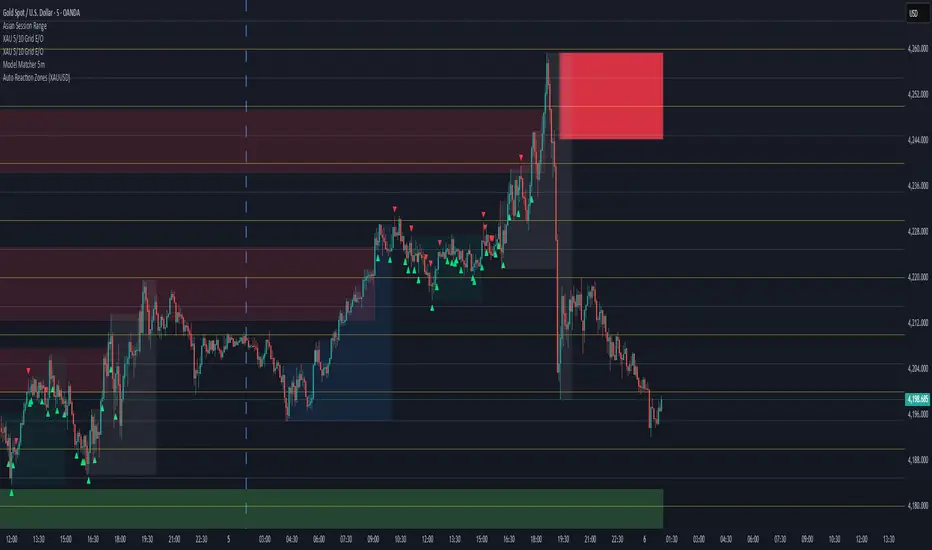
Auto Reaction Zones (XAUUSD) ✅ Auto Reaction Zones (XAUUSD) OANDA:XAUUSD Auto Reaction Zones (XAUUSD) is an advanced supply & demand mapping tool designed to detect high-probability reaction zones using price impulses, volatility filters, market structure, and adaptive confirmation logic. This indicator automatically identifies strong bullish and bearish reaction bases formed before impulsive movements, then plots dynamic demand and supply zones that help traders anticipate future reactions, reversals, or continuation points. 🔍 Core Features ▪ Automatic Supply & Demand Zone Detection Identifies zones based on structural breakout impulses using ATR-based thresholds, volume confirmation, and validated base levels. ▪ Adaptive Confirmation Distance (ADR-Based) The zone becomes active/confirmed only after price moves a configurable number of points. A unique 3-case ADR logic adjusts the required confirmation distance based on current market volatility: Case 1: Low ADR → smaller confirmation required Case 2: Moderate ADR → medium confirmation Case 3: High ADR → higher confirmation (more filtering) This ensures stronger zones in high-volatility conditions (e.g., XAUUSD). ▪ Smart Zone Management Automatic extension until tested or consumed Optional lifetime limits (bars or days) Auto-delete unconfirmed zones if price violates them too early Hide tested or consumed zones for a cleaner chart ▪ Adjustable Zone Size Filtering Option to enforce a minimum or maximum zone size, useful for cleaning noise and ultra-small reaction levels. ▪ ADR-Based Zone Spacing Filter Prevents the creation of zones that are too close to each other. Different spacing rules for same-direction and opposite-direction zones. ▪ Multi-Timeframe Mode Overlay zones detected from higher timeframes directly onto your current chart. ▪ Directional Bias (EMA Filter) Optionally restrict long/short zones based on EMA trend alignment. ▪ Real-Time Alerts Receive alerts when price touches any active zone or only fresh zones. 🎯 Why This Indicator Is Different Unlike typical supply/demand indicators that print every swing, Auto Reaction Zones focuses on: Only strong reaction bases Only valid impulse-generated levels Only zones confirmed by price movement Only zones that respect volatility and minimum spacing rules This results in cleaner charting, fewer false zones, and far more reliable reaction levels, especially on volatile instruments like XAUUSD. ⚠️ Disclaimer This tool is not financial advice. Always combine zone analysis with broader market context and risk management.Pine Script® göstergesiDevil2171 tarafındanGüncellendi 78
Custom Session Static Breakout Levels This indicator defines a trading session based on user-specified time and a custom GMT timezone. Its primary function is to provide traders with fixed historical data rather than dynamic information. Core Logic: Dynamic Box Update: While the price remains within the session, the "Box" (dynamic high/low) tracks the current session's extreme prices. Static Level Anchoring: The moment price breaks above the session's high or below its low, the Box updates, and a static horizontal price line is immediately drawn at the previous, unbroken extreme (the historical support/resistance of the Box). Breakout Identification: The candle responsible for the breakout is clearly marked, providing traders with an anchor point for fixed, structural analysis.Pine Script® göstergesiawsl tarafındanGüncellendi 15
Session, Weekly, Daily LevelsScroll down for hungarian description! Magyar leíráshoz görgess lejjebb! Overview This script provides a unified market structure mapping tool that automatically identifies and visualizes key intraday, daily, and weekly reference levels. It helps traders contextualize price action throughout the trading week by marking true session opens, previous day highs/lows, weekly highs/lows, and weekday opens, all with accurate historical anchoring and correct timezone handling. What This Script Does 1. Intraday Session Opens (Tokyo, London, New York) - Detects the exact candle where each session opens. - Draws horizontal rays with labels. - Automatically clears lines at the start of each new day. - Uses a custom local-to-exchange timezone conversion system. 2. Weekly Levels - Last week high and low (precise bar anchoring, not HTF aggregation) - Current week open (also Monday open) - Auto-reset on new week - Levels are always drawn from the true candle where they formed. 3. Previous Day High & Low - Continuously tracks intraday highs and lows. - On a new day, stores yesterday’s values and anchors rays to the exact bars. - Levels remain visible for the full current day and reset the next day. 4. Weekday Opens (Tue–Fri) - Captures the exact opening price of Tuesday–Friday. - Monday open = Week open, so it is not shown separately. - Auto-reset on new week. Timezone Logic (Original Feature) The script converts: local session times → exchange timezone → chart timestamps It works correctly regardless of chart timezone or instrument exchange location. Line Drawing Logic - Finds the exact bar_index where each level forms. - Draws rays extending to the right. - Labels are placed ahead of price. - Safe updating prevents “bar index too far” errors. How to Use - Identify daily/weekly structure. - Track bias relative to session opens. - Observe reactions around weekday opens. - Compare price action to last week's range. Originality - Custom timezone conversion engine. - True historical bar anchoring. - Fully automated weekly/daily structural resets. - Independent styling for each level type. - Not a mashup; all components follow one unified logic. Limitations - Does not predict trend or direction. - Structural tool only. Summary A precise and reliable market structure tool that unifies weekly, daily, and intraday reference levels with full timezone automation and true-candle anchoring. MAGYAR LEÍRÁS -------------- Áttekintés Ez az indikátor egy összetett piaci szerkezet-feltérképező eszköz, amely automatikusan megjeleníti a legfontosabb intraday, napi és heti referenciaértékeket. A célja, hogy a kereskedő tisztán lássa a piac aktuális környezetét: hol nyíltak a főbb devizapiaci szekciók, hogyan alakult a tegnapi tartomány, hol volt a múlt heti csúcs/mélypont, és hogyan nyitottak az egyes hétköznapok. Mit tud a script? 1. Szekciónyitások (Tokyo, London, New York) - Megkeresi a pontos gyertyát, amely a szekciónyitáskori árat tartalmazza. - Vízszintes vonalat és címkét rajzol. - Minden nap elején automatikusan törli a korábbi nap szintjeit. - Egyedi időzóna-konverziós rendszerrel működik (helyi idő → tőzsdei idő → chart idő). 2. Heti szintek - Múlt heti maximum és minimum (pontos gyertyapontra horgonyozva) - Aktuális heti nyitóár (egyben a hétfői nyitó is) - Új hét kezdetekor automatikusan frissül. - A múlt heti high/low nem fix időpontra, hanem a valódi gyertyára kerül. 3. Előző napi High és Low - Folyamatosan követi a napi maximumot és minimumot. - Napváltáskor elmenti és pontos gyertyáról indítja a ray-t. - A szintek a teljes nap folyamán megmaradnak, majd a következő nap törlődnek. 4. Hétköznapok nyitóárai (Kedd–Péntek) - A kedd, szerda, csütörtök és péntek nyitóárát rögzíti és megjeleníti. - A hétfői nyitó a Week Open, ezért külön nem jelenik meg. - Heti váltáskor automatikusan törlődnek. Időzóna-kezelés (egyedi megoldás) A script a felhasználó helyi idejét átszámítja az instrumentum tőzsdei időzónájára, majd a chartra vetíti. Ez biztosítja, hogy minden szekciónyitás helyesen jelenik meg, bármely chart vagy instrumentum esetén. Vonalrajzolási logika - A szintek a valódi bar_index alapján kerülnek rögzítésre. - Jobbra nyúló ray-eket rajzol. - A címkék mindig a jobb oldalon, előre helyezve jelennek meg. - Biztonságos frissítési rendszer akadályozza meg a hibákat (pl. “bar index too far”). Használat - Napi/heti szerkezet meghatározása. - Bias követése a session openekhez viszonyítva. - Reakciók figyelése a hétköznapok nyitóárai körül. - Összevetés a múlt heti tartománnyal. Eredetiség - Egyedi időzóna-kezelő motor. - Igazi gyertyapont-alapú horgonyzás. - Automatikus napi/heti reset. - Minden szint külön stílusban konfigurálható. - Nem mashup; egységes rendszer. Összegzés Professzionális, pontos eszköz a piaci szerkezet feltérképezésére, amely egyesíti a heti, napi és intraday szinteket, teljes időzóna-automatizálással és gyertyapontra horgonyzott kijelölésekkel.Pine Script® göstergesimildZebra14333 tarafındanGüncellendi 81
RVol based Support & Resistance ZonesDescription: This indicator is designed to help traders identify significant price levels based on institutional volume. It monitors two higher timeframes (defined by the user) simultaneously. When a candle on these higher timeframes exhibits unusually high volume—known as high Relative Volume (RVol)—the indicator automatically draws a "Zone of Interest" box on your current chart. These zones are defined by: Up candle : from candle open to low of candle Down candle : from candle open to high of candle Key Features: Multi-Timeframe Monitoring: You can trade on a lower timeframe (e.g., 5-minute) while the indicator monitors the 30-minute and 1-hour charts for volume spikes. RVol Boxes: Automatically draws boxes extending from high-volume candles. Up Candles: Box covers Low to Open. Down Candles: Box covers High to Open. Live Dashboard: A neat, color-coded table displays the current Volume, Average Volume, and RVol percentage for your watched timeframes. Real-Time vs. Confirmed: Choose whether to see boxes appear immediately as volume spikes (Live) or only after the candle has closed and confirmed the volume (Candle Close). Settings Guide: 1. General Settings Relative Volume Length: The number of past candles used to calculate the "Average Volume." (Default is 20). Max Days Back to Draw: To keep your chart clean, this limits how far back in history the script looks for high-volume zones. (e.g., set to 5 to only see zones created in the last 5 days). Draw Mode: - Live (Real-time): Draws the box immediately if the current developing candle hits the volume threshold. (Note: The box may disappear if the volume average shifts before the candle closes). - Candle Close: The box only appears once the candle has finished and permanently confirmed the volume spike. 2. Table Settings Show Info Table: Toggles the dashboard on or off. Text Size & Position: Customise where the table appears on your screen and how large the text is. Colours: Fully customisable colours for the Table Header (Top row) and Data Rows (Bottom rows). 3. Timeframe 1 & 2 Settings You have two identical sections to configure two different timeframes (e.g., 30m and 1H). Timeframe: The chart interval to monitor (e.g., "30" for 30 minutes, "60" for 1 Hour, "240" for 4 Hours). Threshold %: The "Trigger" for drawing a box based on relative candle volume in that timeframe. Example: 100% = Candle Volume is equal to the average volume for the specified timeframe. 200% = Candle Volume is 2x the average volume for the specified timeframe. 300% = Candle Volume is 3x the average volume for the specified timeframe. Box & Edge Colour: Distinct colours for each timeframe so you can easily tell which timeframe created the zone. Pine Script® göstergesiMereep01 tarafındanGüncellendi 11331